GPT-6 in ChatGPT: What the New Model Can Do and How to Try It
GPT-6 arrived in ChatGPT on October 7, 2026: paid plans got the Sol version, and from October 8 the Free and Go plans got the Luna version. The headline feature is Intelligent UI: instead of a wall of text, ChatGPT builds the answer out of tables, diagrams, buttons, and small calculators right in the chat. Below I break down how Astra, Sol, and Luna differ, what you get for free, which plan to pick, and how to get GPT-6 running in a single evening.
GPT-6 is OpenAI's new model, available in ChatGPT since October 7, 2026. Plus, Pro, Business, and Enterprise run GPT-6 Sol, while Free and Go run the lighter GPT-6 Luna. The model answers faster than the previous one, handles multi-step tasks better, and comes with Intelligent UI: it builds answers out of tables, diagrams, buttons, and calculators. You can try GPT-6 for free on the Free plan. To get it, update the app and pick GPT-6 in the model menu at the top of the chat.
Not long ago, ChatGPT answered the usual way: paragraphs, lists, sometimes a table. Now answers come with interactive comparisons you can slide around, budget calculators, and diagrams you can actually click. Plenty of people assume it's some separate app. It's GPT-6, and it's rolling out right now, in waves, plan by plan.
I work with AI every day and teach it to everyone who sells services, courses, and consulting. So I took the update apart piece by piece: what actually changed, where the marketing noise is, and how to get real value out of the new model for your work today.
You'll read this in 24 minutes. Another 15 minutes go into opening ChatGPT and running the test prompts from Section 08. By the end of the evening, you'll know whether a subscription is worth it for you, or whether free Luna is more than enough.
What's inside
- What GPT-6 is and why there are three versions
- Who got GPT-6 in ChatGPT, and when
- Intelligent UI: answers you can touch
- 10 work tasks for GPT-6 with ready prompts
- GPT-6 for free: what Free and Go give you
- Which plan to pick: Go, Plus, or Pro
- How to get GPT-6 in ChatGPT
- Your first evening with GPT-6: test prompts
- GPT-6, Claude, or Gemini: which to choose
- Where GPT-6 gets things wrong
- If something doesn't work
- The whole path in a minute
Section 01What GPT-6 is and why there are three versions
GPT-6 is the sixth generation of language models from OpenAI, the company behind ChatGPT. The model is the "brain," and ChatGPT is the app you use to talk to that brain. When people say "GPT-6 is out," they mean the brain got replaced with a new one. The chat window, your folders, your conversation history, and your settings all stay where they were.
What's new this time is that GPT-6 launched as a whole family of three models. Each one has its own name and its own job:
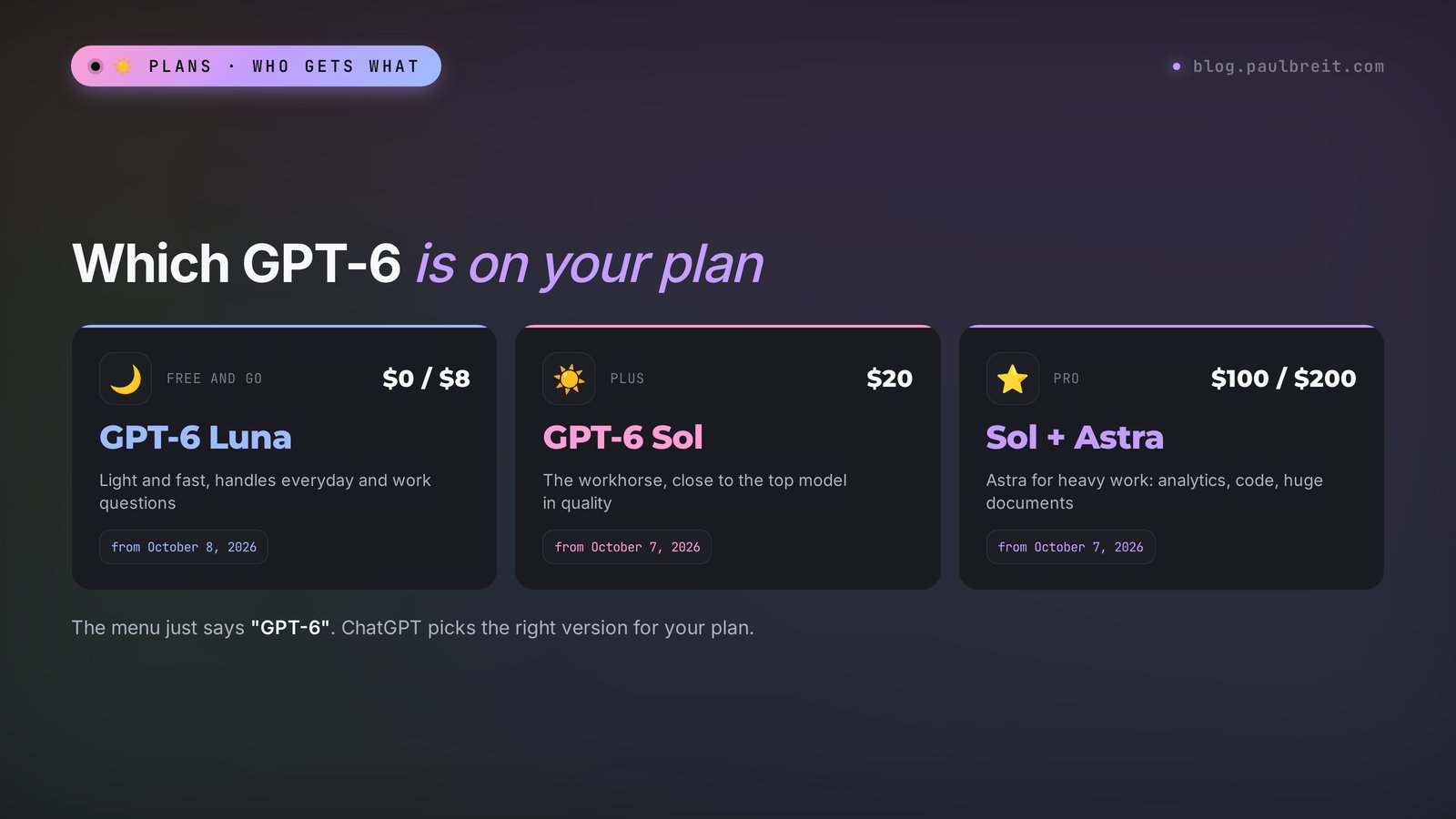
- GPT-6 Astra is the top model and the most powerful. OpenAI announced it on September 3, 2026, and opened wide access the next day. It showed up first for developers and in OpenAI's work tools. Astra is built for heavy tasks: multi-step analysis, programming, working with huge documents. Its context window is about a million tokens, which is hundreds of pages of text at once.
- GPT-6 Sol is the middle one. It came out on September 22. It gets close to Astra in quality but costs several times less per task. This is the model every paid ChatGPT user has had since October 7.
- GPT-6 Luna is the youngest, light and fast. It also came out on September 22. From October 8, Free and Go users get it.
The names are easy to remember: Astra is a star, Sol is the sun, Luna is the moon. The farther from the star, the lighter and cheaper the model. Within one family they understand tasks the same way. They differ in how deep they reason and how complex a job they can pull off without mistakes.
Why would OpenAI ship three models instead of one? It all comes down to money and speed. Running the strongest model for hundreds of millions of people who ask for a pie recipe or want an email translated is expensive. So the heavy Astra is kept for heavy tasks, Sol goes to people who pay and work with AI seriously, and Luna handles everyday questions for free. For you, this means one simple thing: GPT-6 in ChatGPT can answer differently for two people if they're on different plans.
In the ChatGPT model menu you'll just see "GPT-6." Your plan decides which version runs behind that option: on Free and Go it's Luna, on Plus and above it's Sol. You don't need to pick Sol or Luna yourself, ChatGPT plugs in the right one automatically.
One more detail that confuses people. In September, lots of people wrote "GPT-6 is already out," yet it wasn't in ChatGPT. Both are true: the models showed up first for developers and in OpenAI's work products, and only reached the regular chat in October. So you'll see articles online with different dates, and both dates are correct. For a regular ChatGPT user, the clock starts on October 7.
Section 02Who got GPT-6 in ChatGPT, and when
OpenAI rolls updates out in waves. It's standard practice: if something goes wrong in the first hours, the problem only hits part of the users. So don't be surprised if a colleague already has GPT-6 and you don't yet. It'll show up within a day or two.
Here's how the versions are split across plans:
| Plan | Price per month | Which GPT-6 runs in the chat | Starting |
|---|---|---|---|
| Free | $0 | GPT-6 Luna | from October 8, 2026, gradually |
| Go | $8 | GPT-6 Luna | from October 8, 2026, gradually |
| Plus | $20 | GPT-6 Sol | from October 7, 2026, gradually |
| Pro | $100 or $200 | GPT-6 Sol, with Astra available for heavy tasks | from October 7, 2026 |
| Business and Enterprise | per seat on the team | GPT-6 Sol | from October 7, 2026, turned on by the admin |
Prices are for the US.
On business plans, the decision belongs to the workspace admin. If you use ChatGPT through a company account and GPT-6 still hasn't appeared, ask whoever manages the subscription. You can't turn it on yourself.
How to tell if you already have GPT-6
The simplest way is to open the model picker at the top of the chat window. If there's a "GPT-6" option, that's it, you're on the new model. The second sign is that answers start arriving with interactive elements: a table you can sort, a diagram, a calculator. The third way is to ask ChatGPT itself. Sometimes it answers vaguely, so the menu is more reliable.
If there's nothing new in the menu, check two things. First, update the app on your phone and computer: new features only land in fresh versions. Second, sign out of your account and sign back in. That's often enough to pull in the settings from the new wave.
Section 03Intelligent UI: answers you can touch
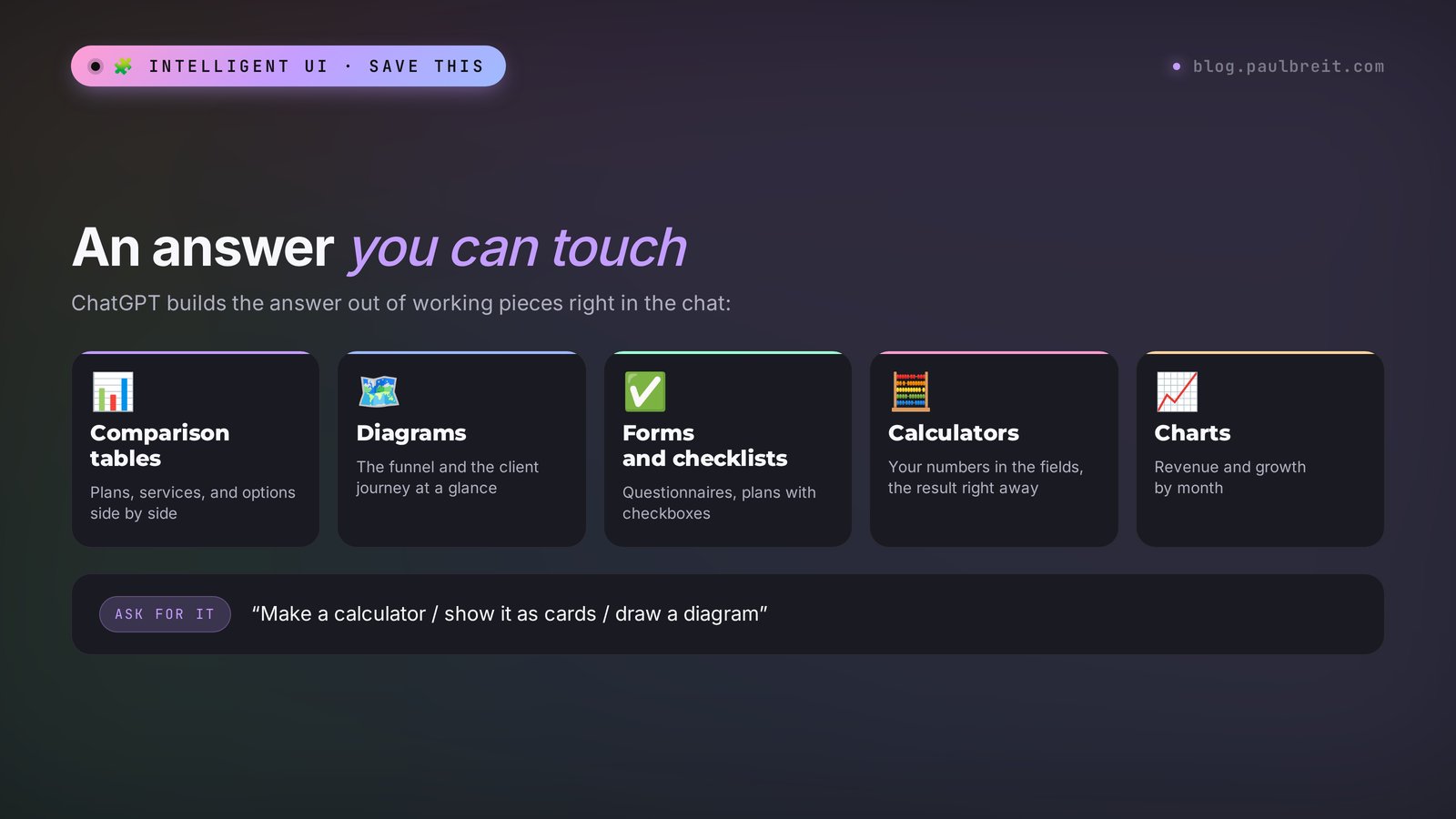
This is the main reason to open ChatGPT today. Together with GPT-6, OpenAI launched a feature called Intelligent UI. The idea is that ChatGPT now decides for itself what form an answer should take. Sometimes it's plain text. And sometimes it's a comparison table, a diagram, a form with fields, or a small working tool: a calculator, a planner, a bill splitter for a group, even a simple game.
It sounds like a toy, but in practice it saves a ton of time. Before, you'd ask it to work out the payback on your ads, get a formula, and go to Excel to plug in your numbers. Now ChatGPT builds the calculator right in the chat: you move the budget, the cost per lead, and the conversion rate, and the total recalculates in front of you. No spreadsheets, no copying back and forth.
What Intelligent UI can build
- Side-by-side comparisons. Three plans, three services, three trip options, as cards you can scroll through and mark.
- Diagrams and charts. A sales funnel, a client journey, the structure of a course, as a picture you can see all at once.
- Calculators. Payback, client acquisition cost, markup, installment payments, with fields where you enter your own numbers.
- Forms and checklists. A client questionnaire, a launch to-do list with checkboxes, a weekly plan.
- Graphs. Follower growth, revenue by month, a comparison of metrics from your spreadsheet.
- Mini tools for everyday life. Split a restaurant bill, count calories, find a meeting time across time zones.
How to trigger the smart interface
There's no separate button. ChatGPT turns on the interface by itself when it sees that it'll be more convenient. But you can nudge it with a direct request. Phrases like "make an interactive calculator," "show a comparison as cards," "draw a diagram," and "build a form" all work. If the answer comes back as text and you need a tool, write in your next message: "Turn this into a calculator where I can change the numbers myself."
Here's an example. Write: "I sell online consultations at $150 each. Make a calculator: how many leads do I need per month to earn $3,000, if one in five leads books a consultation and one in three people buys after the consultation." GPT-6 will build a calculator with three sliders: the revenue goal, the booking rate, and the conversion to purchase. You see it right away: you need 20 sales, 60 consultations, and 300 leads. Move the conversion to purchase up to 40 percent, and you only need 250 leads. That's what talking with numbers looks like, instead of talking about numbers.
Intelligent UI works in the web version of ChatGPT and in the updated mobile apps. In older versions of the desktop app, the interactive elements may not show up. If you see bare text or code instead of a calculator, update the app or open the same chat in your browser.
One more nice little thing: GPT-6 starts showing the answer before it has finished writing all of it. According to OpenAI, the fast version, GPT-6 Instant, starts answering questions that need a web search 44% sooner on average than the previous GPT-5.6 Instant. In real work it feels like this: you ask a question, and the text starts flowing almost immediately, without a long pause and a spinning icon.
Section 0410 work tasks for GPT-6 with ready prompts
A new model is only as good as the tasks you give it. Below are ten tasks where GPT-6 is noticeably stronger than earlier versions, plus prompts you can copy right now. Swap your own niche in for the examples in square brackets.
A launch payback calculator
Prompt: "I'm a [psychologist] and I sell [a course for $300]. Make an interactive payback calculator: ad budget, cost per lead, conversion from lead to purchase. Show how much I'll earn and how much I'll spend."
What you get: a tool with fields where you change the numbers and see the profit instantly. Useful before you hand over money for ads.
A comparison of your product's packages
Prompt: "I have three service packages: [description]. Show them compared as cards, the way a client would see them. Highlight which package is the best value, and suggest what to remove from the cheapest one so people pick the middle one more often."
What you get: a clear layout and an honest outside view of your lineup.
A client journey diagram
Prompt: "Draw a diagram of how a client gets to me: from [my Instagram account] through [a free lesson] to [a consultation] and [a purchase]. Mark where people most likely drop off, and what can be improved at each step."
What you get: a funnel diagram with hints. Handy to show your team or a contractor.
A questionnaire for new clients
Prompt: "Build an intake form for a client before their first meeting with [a nutritionist]: 8 questions that help understand the request, the budget, and the timeline. Give it to me as a form, and below that as text so I can move it into Google Forms."
What you get: a ready questionnaire in two formats. You can test the form on yourself right away.
A content plan for the month
Prompt: "Make a 4-week content plan for [a Spanish tutor's] channel. Three posts a week. Show it as a table: date, topic, goal of the post (trust, value, sale), idea for the opening line."
What you get: a table you can sort by goal to check the balance between value and selling. More ideas for social media are in the article social media prompts.
Breaking down a long document
Prompt: "Here's a contract with a contractor. List the clauses that could hurt me on money or deadlines. Show it as a table: clause, why it's risky, what to propose instead."
What you get: a summary of the risks. It doesn't replace a lawyer, but it saves an hour of reading and gives you a list of questions worth asking.
Analyzing a sales spreadsheet
Prompt: "I'm uploading a sales export for the last six months. Build a chart of revenue by month, find the three main reasons for the dip, and suggest what to check first."
What you get: a chart and hypotheses. Double-check the numbers yourself, more on that in Section 10. If spreadsheets are your daily work, take a look at the article AI for spreadsheets.
Sales copy for a landing page
Prompt: "Write the above-the-fold copy for a landing page for [a photography course for stay-at-home moms]. Give three headline options, a subheadline, and button text. Show them side by side as cards so I can choose."
What you get: options in an easy comparison. Pick one and polish it to match your voice.
A weekly plan with priorities
Prompt: "Here are my tasks for the week: [list]. Lay them out as a checklist by day, keeping in mind that Wednesday is a full day of consultations. Put whatever matters most for money at the start of the week."
What you get: a plan with checkboxes you can tick off right in the chat.
A sales practice partner
Prompt: "Play a client who wants to buy [coaching] but hesitates because of the $800 price. Give me objections one at a time, rate each of my answers on a scale of 1 to 10, and suggest how to say it more convincingly."
What you get: live practice before real calls. Ten minutes of this gives you confidence no book can.
If the prompts work worse than you'd like, the wording is almost always the reason. I broke down a five-part formula for a good prompt in the article how to write prompts, and collected a hundred ready commands in the AI prompt library. Everything there works in GPT-6 too.
Section 05GPT-6 for free: what Free and Go give you
Good news: you can try GPT-6 without a subscription. The Free plan has run GPT-6 Luna since October 8. It's a full model for everyday tasks: emails, posts, explanations, translations, breaking down photos and short documents.
OpenAI says text chats with GPT-6 on the Free plan are unlimited, with a caveat about abuse protection. File uploads, image generation, voice mode, deep research, and memory on the Free plan still come with limits. OpenAI doesn't publish the exact limits, so go by what happens in practice: if you hit one, ChatGPT will tell you and offer to wait or move to a paid plan.
What Go is and why it exists
Go is an in-between plan at $8 a month. The model is the same, Luna, but the limits are higher: more uploads, more images, longer conversation memory. It's the same free ChatGPT, just without constantly bumping into the ceiling. Keep in mind that OpenAI may show ads on the Free and Go plans.
Who free Luna is enough for
- you use ChatGPT a couple of times a day: a post, an email, a question, a translation;
- your tasks are short and clear, with no multi-page documents;
- you're just starting out and want to understand whether you need AI at all.
For people like this, I recommend living on Free for two weeks. If you never hit the limits and the answers work for you, there's no reason to pay. More free options are in the roundup free AI tools 2026.
Section 06Which plan to pick: Go, Plus, or Pro
The most common question after GPT-6 came out: "Do I have to pay now?" No. But the difference between Luna and Sol is noticeable, and for some tasks it's decisive. Here's an honest breakdown of who should take what.
| Plan | Who it fits | What you'll miss |
|---|---|---|
| Free | getting to know it, occasional short tasks | you can't do much with files, images, and voice |
| Go, $8 | simple daily tasks without hitting the limit | Sol's depth on complex analysis |
| Plus, $20 | working with AI every day, sales copy, document reviews, projects | almost nothing, except very heavy tasks |
| Pro, $100 or $200 | people who spend hours in ChatGPT, run agents and huge documents | nothing, it's only a question of price |
My advice for anyone who sells services, courses, and consulting: if AI is already part of your work and you open it every day, take Plus. For $20 you get Sol, projects to keep materials for each product, your own custom GPTs, and scheduled tasks. That's enough to cover content, client messages, analytics, and sales prep.
Pro makes sense when Plus keeps hitting its limits or you hand AI long multi-step tasks. For most people it's money you don't need to spend. If you're unsure, start with Plus for a month and count how many times you saw a limit message.
Don't subscribe to two AI tools at once "just in case." Pick one main tool where you do 80% of the work, and one free one as a backup. After a month, it'll be clear which one suits you better. A comparison of the two main options is in the article Claude vs ChatGPT.
Section 07How to get GPT-6 in ChatGPT
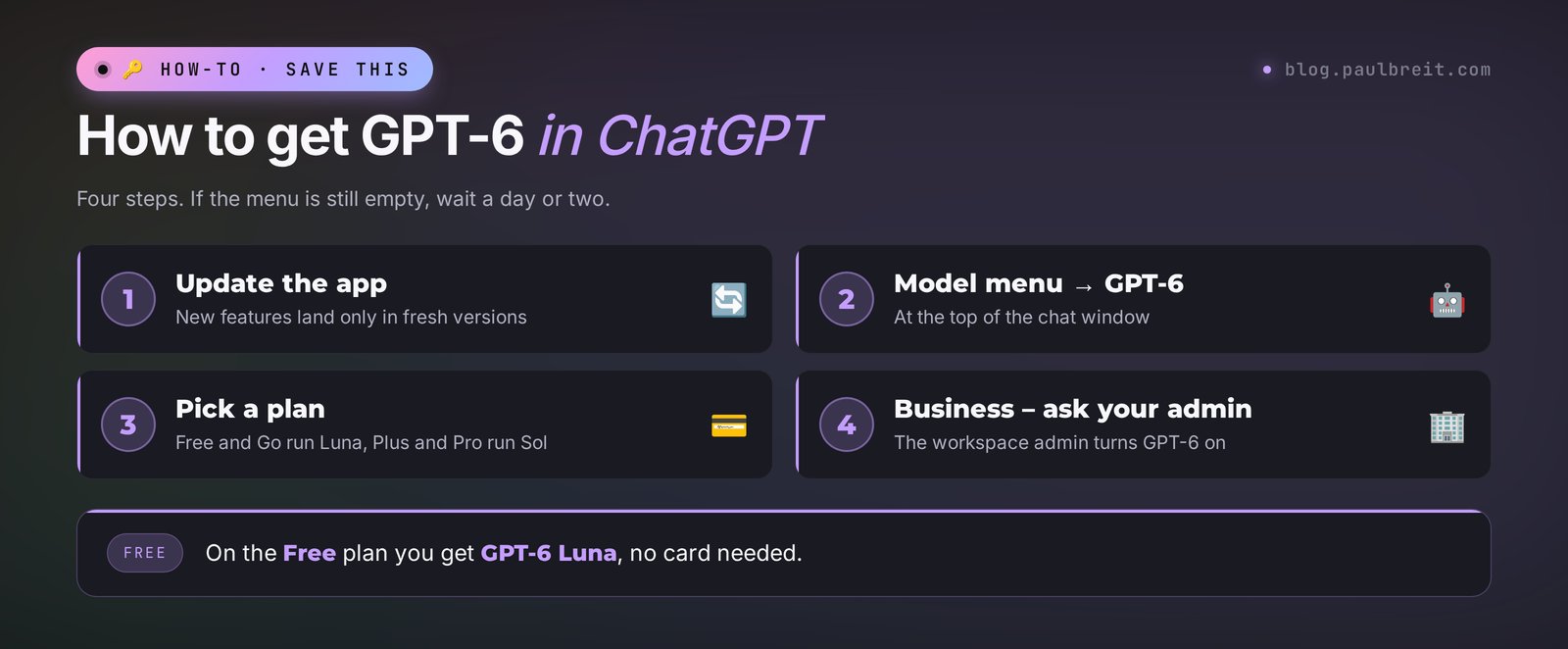
There's nothing to install or switch on separately. GPT-6 arrives in the same ChatGPT you already use, and the whole setup takes a few minutes. Here's the short version, step by step.
Update the app
New features only land in fresh versions. Update ChatGPT on your phone and your computer. If you work in the browser, just reload chatgpt.com.
Sign out and sign back in
If the app is up to date but nothing has changed, sign out of your account and sign back in. That's often enough to pull in the settings from the new rollout wave.
Open the model menu
The model picker sits at the top of the chat window. If there's a "GPT-6" option, you're on the new model. On a free account, it will be GPT-6 in the Luna version. Run the first prompt from Section 08 to make sure everything works.
Pick a plan
Free at $0 and Go at $8 a month run GPT-6 Luna. Plus at $20 runs GPT-6 Sol. Pro at $100 or $200 runs Sol, with Astra available for heavy tasks. If you're not sure, start on Free and use the table in Section 06 to decide.
On Business or Enterprise, ask your admin
On team plans, the workspace admin turns GPT-6 on. If you work through a company account and the model still isn't in the menu, write to whoever manages the subscription. You can't enable it yourself.
The rollout goes in waves, so most of the time the new wave just hasn't reached you yet. Give it a day or two. Plus, Pro, Business, and Enterprise started getting GPT-6 on October 7, and Free and Go on October 8.
Section 08Your first evening with GPT-6: test prompts
To understand how GPT-6 is useful for you personally, don't read reviews. Give it your own tasks. Below are twelve prompts that will show the new model's strengths and weaknesses in one evening. Run them back to back, it takes 15-20 minutes.
Testing the smart interface
- "Make a calculator: how many clients do I need per month to earn [amount] if the average sale is [amount]."
- "Compare three ways to get clients for [your niche] as cards: a social media account, ads, word of mouth. Pros, cons, time to first money."
- "Draw a diagram of my workday and show where I lose the most time." Before this, describe your day in two paragraphs.
Testing writing
- "Write a Telegram channel post about [topic] in my style." Paste two of your own posts as a sample.
- "Rewrite this email to a client to sound softer, but so they still pay the invoice by Friday." Paste your email.
- "Come up with 10 headlines for a free lesson on [topic]. Mark the three strongest and explain why."
Testing reasoning
- "I want to raise my consultation price from $70 to $110. Ask me questions that help figure out whether I'm ready for this, and only then give advice."
- "Find the weak spots in my offer." Paste a description of your product.
- "Lay out step by step how to launch sales of [product] from scratch in a month if I have 300 followers and no ad budget."
Testing honesty
- "What news about [your niche] came out this week? Give links to the sources." Check that the links open.
- "Calculate: 17 consultations at $85 plus 4 courses at $320. Show the math." Recheck it on a calculator.
- "What don't you know about my task that you'd need to give an accurate answer?" A great question after any complex answer.
After this evening, you'll have your own opinion of GPT-6, built on your own tasks. That's worth more than any review, including mine. Save the prompts that work in your notes: in a month you'll have a personal library that saves you hours.
Section 09GPT-6, Claude, or Gemini: which to choose
GPT-6 coming out doesn't mean the other AI tools are outdated. The market right now has several strong models, and each one has its own character. I work with several at once and choose by task.
| AI tool | Strength | When to use it |
|---|---|---|
| ChatGPT with GPT-6 | smart interface, calculators and diagrams, versatility, voice, images | when you need one tool for everything and visual answers |
| Claude | long texts in natural, human-sounding language, careful work with large documents | articles, newsletters, sales copy, contract reviews |
| Gemini | ties into Google services: Gmail, Docs, Sheets, YouTube | if all your work lives in Google |
Here's my working setup. Texts that need to sound human go to Claude. Visual calculations, comparisons, and quick estimates go to ChatGPT, and with GPT-6 that got noticeably more convenient thanks to the smart interface. Images go to dedicated services, covered in detail in the article AI image generators.
If you're starting from scratch and only want to pay for one subscription, go by your main task. If you write a lot, try Claude: sign up at claude.ai. If you calculate, compare, and want everything in one window, go with ChatGPT and GPT-6. The full roundup of tools by task is in the article best AI tools 2026, and how the models evolved before GPT-6 is in the review Claude 5, GPT-5, and Gemini 3.
Section 10Where GPT-6 gets things wrong
The new model is smarter than the previous ones, but it hasn't become magic. To keep it from letting you down, keep its weak spots in mind.
Numbers and facts need checking
GPT-6 makes things up less often than earlier versions, but it can still confidently name a number, date, or quote that doesn't exist. Especially when it answers without a web search. The rule is simple: anything that goes to a client, into a contract, or into a public post gets checked against the original source. Ask the model for links and open them.
Its knowledge ends at its training date
The model was trained on data up to a certain point. It only learns about recent events through search. If you ask about news, prices, or laws, make sure ChatGPT actually searched the web: the answer will have links to sources.
A pretty interface doesn't guarantee the right formula
A calculator in the chat looks convincing, and that makes it easy to be fooled. If the logic underneath is wrong, the sliders will beautifully show the wrong result. Before you rely on a calculation, check it on one simple example you can work out in your head.
Luna is weaker than Sol
If you're on the Free plan and the answer to a complex task came out shallow, it's not always your wording. Luna is the lighter version. Break the task into smaller steps or try the same task in another AI tool.
Client personal data, only anonymized
Don't upload passports, card numbers, clients' medical data, or conversations with their names into ChatGPT. Replace names with labels like "Client 1," and remove phone numbers and addresses. This protects both your clients and you.
Section 11If something doesn't work
| Problem | What to do |
|---|---|
| No GPT-6 in the menu | wait 1-2 days, the rollout goes in waves; update the app; sign out and back in |
| Text or code came back instead of a calculator | open the chat in your browser or update the app; ask directly: "make an interactive calculator" |
| Answers got shorter and simpler | on the Free plan, the limit on some features may have run out; try later or break the task into parts |
| Business account without GPT-6 | access is turned on by the workspace admin, write to them |
If nothing on the list helped, contact OpenAI support through the question mark icon in the ChatGPT interface.
Section 12The whole path in a minute
GPT-6 is a family of three OpenAI models: Astra, Sol, and Luna. In ChatGPT, paid plans get Sol from October 7, 2026, and Free and Go get Luna from October 8. The rollout goes in waves, and you can check it in the model menu at the top of the chat.
The headline feature is Intelligent UI. ChatGPT builds the answer out of tables, diagrams, forms, and calculators by itself. You can nudge it with a direct request: "make a calculator," "show it as cards," "draw a diagram."
GPT-6 is available for free on the Free plan. Go at $8 raises the limits, and Plus at $20 gives you Sol and suits anyone who works with AI every day. To get it, update the app, open the model menu, and on Business plans ask your admin. Check the numbers and facts in the answers, and anonymize client data. And start today with the twelve test prompts from Section 08.
FAQFrequently asked questions
When did GPT-6 come out in ChatGPT?
OpenAI introduced the top model, GPT-6 Astra, on September 3, 2026, and the Sol and Luna versions on September 22. GPT-6 reached the regular ChatGPT chat on October 7, 2026, for the Plus, Pro, Business, and Enterprise plans, and on October 8 for Free and Go. The rollout goes in waves, so some people get the model a day or two later.
Can I use GPT-6 for free?
Yes. Since October 8, 2026, the Free plan in ChatGPT runs GPT-6 Luna. Text chats are almost unlimited, while file uploads, images, voice, and deep research come with limits. That is enough to get started.
What is the difference between GPT-6 Astra, Sol, and Luna?
Astra is the most powerful and most expensive model, for heavy tasks, programming, and huge documents. Sol gets close to Astra in quality but costs noticeably less, and it runs in ChatGPT on the paid plans. Luna is the light and fast version for the Free and Go plans.
What is Intelligent UI in ChatGPT?
It is a feature that launched together with GPT-6. ChatGPT decides for itself what form to give an answer and builds it out of text, tables, diagrams, forms, buttons, and mini tools: calculators, planners, side-by-side card comparisons. It works in the web version and in the updated mobile apps.
How do I get GPT-6 in ChatGPT?
Update the ChatGPT app, then open the model menu at the top of the chat and look for GPT-6. If it is not there, sign out and sign back in, or wait a day or two for the rollout wave to reach you. On the Free plan you get GPT-6 Luna right away. On Business and Enterprise, the workspace admin turns it on.
How much does ChatGPT with GPT-6 cost?
Free costs nothing and comes with GPT-6 Luna. Go is 8 dollars a month, the same Luna with higher limits. Plus is 20 dollars, with GPT-6 Sol. Pro is 100 or 200 dollars a month for the heaviest tasks.
Why don't I have GPT-6 in ChatGPT?
Most often the rollout wave simply has not reached you yet, so wait a day or two. Update the app, sign out of your account, and sign back in. On business plans, the workspace admin turns GPT-6 on.
Is it worth upgrading to Plus for GPT-6?
If you work with AI every day, write sales copy, review documents, and run numbers, then yes: Sol on Plus is noticeably stronger than free Luna. If you use ChatGPT a couple of times a day for short tasks, start with the Free plan and live on it for two weeks.