Social Media Prompts: Posts, Stories, and Reels in Minutes
Social media prompts are ready-made instructions for AI that make it write posts, stories, reel scripts, and replies to followers in your voice. Below are 50 prompts for Instagram, Facebook, LinkedIn, Threads, TikTok, and YouTube Shorts, a six-part prompt formula, and a walkthrough of how to turn an AI draft into a post that sounds like a real person wrote it.
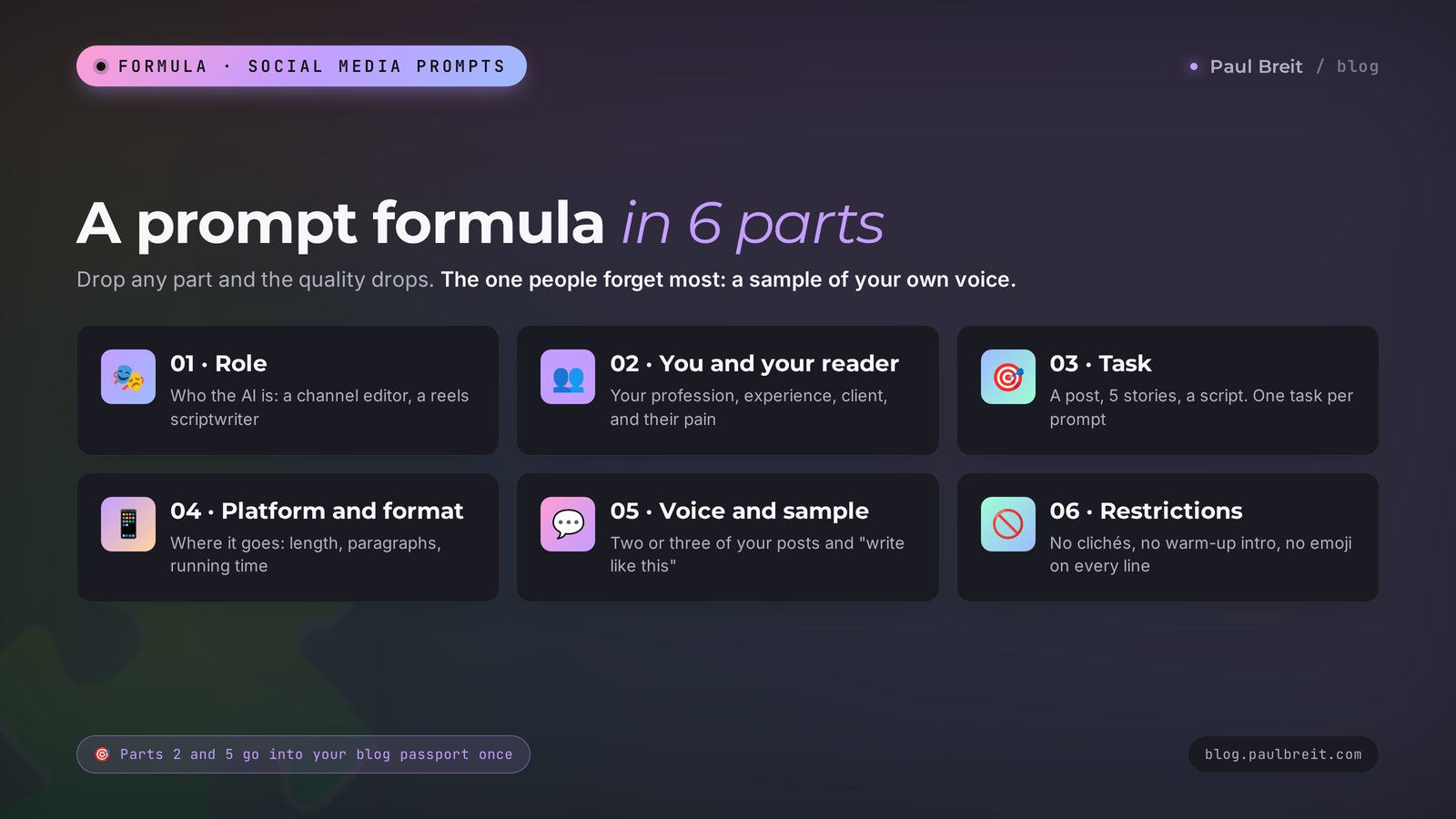
A social media prompt works when it has six parts: the AI's role, who you are and who you write for, a specific task, the platform and format, a sample of your writing, and restrictions. Template: "You are the editor of an Instagram account. I'm a therapist writing for women aged 30–45. Write a 200-word caption about the fear of making phone calls. Open with an everyday scene, end with a question to the reader. Write as simply as in my sample below. No jargon, no exclamation points." It works in Claude, ChatGPT, and Gemini.
Everyone who runs their own social media and sells services, courses, or consulting: therapists, coaches, nutritionists, tutors, trainers, lawyers, beauty pros, freelancers, and owners of small studios. If you're just getting to know AI, start with the best AI tools of 2026 and the roundup of free AI tools. If you need prompts for other tasks, open the AI prompt library.
What's inside
- Why prompts from the internet give you identical posts
- Which AI to use for social media
- The six-part prompt formula
- The blog passport: one paste for every prompt
- 15 prompts for posts
- 10 prompts for stories
- 10 prompts for reels and short videos
- 5 prompts for carousels
- 5 prompts for comments and DMs
- 5 prompts for content plans and repurposing
- How to turn a draft into a living text
- A full conversation example
- Topics for different niches
- 7 mistakes that make posts sound like AI
- If something goes wrong
- Your first-week checklist
- The whole path in a minute
You know the scene. It's evening, a post is due tomorrow, and your head is empty. You open an AI chat, type "write a post about marketing," and ten seconds later you get a text. Smooth, grammatical, with a five-point list and a cheerful call to action at the end. And completely foreign. Anyone could have written that post about anything.
The problem is the prompt. AI writes exactly as well as you explained the task. If you didn't say who you are, who you write for, how you talk, and what's off-limits, it pulls the most average text in the world out of its memory.
I've run my own social media for years and I teach this to the clients of my school. Today almost every post, script, and reply to a follower I publish starts with AI and ends with my own edit. Below is what actually works: the prompt formula, the blog passport, 50 ready prompts for different formats, a real conversation example, and the mistakes that give AI away from the first line.
You can copy the prompts as they are. Anything in square brackets is what you replace with your own details.
Section 01Why prompts from the internet give you identical posts
There are thousands of "100 prompts for social media" lists online. Most of them look like this: "Write an engaging Instagram post about [topic]." Try that prompt three times on three different topics. You'll get the same text with different words: a rhetorical question at the top, three bullet points with emoji, and "What do you think? Let me know in the comments!"
The reason is simple. AI was trained on billions of texts from the internet, and when the task is vague, it produces whatever showed up most often. The average post about marketing. The average post about health. The average post about relationships. Readers scroll past those in a second because they've seen hundreds of them.
To get a text that's yours, a prompt needs three things the internet templates leave out:
- context about you – what you do, for whom, how much experience you have, and where you stand;
- a sample of your voice – two or three of your real posts, so the AI can hear how you talk;
- restrictions – what's off-limits: clichés, exclamation points, lists where a story belongs.
You can gather all of this into one paragraph once and paste it at the top of any prompt. I'll show you how in the section on the blog passport. First, let's pick the tool.
Section 02Which AI to use for social media
The prompts in this article work in any text AI. The differences are in how natural the writing sounds, how much context the tool remembers, and what you get for free. Here's a short comparison of the tools I've tested on social media tasks:
| AI | What it does best | Writing quality | Free plan | Paid plan |
|---|---|---|---|---|
| Claude | Natural posts, holds the author's voice, long series of posts | Excellent | Yes, with message limits | Pro, about $20 a month |
| ChatGPT | Ideas, scripts, images for posts in the same window | Excellent | Yes, with limits | Plus, about $20 a month |
| Gemini | Quick drafts, works inside Google Docs and Gmail, YouTube research | Good | Yes, generous | Google AI Pro, about $20 a month |
| Perplexity | Fresh facts, stats, and news hooks with links to sources | Good for summaries | Yes, unlimited basic search | Pro, about $20 a month |
| Microsoft Copilot | Short captions and ideas on the go, built into Windows and Edge | Good | Yes | Included in some Microsoft 365 plans |
My pick for posts is Claude. It holds an author's manner better than the others and slides into an advertising tone less often. You can sign up at claude.ai with a Google account or any email address, and the free plan is enough to try every prompt below. The detailed formula for this AI is in the article on Claude prompts.
If you want a side-by-side test of which tool writes the most human copy, read the comparison of the best AI for writing. Short version: for social media, the difference between the top tools is smaller than the difference between a vague prompt and a good one.
Set up a separate project or chat for social media. In Claude these are Projects, in ChatGPT it's Projects or a custom GPT, in Gemini it's a Gem. You put your blog passport there once, and from then on it loads by itself.
Section 03The six-part prompt formula
Every prompt in this article is built on the same pattern. Once you understand it, you can write your own prompt for any format in a minute.
- Role. Who the AI should be: the editor of an Instagram account, a reels scriptwriter, a social media manager in the therapy niche. The role sets the vocabulary and the level.
- Who you are and who you write for. Your profession, experience, who your client is, what hurts, what they want. Without this part, posts end up being about nobody.
- Task. Exactly what to do: a post, 5 stories, a 40-second script. One task per prompt.
- Platform and format. Where the text will run and what its limits are: length in words or characters, paragraphs, running time, number of slides, whether there's a call to action at the end.
- Voice and sample. How you talk. The best move is to paste two or three of your own posts and write "write in this manner."
- Restrictions. What to avoid: clichés, exclamation points, emoji on every line, a warm-up intro.
Why this order. The first two parts answer "who is speaking and to whom." The third and fourth answer "what to do and within what limits." The fifth and sixth answer "how it should sound." Remove any one part and the quality drops noticeably. The one people forget most often is the fifth: without a sample, the AI writes in its own voice, and that voice is the same for everyone.
Here's what a prompt built on the full formula looks like:
You are the editor of an Instagram account in the therapy niche.
I'm a therapist with 8 years of practice. I work online with women aged 30–45 who are tired of carrying everything on their own.
Write a caption about why asking for help feels scarier than doing everything yourself.
Platform: Instagram. Length 200–250 words, paragraphs of 2–3 sentences. Open with an everyday scene. End with one question to the reader.
Write as simply and warmly as in my posts below:
[paste 2–3 of your posts]
Avoid: jargon, exclamation points, the words "crucial", "journey", "game-changer", lists, emoji.
Compare that with "write a post about asking for help." The difference in the result is the difference between a stranger's text and a text you barely need to edit. I covered the general rules of writing prompts for any task in the article on how to write prompts.
Section 04The blog passport: one paste for every prompt
Writing out parts two and five of the formula every time takes too long. So gather them once into a "blog passport" – a paragraph of 150–300 words that you paste at the top of any prompt or store in an AI project.
The easiest way to build a passport is with the AI itself. Copy in 10–15 of your posts that you like and that performed well, and give it this prompt:
Prompt 1. Build a blog passport
Below are my posts from Instagram. Study them and write a passport of my blog for an AI that will write on my behalf.
The passport should include:
1. Who I am and what I do – 2 sentences.
2. Who my readers are: age, situation, main pains and desires.
3. How I write: sentence length, how I address the reader, humor, favorite words and phrases (quote 10 of them word for word).
4. What I never do in my posts.
5. My main topics and where I stand on them.
Keep it short, with no judgments. Don't invent anything that isn't in the posts.
[paste 10–15 posts]
Check the result with your own eyes. The AI sometimes attributes things to you that aren't there: say, "loves motivational quotes," when you quoted someone exactly once. Cross that out. Add what it couldn't see: prices, how you work with clients, your own rules like "I never promise results in a week."
Here's an example of a finished passport for a nutritionist:
I'm a nutritionist with 6 years of practice. I coach women aged 35–50 who have tried every diet and are tired of falling off the wagon.
My readers work, many have kids, and they have little time to cook. They're afraid of slipping again, ashamed of their weight, and don't believe you can lose weight without going hungry.
I write simply and with humor, in short paragraphs. I often open with a client's story (no names) or an everyday kitchen scene. Words I like: "plate", "no heroics", "like a normal person".
I never scare people with diseases, never call foods "toxic", never write "urgent", and never promise 20 pounds off in a month.
My stance: food is not the enemy, and consistency matters more than speed.
The more detailed the passport, the fewer edits you'll make later. I covered how to bring the AI's voice almost all the way to yours in the article on how to teach AI to write in your voice.
From here on, every prompt starts with the line [blog passport] – that means paste your passport. If you work inside a project where the passport is already stored, you can skip that line.
Section 0515 prompts for posts
These prompts are written for Instagram and Facebook captions, but they work just as well for LinkedIn posts and Threads. Adjust the length to the platform: an Instagram caption can run up to 2,200 characters, a LinkedIn post up to 3,000, a Threads post up to 500. For most captions, 125–300 words is a comfortable range.
Prompt 2. A story from your practice
[blog passport]
Write a story post for Instagram, 200–250 words.
Situation: [describe a real client case in 3–4 sentences, no names].
Structure: a scene with details – what the client thought and felt – what we did – what changed – the takeaway in one sentence.
No moral at the end and no call to buy.
Prompt 3. A mistake breakdown
[blog passport]
Write a post about the mistake my clients make most often: [mistake].
Show why people do it (without judgment), where it leads, and what to do instead – 3 steps they can apply today.
Length 170–230 words. Calm tone, no scare tactics.
Prompt 4. An opinion post
[blog passport]
My position: [your opinion that many people in your niche disagree with].
Write a post where I state it calmly and confidently. Give 2 arguments from my practice, acknowledge where the people who disagree have a point, and end with a question people will want to discuss.
Up to 250 words. No attacks on colleagues.
Prompt 5. A how-to post
[blog passport]
Write a how-to post: how to [result] in [time frame / number of steps].
Each step is an action the reader can take without me. After each step, one sentence on why it matters.
At the end, the typical mistake people make on this path.
Length 250–330 words.
Prompt 6. An introduction post
[blog passport]
Write an introduction post for new followers.
Facts about me: [5–7 facts: experience, how you got into the profession, something unusual about you, client results, what you believe in].
Don't list them – weave them into a living story. Open with an unexpected fact. At the end, say what I write about here and why this account is useful to the reader.
Prompt 7. A myth-busting post
[blog passport]
Break down a myth in my niche: [myth].
Where it came from, why people believe it, what's actually true (with an example), and what someone who believed it should do now.
Length 200 words. No condescension: the reader isn't stupid, they were simply told this.
Prompt 8. A case study post
[blog passport]
Write a case study post from this data: client [who], came in with [problem], we did [what], result [numbers and time frame].
Structure: starting point with details – what they tried before me – 2–3 key decisions – where they are now – what the client said in their own words.
Only facts from my description, don't invent anything. Length 250 words.
Prompt 9. An engagement question post
[blog passport]
Come up with 10 questions for my followers on [topic] that people will want to answer in the comments. The questions should be about the reader's personal experience, with no right answer.
Then write a short post of 70–100 words around the best question: a small story from my life and the question at the end.
Prompt 10. A roundup post
[blog passport]
Make a roundup post: [7] [books / exercises / tools / habits] for [who and why].
For each item, 1–2 sentences: what it is and who it suits. Add my short comment to two of the items.
Up to 300 words. Leave out any item you're not sure actually exists.
Prompt 11. A before-and-after post
[blog passport]
Write a "before – after" post about [process or habit].
Describe an ordinary day of a person before the change and after it, through specific details: time, actions, feelings. No numbers that aren't in my description: [description].
Length 200 words.
Prompt 12. An answer to a frequent question
[blog passport]
People constantly ask me: [question].
Write an answer post: a short answer in the first paragraph, then why, then an example, and at the end, when the answer is different.
Length 170 words.
Prompt 13. A personal post
[blog passport]
Write a personal post about something that happened to me: [event in 3–5 sentences].
Show what I felt and what I realized. The link to my work is one sentence at the end, without forcing it.
No grand words and no "life taught me". Length 170–220 words.
Prompt 14. A sales post
[blog passport]
Write a sales post for [product/service].
Who it's for: [description]. What's inside: [contents]. Result: [what the person gets]. Price and terms: [price, dates, number of spots].
Structure: the reader's pain through a scene – why the usual approaches didn't work – what I'm offering – what's inside – who it's NOT for – price and how to sign up.
Call to action: [for example, DM me the word "REVIEW"].
No pressure, no "last chance", no made-up testimonials. Up to 330 words.
Prompt 15. A live stream or webinar announcement
[blog passport]
Write an announcement for a live session: topic [topic], date and time [when], where [platform].
Give 3 specific questions I'll answer and who needs this session most.
Length 120–150 words. At the end, what to do so they don't miss it.
Prompt 16. Ten first lines
[blog passport]
Here's my post: [text].
Suggest 10 first lines that will make someone stop scrolling. Use different types: a question that hits a pain, a surprising number, a confession, a contradiction of common wisdom, a scene.
None of them should promise more than the post delivers. Mark the 2 best and explain why in one sentence.
I use that last prompt for almost every post. The first line decides whether the text gets read at all, and it deserves more of your time than everything else combined. If you need a ready warm-up sequence before a launch, take the structure from the article on a warm-up series with AI: 5 nurture posts in one evening.
Section 0610 prompts for stories
Stories live for 24 hours, and people watch them fast and often with the sound off. So the rules change: one thought per screen, 2–3 lines of text at most, and each next story has to give a reason to keep tapping. The prompts below work for Instagram and Facebook stories.
Prompt 17. A story series from a post
[blog passport]
Here's my post: [text].
Break it into a series of 6–8 stories. For each one: on-screen text of up to 15 words and a hint for what to show in the frame (me on camera, a phone screen, a photo, an object).
The first story is the hook, the last one is an action: a poll, a question, or a link to the post.
Prompt 18. A poll story
[blog passport]
Come up with 5 story polls on [topic]. Each has a question of up to 10 words and 2 answer options.
The questions should help me understand my audience: what hurts, what they've already tried, what stops them from buying.
For each poll, write which post I could make based on the answers.
Prompt 19. A day in my life
[blog passport]
My plan for tomorrow: [list your tasks].
Suggest a series of 8–10 "a day with me" stories where my work and values show through ordinary tasks. For each one: what to film and a short caption.
One story should gently remind people about my service [service] without a hard sell.
Prompt 20. Behind the scenes
[blog passport]
Suggest 5 behind-the-scenes ideas from my work that are interesting to watch: preparation, process, tools, mistakes.
For each idea, 3 stories with on-screen text of up to 12 words.
Prompt 21. Q&A stories
[blog passport]
People sent these questions to my question box: [paste 5–10 questions].
Pick the 5 that are most useful for everyone. For each, write a story answer: up to 40 words, conversational, as if I'm saying it on camera.
Prompt 22. A pre-launch story warm-up
[blog passport]
In [N] days I open sales for [product]. Plan a story warm-up for those days: 3–5 stories a day.
Day 1 – the problem, day 2 – why the usual solutions don't work, day 3 – a client story, day 4 – my approach, day 5 – sales open.
For each story: the on-screen text and what's in the frame. No pressure and no countdowns.
Prompt 23. A quiz story
[blog passport]
Make a story quiz "[What's your ... type]" with 4 questions and answer options (quiz or poll sticker).
At the end, 3 possible results with a short description and a tip for each one.
Prompt 24. Stories after a live session
[blog passport]
Here are the key points from my live session: [points].
Make 6 recap stories: each is one idea from the session in up to 15 words. The last one says where to watch the replay.
Prompt 25. A testimonial story
[blog passport]
Here's a client testimonial: [testimonial text].
Make 3 stories around it: 1 – the client's situation before we worked together, 2 – a quote from the testimonial (the strongest line, word for word), 3 – my comment and a soft invitation.
Don't rewrite or embellish the testimonial.
Prompt 26. Morning stories for a week
[blog passport]
Create a morning stories series for 7 days: one short thought or exercise per day for [my audience].
Each is up to 20 words plus a background suggestion. Give the series a name of 2–3 words.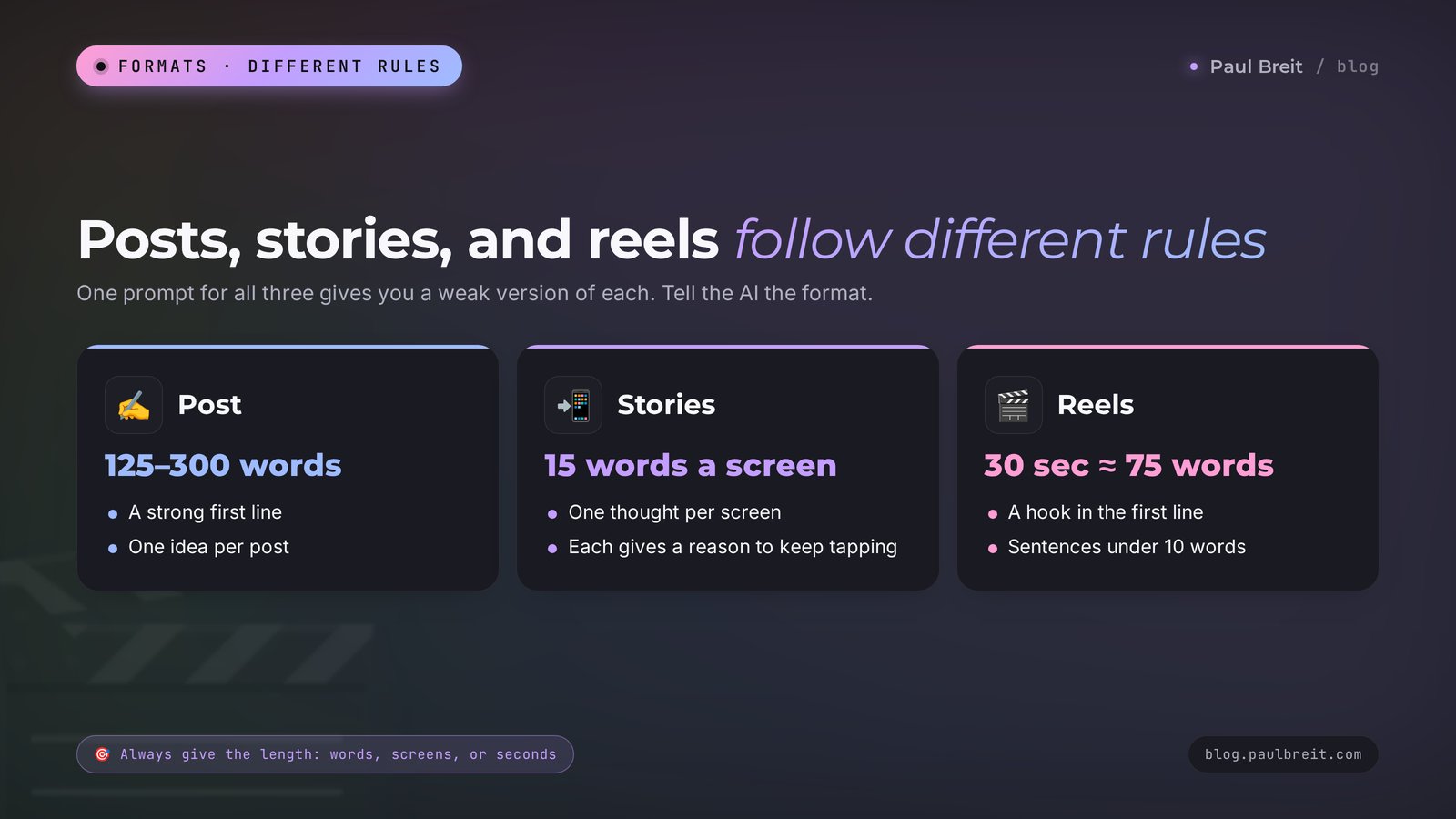
Section 0710 prompts for reels and short videos
Short videos – Instagram Reels, TikTok, YouTube Shorts, Facebook Reels – live or die on the first seconds and on watch time. The prompts below ask the AI to write the way people talk: short sentences, no bookish phrases. Always give the running time: 30 seconds is roughly 75 words of voiceover.
Prompt 27. A talking-head reel script
[blog passport]
Write a 40-second reel script, I'm talking to the camera. Topic: [topic].
Structure: a hook in the first sentence – the problem – a twist or fresh idea – what the viewer should do.
Write conversationally, sentences up to 10 words. Separately, on-screen text for the first frame of up to 7 words.
Prompt 28. A voiceover reel
[blog passport]
I have a video: [describe what's in the frame – a walk, working at a laptop, a kitchen].
Write a 30-second voiceover that doesn't describe the picture and gives the viewer an idea about [topic]. Plus a 50–80-word caption that continues the thought in new words.
Prompt 29. 10 hooks for a reel
[blog passport]
Reel topic: [topic]. Come up with 10 opening lines of up to 8 words that make people want to keep watching.
Types: a question that hits a pain, a confession, "everyone does X and regrets it", a number, a promise of specifics.
None of them should mislead: the video has to deliver the answer.
Prompt 30. A list reel
[blog passport]
A 30-second reel script: "3 [mistakes / ways / signs] of [what]".
Each item is one on-screen line and one line of explanation. End with the least obvious item and a suggestion to save the video.
Prompt 31. A reply-to-a-comment reel
[blog passport]
Someone commented under my video: [comment].
Write a 30–40-second reply reel script: I read the comment, thank them, and answer on the merits with an example.
If the comment is harsh, the answer stays calm, with no excuses.
Prompt 32. A 45-second story reel
[blog passport]
Retell this story as a 45-second reel script: [story].
Start with the most tense moment, then go back. The last line is a takeaway someone could repeat to a friend.
Prompt 33. A shot list
[blog passport]
Here's the text of my reel: [text].
Break it into shots of 2–4 seconds. For each: what's in the frame, the on-screen text, the change of angle. Keep in mind I film alone on my phone, with no camera operator.
Prompt 34. A reel caption
[blog passport]
Here's my reel script: [text].
Write a caption of 70–120 words. The first line is a new idea that isn't in the video. Then a short story or example. At the end, a simple action: save it, send it to a friend, comment with a word.
Don't repeat lines from the video.
Prompt 35. A week of reels
[blog passport]
Come up with 7 reels for the week on [topic]: 2 educational, 2 stories, 1 opinion, 1 behind the scenes, 1 sales.
For each: the hook, the core idea in 2 sentences, the call to action.
Prompt 36. A trend for my niche
[blog passport]
Here's a description of a trend in short videos: [describe the format or sound].
Suggest 3 ways to repeat it in my niche so the video is useful to my audience. For the best one, write a 20-second script.
If reels are your main format, I have a separate breakdown with a monthly plan: AI for reels: 30 scripts a month in one evening. And if you want AI to help produce the video itself, see the article on making a video from text with AI.
Section 085 prompts for carousels
A carousel is a post made of several slides that people swipe through. It gets saved a lot, so it works well for reach on Instagram and LinkedIn. The main rule: one slide, one thought, very little text, and the first slide promises a benefit.
Prompt 37. A how-to carousel
[blog passport]
Write the text for an 8-slide carousel: "How to [result] in [N] steps".
Slide 1 – a headline of up to 8 words. Slides 2–7 – one step each: a heading of up to 5 words and an explanation of up to 25 words. Slide 8 – the summary and a prompt to save it.
Prompt 38. A checklist carousel
[blog passport]
A 7-slide checklist carousel: "[Check yourself: ...]". Each slide has one item the reader can tick off for themselves and a short explanation.
The last slide says what to do if more than 3 items are ticked.
Prompt 39. A "mistake – how to fix it" carousel
[blog passport]
A 9-slide carousel about 4 common mistakes in [topic]. Two slides per mistake: the first shows the mistake and why people make it, the second shows how to do it right with an example.
The first slide is a hook headline.
Prompt 40. A carousel from a long text
[blog passport]
Here's my article or long post: [text].
Condense it into a carousel of 7–10 slides. Keep the main ideas and my wording. Up to 30 words of text per slide.
Prompt 41. A carousel caption
[blog passport]
Here's the carousel text: [slides].
Write a caption of about 80 words: why this carousel matters to the reader, one detail that isn't on the slides, and a prompt to save it or send it to a friend.
If you need carousels every day, you can assemble them automatically. I explained how that works in the article on Instagram carousels on autopilot.
Section 095 prompts for comments and DMs
Replies to followers can be sped up too. One thing matters here: the AI writes the draft, you hit send. Reread every reply before sending it, especially when someone is sharing something personal.
Prompt 42. Answering a question in the comments
[blog passport]
Someone asked under my post: [comment].
Write 2 reply options of up to 50 words: a short one and a longer one. Warm tone, as if I'm answering someone I know. If the question needs a consultation, gently say that I cover this in detail in [format].
Prompt 43. Responding to negativity
[blog passport]
Someone left me a harsh comment: [comment].
Suggest a calm reply of up to 40 words. Acknowledge it if the criticism has a point, and answer on the merits. No sarcasm and no excuses. If the comment is just an insult, tell me it's better not to reply.
Prompt 44. Answering "how much does it cost?"
[blog passport]
Someone sent me a DM: "[message]".
My services and prices: [description].
Write a reply: thank them, ask 1–2 clarifying questions to understand their situation, briefly name the options and prices. Up to 80 words, no pressure.
Prompt 45. Welcoming new followers
[blog passport]
Write a welcome message for people who followed me and messaged me first. Up to 70 words: who I am, what's useful on my account (3 links: [links]), and one question so the person tells me about themselves.
Prompt 46. Reviewing a conversation
Here's my conversation with a potential client, name replaced: [conversation].
Where did I lose the person's interest? What should I have asked or said differently? Suggest the next message that will bring the conversation back.Don't paste clients' phone numbers, last names, addresses, or health details into an AI. Before you copy a conversation, replace the name with "Client" and delete anything that could identify the person.
Section 105 prompts for content plans and repurposing
Repurposing saves the most time: one idea turns into five formats. These prompts help you plan a month and expand finished posts into new formats.
Prompt 47. A one-month content plan
[blog passport]
Build a 4-week content plan for [platforms], [N] posts a week.
Mix: 40% value, 30% stories and personal, 20% engagement, 10% sales. At the end of the month – a sale of [product].
Table: date, format (post/stories/reel/carousel), topic, a one-line hook, the goal of the post.
Prompt 48. 30 topics from client pains
[blog passport]
Here's what clients say at our first meeting: [paste 10–20 phrases word for word].
Turn this into 30 post topics. Each topic is a headline phrased the way a client would say it, plus the format that suits it best.
Prompt 49. One post, five formats
[blog passport]
Here's my post: [text].
Repurpose it into: 1) a 30-second reel script, 2) 5 stories, 3) a 7-slide carousel, 4) a short Threads post of up to 500 characters, 5) a discussion question for the comments.
Keep my wording wherever possible.
Prompt 50. Analyzing your best posts
Here are 10 of my posts and their stats (reach, likes, shares, saves, comments): [data].
Find what separates the 3 best from the 3 worst: topic, first line, length, format. Give me 5 takeaways and 10 topics for my next posts based on the best ones.
Prompt 51. Ideas from someone else's viral post
[blog passport]
Here's a post from another account that got a lot of engagement: [text].
Explain why it worked. Suggest 3 topics for my account that use the same mechanism, built on my experience and for my audience. Don't copy the text.
The full step-by-step planning system with a live example is in the article on a content plan for a month in one evening.
Section 11How to turn a draft into a living text
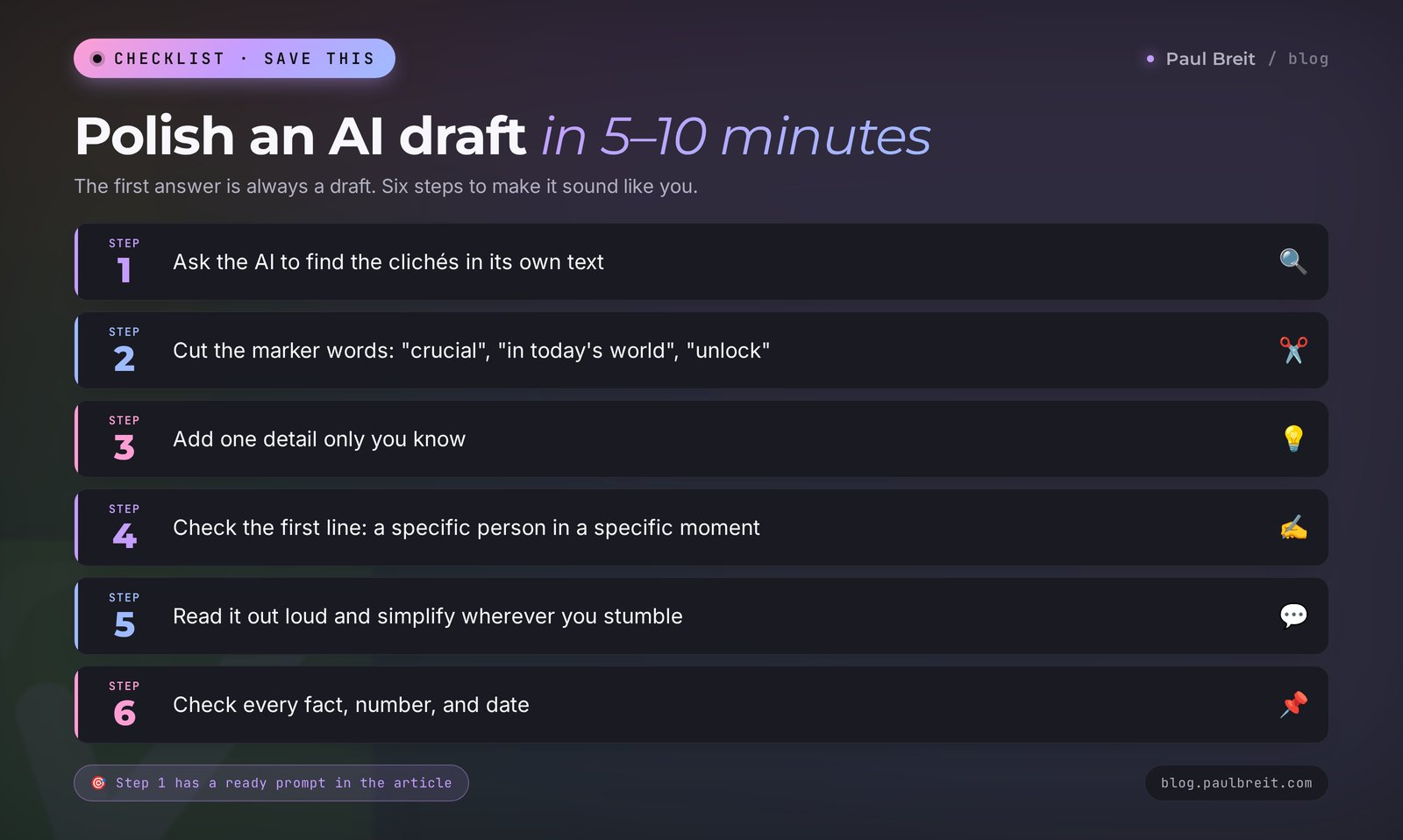
Even with a good prompt, the AI's first answer is a draft. The gap between an account people read and an account people scroll past shows up at the editing stage. It takes me 5–10 minutes.
Step 1. Ask the AI to find its own clichés. This saves the most time:
Reread your text like a strict editor. Find the phrases that sound like AI: jargon, vague words, grand statements, advertising language, filler intros, paragraphs that all start the same way.
List them and suggest a plain-language replacement for each. Then give me the full corrected text.
Step 2. Cut the marker words. Readers spot AI by them in a second: "crucial," "in today's fast-paced world," "delve," "unlock your potential," "take it to the next level," "game-changer," "journey," "in a world where." Cross them out without mercy. A full list of a hundred such words and a ready filter prompt are in the article on how to make AI write like a human.
Step 3. Add one detail only you know. A name for the situation, a number from your practice, a client's exact phrase, the place where it happened. One detail like that brings a text to life more than any style edit.
Step 4. Check the first line. If it starts with "Many of us" or "We've all been there," rewrite it. The first line should be about a specific person in a specific moment.
Step 5. Read it out loud. Where you stumble, the sentence is too long or the word is too bookish. Where it gets boring, there's filler – cut it.
Step 6. Check the facts. AI can confidently invent a study, a statistic, or a quote. Any fact that wasn't in your prompt gets checked or deleted.
Section 12A full conversation example
Here's what this looks like in practice. A Spanish tutor is preparing an Instagram post. The blog passport is already stored in the project.
You write:
Write a 200-word post. Topic: adults are afraid to speak Spanish even though they know the grammar.
Situation: a 38-year-old client studied Spanish for 10 years, couldn't order a coffee on vacation in Mexico, walked out, and cried in her hotel room.
Open with the scene in the café. End with a question: what stops you from speaking.
The AI answers (first version, excerpt):
In today's globalized world, language skills are a crucial tool. Many adults face a language barrier...You can see it right away: the passport didn't kick in, and the AI drifted into generalities. That happens when a topic is very familiar to it. Don't rewrite it yourself – send the task back:
You write:
That's off. You opened with generalities, and I asked for a scene. The first sentence is what the client sees and feels at the counter. Remove "globalized", "crucial", "face". Write like my posts in the passport.The AI answers (second version, opening):
She stood at the counter, rehearsing "Un café con leche, por favor" in her head for the third time. The barista smiled and asked something fast. She nodded, paid, and walked out without her coffee.
Back in her room, she cried. Ten years of Spanish, and she couldn't order a coffee.
That one can go out after an edit. All that's left is to add your own detail (for example, what you told this client at her first lesson), check the ending, and read it out loud.
The main lesson from this example: when an answer is weak, don't start over and don't rewrite the whole thing by hand. Tell the AI exactly what's wrong, point by point. The second version is almost always far better than the first.
Section 13Topics for different niches
The prompts above are universal. To make starting easier, here are three starter topics for several niches. Plug them into prompts 2–16.
| Niche | Story post | Myth post | Reel |
|---|---|---|---|
| Therapist | A client who couldn't say "no" to her mother for years | "You only need therapy when things get really bad" | 3 phrases that dismiss your feelings |
| Nutritionist | A Friday-night slip and what to do about it on Saturday | "Don't eat after 6 p.m." | What I eat for breakfast when I'm running late |
| Tutor | A student who hated math and got his first A | "My kid just isn't a math person" | How to check in 5 minutes whether a child keeps up with the curriculum |
| Coach | A client who wanted to quit and ended up restructuring his work instead | "Motivation shows up on its own" | The question that makes clients go quiet |
| Fitness trainer | A 50-year-old client and her first pull-up | "To lose weight, just run more" | A 3-minute exercise for people who sit all day |
| Lawyer | How one line in a contract cost a client $4,000 | "A handshake deal means nothing" | 3 clauses I check in every contract |
| Nail technician | A client who was scared to come in after a bad salon experience | "Gel polish ruins your nails" | What I do with my tools between clients |
If your niche isn't in the table, give the AI prompt 48: paste in the phrases you hear from clients at the first meeting. The best topics are almost always hiding there.
Section 147 mistakes that make posts sound like AI
- No context. A "write a post about X" prompt with no blog passport. One paste from Section 04 fixes it.
- Several tasks in one prompt. "Write a post, come up with 5 headlines and a reel script." The quality of each part drops. One task, one request.
- Publishing the first version. The first answer is a draft. At least one round of notes, then your own edit.
- Texts that run too long. AI loves to write a lot. Always give the length in words or characters.
- Emoji on every line. If you don't write that way, forbid it in the prompt.
- Made-up facts. "Studies show that 87% of people..." With no link to a source, delete that sentence.
- Every post built the same way. If all your posts follow one template, readers notice within a week. Rotate the formats from Sections 05–09.
Section 15If something goes wrong
The AI writes too formally. Add to the prompt: "Write as if you're telling a friend over coffee. Short sentences, no textbook phrases." And always paste a sample of your own writing.
The text comes out the same every time. Ask: "Give me 3 completely different versions: a story, a how-to, an opinion." Or start a new chat: a long conversation pulls the AI toward repetition.
The AI forgot the passport. In a long chat, early messages lose weight. Paste the passport again or work inside a project where it's attached permanently.
The wording feels off for your readers. Sometimes the AI mixes British and American spelling or slips into corporate buzzwords. Add to the end of the prompt: "Use American English spelling and everyday words. No business jargon."
The AI refuses to write on a topic. Most often these are topics about health, medication, or money. Clarify that you're a professional writing an educational post with no treatment or investment advice.
Claude or ChatGPT won't open. Check the service's status page first – outages happen and usually last minutes. Claude is available in a list of supported countries; if you're outside them, the prompts in this article work just as well in ChatGPT and Gemini.
You ran out of messages. On free plans, limits reset after a few hours. To spend fewer messages, batch your tasks: "write 3 posts on these topics" instead of three separate requests.
Section 16Your first-week checklist
- Day 1. Pick an AI and set up a "Social media" project. Copy 10–15 of your best posts.
- Day 2. Build your blog passport with prompt 1. Fix it by hand and put it in the project.
- Day 3. Build a one-month content plan with prompt 47 and topics from client pains with prompt 48.
- Day 4. Write 3 posts with prompts 2, 3, and 7. Polish each one with the six steps from Section 11.
- Day 5. Turn your best post into a reel and stories with prompt 49. Film at least one video.
- Day 6. Prepare reply templates for frequent DM questions with prompts 42 and 44.
- Day 7. Look at your stats and analyze your posts with prompt 50. Write down what worked and add it to the passport.
Section 17The whole path in a minute
- Prompts from the internet give identical posts because you're missing from them: no context, no voice, no restrictions.
- The prompt formula: role, who you are and who you write for, task, platform and format, voice with a sample, restrictions.
- Build a blog passport from your posts once and paste it into every prompt or into a project.
- For posts, Claude and ChatGPT write the most natural copy; Gemini is a solid free option.
- Posts, stories, reels, and carousels follow different rules: length, rhythm, first line.
- The AI's first answer is a draft. Send notes point by point, then finish it yourself in 5–10 minutes.
- One idea, five formats: repurposing saves more time than writing quick posts.
- Check facts, numbers, and testimonials yourself, and keep clients' personal data out of the AI.
Start today with one step: build your blog passport with prompt 1. It takes 15 minutes, and after that every text you produce will sound like you.
FAQFrequently asked questions
What is a social media prompt?
A social media prompt is an instruction you give an AI so it writes a post, a set of stories, a reel script, a carousel, or a reply to a follower. A good prompt includes a role, information about you and your audience, the task, the platform and format, a sample of your writing, and a list of things to avoid.
Which AI writes the best social media posts?
For natural, human-sounding posts, Claude and ChatGPT do the best job. Claude holds an author's voice especially well over a long series of posts. Gemini is a strong free option, and Perplexity is handy when a post needs fresh facts with sources. With a good prompt and a blog passport, all of them get close.
How do I make the AI write in my voice?
Build a blog passport: give the AI 10–15 of your posts and ask it to describe who you are, who your readers are, how you write, and what you never do. Paste that passport at the top of every prompt or attach it to a project in Claude or ChatGPT.
Can I publish AI text without editing it?
Better not. The AI's first answer is a draft: it can contain clichés, vague phrases, and made-up facts. Send the AI your notes point by point, then spend 5–10 minutes finishing the text yourself: add a detail of your own and read it out loud.
How is a prompt for a post different from a prompt for stories or reels?
For a post, what matters is the length, the structure, and the first line. For stories, it's one thought per screen, up to 15 words, and a reason to keep tapping. For reels, it's the running time, a spoken rhythm, short sentences, and a hook in the first seconds.
How long should an Instagram caption be?
Instagram allows captions up to 2,200 characters, but only the first line or two show before the "more" button. Ask the AI to put the hook in the first 125 characters and keep most captions between 300 and 1,200 characters. For Threads, the limit is 500 characters per post.
Are there free AI tools for writing social media posts?
Yes. Claude, ChatGPT, and Gemini all have free plans with message limits, which is enough for a few posts a day. Microsoft Copilot is free as well. The paid plans cost around $20 a month and are worth it once you hit the limits or want projects that remember your blog passport.
Can I paste conversations with clients into an AI?
Only anonymized ones. Before you copy a conversation, replace the name with "Client" and delete phone numbers, last names, addresses, and health details. Send a reply to a client only after you've reread it yourself.