Shedevrum: Yandex's Free AI for Images and Short Video
Shedevrum is Yandex's AI app that turns a text description into pictures and short video clips. It's free to start, you sign in with a Yandex ID, and its interface is built like a social feed full of other people's prompts. I'll walk you through what it is, how to try it from outside Russia (and what nobody officially promises), your first image in 3 minutes, a 6-part prompt formula with 15 ready prompts that work in any image generator, lettering without typos, video, usage rights, and how it compares to Midjourney, ChatGPT, and Gemini. For everyone who sells services, courses, and consulting and wants post covers, backgrounds, and illustrations without hiring a designer.
Shedevrum is Yandex's free AI generator for images and short videos. Open shedevrum.ai or the app, sign in with a Yandex ID, and describe the picture: subject, setting, 2-3 details, light, and style, for example "a cappuccino on a wooden table by a window, soft morning light, photo." Pick a format, tap Create, and two versions arrive in a few seconds. Video works the same way in video mode. Free images are for personal use only; business use requires Shedevrum Pro, about 100 rubles (roughly a dollar) a month on top of Yandex Plus. Access from outside Russia isn't officially confirmed by Yandex.
Anyone who needs visuals without a designer: post covers, story backgrounds, guide illustrations, client greeting cards, short moving backgrounds for reels. If you're still choosing between services, start with my overview of AI image generators in 2026, and for clips longer than a few seconds see AI video from text.
What's inside
- What Shedevrum is in 2026
- What it costs: free vs Pro
- How to start: site, app, and Yandex ID
- Your first image in 3 minutes
- The prompt formula and 15 ready prompts
- Styles and formats for each platform
- Text on images without typos
- Video: bringing a picture to life
- Your own photos, Studio, and edits
- Let another AI write your prompts
- 10 ways these images work for your business
- Usage rights: what Yandex allows
- When something goes wrong
- Shedevrum vs Midjourney, ChatGPT, Gemini, and others
- Pre-publish checklist
- The whole path in a minute
- FAQ
You know the scene. It's evening, you sit down to publish a post, the text is done, and there's no picture. None of your own photos fit the topic, you've seen the stock shots of smiling people in suits a hundred times, and your designer will answer tomorrow at best. So the post goes out with the first image you can find, or it doesn't go out at all.
AI image generators close that gap in a couple of minutes. Shedevrum is one of the biggest of them that most Americans have never heard of: Yandex's app for pictures and short videos, with millions of installs and a public feed where you can peek at the exact prompts behind other people's images. It's free to start, and for a post cover, a story background, an article illustration, or a client greeting card it's more than enough.
I'll be upfront about one thing. Shedevrum is a Russian service, built for a Russian audience, with Russian payment rails. Some of it won't apply to you, and I'll flag every spot where that's the case. The good news: about two-thirds of this guide – the prompt formula, the 15 prompts, lettering tricks, video tips, troubleshooting, and the pre-publish checklist – works the same in any image generator you use. Read in order, or jump to the section you need from the table of contents.
Section 01What Shedevrum is in 2026
Shedevrum is Yandex's service for generating images, videos, and texts. The name comes from the Russian word for "masterpiece." You describe what you want to see in words, for example "a ginger cat asleep on a windowsill, a winter city outside, soft morning light," and a few seconds later you get finished versions of the picture. Images and video come from Yandex's YandexART family of models, and texts come from YandexGPT.
If Yandex is new to you: it's Russia's largest tech company, roughly what Google is in the US – search, maps, email, taxis, music, and a voice assistant called Alice. Shedevrum is its consumer AI art app.
The service launched in April 2023. Since then the app has gathered millions of installs, and by the end of 2023 it ranked among the three most popular AI apps in the world. Inside, Shedevrum works like a social network: every user has a profile, you can publish your work to a shared feed, like it, follow authors, and see the prompts other people used.
What matters as of early October 2026:
- The models got a serious upgrade. YandexART 2.5 came out in March 2025, version 2.7 in summer 2025, and on July 14, 2026 Yandex released Alice AI ART 2.0. This model both generates images and edits them from an instruction, and it also powers images inside Yandex's Alice AI chat. In Yandex's own internal comparison the model took second place in the world for text-to-image generation. That's the company's claim, not an independent benchmark, but the jump from versions two years old is visible to the naked eye.
- Text on images finally works. After the May 2026 update, according to Yandex, the model writes Russian words correctly three times more often. Yandex's numbers are about Russian lettering, so for English text, test it yourself. There's a separate section below with techniques that help in any generator.
- There's video too. Shedevrum makes clips a few seconds long: it draws the first frame, then animates it. You can choose between several video models in the menu, and some are subscription-only.
- There's a paid tier called Shedevrum Pro. It costs about 100 rubles (roughly a dollar) a month on top of Yandex Plus and removes the watermark, skips the queue, adds 4K, and allows commercial use. Details in the next section.
Where Shedevrum lives: the website shedevrum.ai and apps for iPhone and Android in the App Store and Google Play. The service is meant for users 18 and older; there's a separate kids' mode with coloring pages, and you can only exit it with a password.
The interface and most of the community are Russian-speaking, so expect the feed to be full of Russian prompts. That's actually useful: paste any prompt into a translator and you get a free lesson in how other people describe light, style, and framing.
Section 02What it costs: free vs Pro
The core of Shedevrum is free. You sign in with a Yandex ID and start generating right away. The free tier has these limits: each request returns 2 versions of the image, at peak hours you wait in a queue, there's a daily generation limit, and downloaded images carry a Shedevrum watermark in the corner.
Yandex's help pages don't currently state the exact daily limit, and it has changed over time: when the subscription launched in 2025, the site listed 70 free generations, with a noticeably lower limit for video. For normal work, a few covers for your posts, the free limit is plenty. The people who hit it are the ones cycling through dozens of versions in a row.
| What | Free | Shedevrum Pro |
|---|---|---|
| Price | $0 | about 100 rubles (roughly a dollar) a month; requires an active Yandex Plus subscription; first 7 days free |
| Versions per request | 2 | 6 |
| Queue | waits at peak hours | no waiting |
| Watermark on downloads | yes | no |
| Quality | standard | upscaling to 4K |
| Models | base | plus Alice AI ART, YandexART 2.5 PRO, YandexART 2.0, and paid video models |
| Animating your own photos | no | yes |
| Shedevrum Studio | no | yes: batches, collages, portrait retouching, background removal |
| Private posts and prompts | everything visible in the feed | can be hidden |
| Commercial use | only with Yandex's written consent | allowed without approval |
Look at the last row; it matters more than all the others. Under Yandex's rules, images from the free tier may be used for personal, non-commercial purposes. A cover for a post that sells your consultation, an illustration on your course landing page, an ad creative – that's commercial use. For those you need Pro. I cover rights in detail in Section 12.
Pro requires a Yandex Plus subscription, and Yandex's billing is built around Russian bank cards. Yandex doesn't promise that a US card or a US billing address will work, and I won't pretend to know. So plan on the free tier for experiments and personal projects, and if you need commercial images, use a generator whose license you can actually pay for from the US. The comparison in Section 14 shows the options.
How to turn on Pro, if it's available to you: in the app, open your profile and tap the Shedevrum Pro banner; on the website, the subscribe button sits in the profile menu. For Russian users this is one of the service's big conveniences – rubles, a local card, no foreign payment hassle. For everyone else it's the main friction point.
Section 03How to start: site, app, and Yandex ID
There's no separate Shedevrum registration. You sign in with a Yandex ID, the same account Russians use for Yandex Mail, Music, or Taxi. If you don't have one, Yandex creates it from a phone number in about a minute.
Choose where you'll work
On a computer, open shedevrum.ai. On a phone, look for the Shedevrum app in the App Store or Google Play. Check the developer: the official app is published by Yandex. App stores are full of look-alike names that resell access to other people's AI models. If the app doesn't show up in your country's store, that's an answer in itself – don't install it from random sites.
Sign in with Yandex ID
The site redirects you to Yandex's sign-in page. Enter a phone number or email and confirm with a code. If you already have Yandex apps on your phone, the Shedevrum app offers a one-tap sign-in with the same account.
Pick a profile name
Shedevrum asks for a nickname. It's visible in the feed when you publish work. If you plan to share images publicly, use your project's name; if not, any neutral name will do.
Find the create button
In the app it's the large plus button at the bottom of the screen; on the site it's the prompt field and a create button at the top. The same place has a switch for what you're making: image, video, or text. Start with images, it's the simplest mode.
Scroll the feed for five minutes
Before your first request, scroll through the public feed. Tap an image you like and you'll see the prompt that produced it, unless the author hid it. That's the best tutorial there is: in five minutes you'll see which words create which effect.
Does Shedevrum work from the US? Honest answer: Yandex has no official statement about access from outside Russia. Inside Russia the service opens directly. Outside, it depends on your country, your app store, and whether Yandex's sign-in accepts your phone number. I'm not going to suggest workarounds that break a service's terms. If it opens for you, great; if it doesn't, skip to Section 14 and pick one of the alternatives – everything you learn about prompts in this guide carries over.
Section 04Your first image in 3 minutes
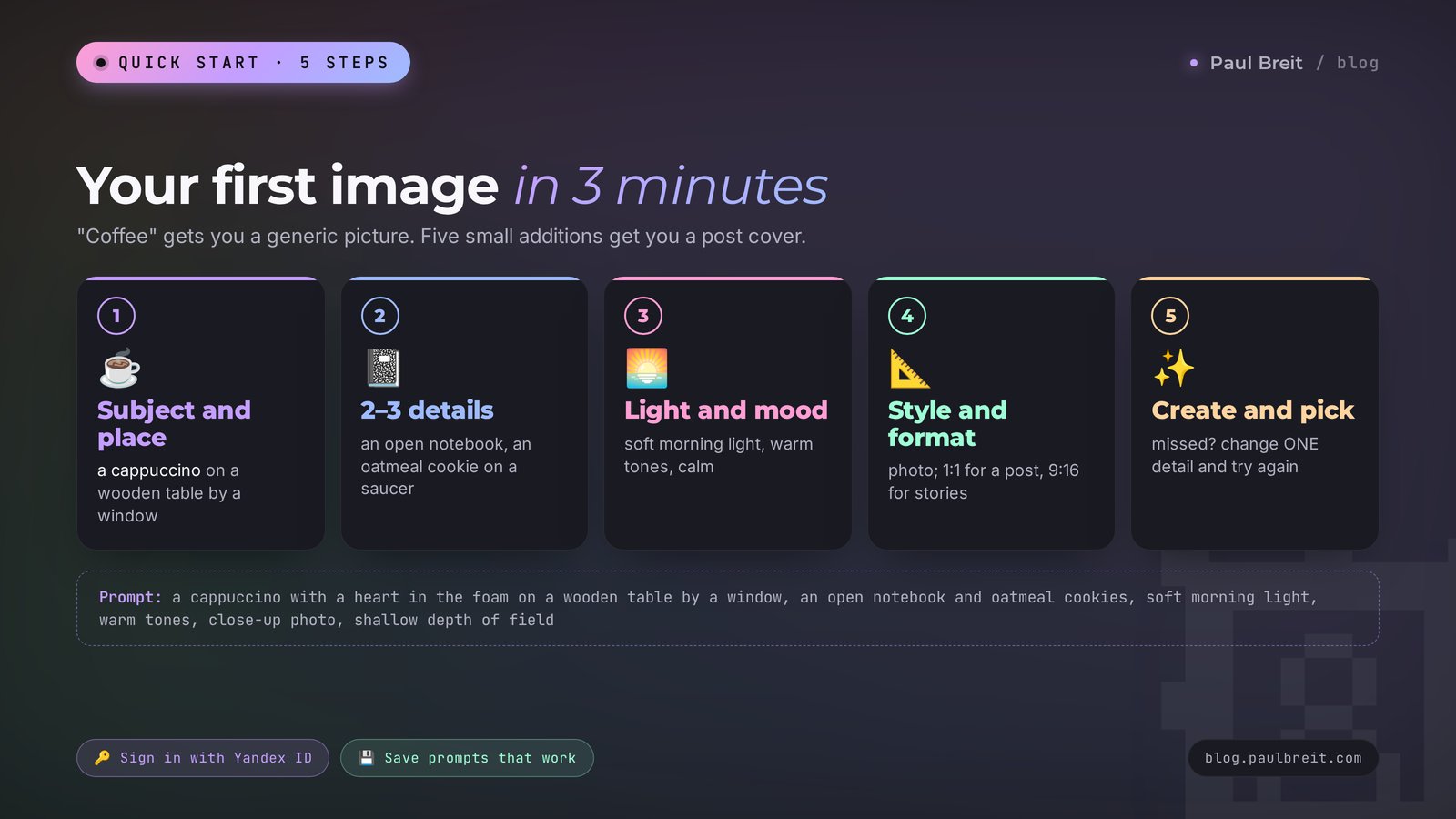
The most common beginner mistake goes like this: someone types "coffee" or "woman in an office," gets something bland, and decides the AI is weak. The model draws exactly what you described, and the word "coffee" describes very little. Here's how to get a picture you'd actually put in a post.
Describe the subject and the place
What's in the picture and where it is. "A cappuccino on a wooden table by a window." Already better than plain "coffee."
Add details
Two or three details that make the scene feel alive: "an open notebook with a pen next to it, an oatmeal cookie on the saucer." Details tell a story, and the picture stops looking like stock.
Set the light and mood
"Soft morning light from the window, warm tones, cozy and calm." Light changes the impression of an image more than anything else, even when the subject stays the same.
Choose a style and format
In the menu under the prompt field, pick a style (photo, watercolor, 3D, anime, and others) and an aspect ratio. A square 1:1 works for a feed post; a vertical 9:16 for stories.
Tap Create and pick the best version
Versions arrive in a few seconds. If none of them land, change one detail in the prompt and generate again. Change one thing at a time – that's how you learn what actually affected the result.
You type into Shedevrum: A cappuccino with a heart in the foam on a wooden table by a window, an open notebook with a pen and a saucer of oatmeal cookies next to it, soft morning light, warm tones, a blurred green garden outside, close-up photo, shallow depth of field.
What you get: two versions of a cozy morning still life. The foam heart is in focus, the notebook and cookies are slightly blurred, the light falls from the side. This picture fits a post about weekly planning, morning routines, or working from home.
Look at what worked here. Subject and place set the scene. Details turn an abstract "coffee" into a specific morning. Light and tones create the mood. The words "close-up photo, shallow depth of field" tell the model how to hold the camera. Strip it all back to "coffee" and you get an image that fits every post in the world – and therefore none of them.
One more useful habit: save prompts that work to your notes. In a month you'll have your own small library, and covers in a consistent style will take a minute. If you want ready wording for different tasks, browse my AI prompt library and the collection of AI photo prompt ideas.
Section 05The prompt formula and 15 ready prompts
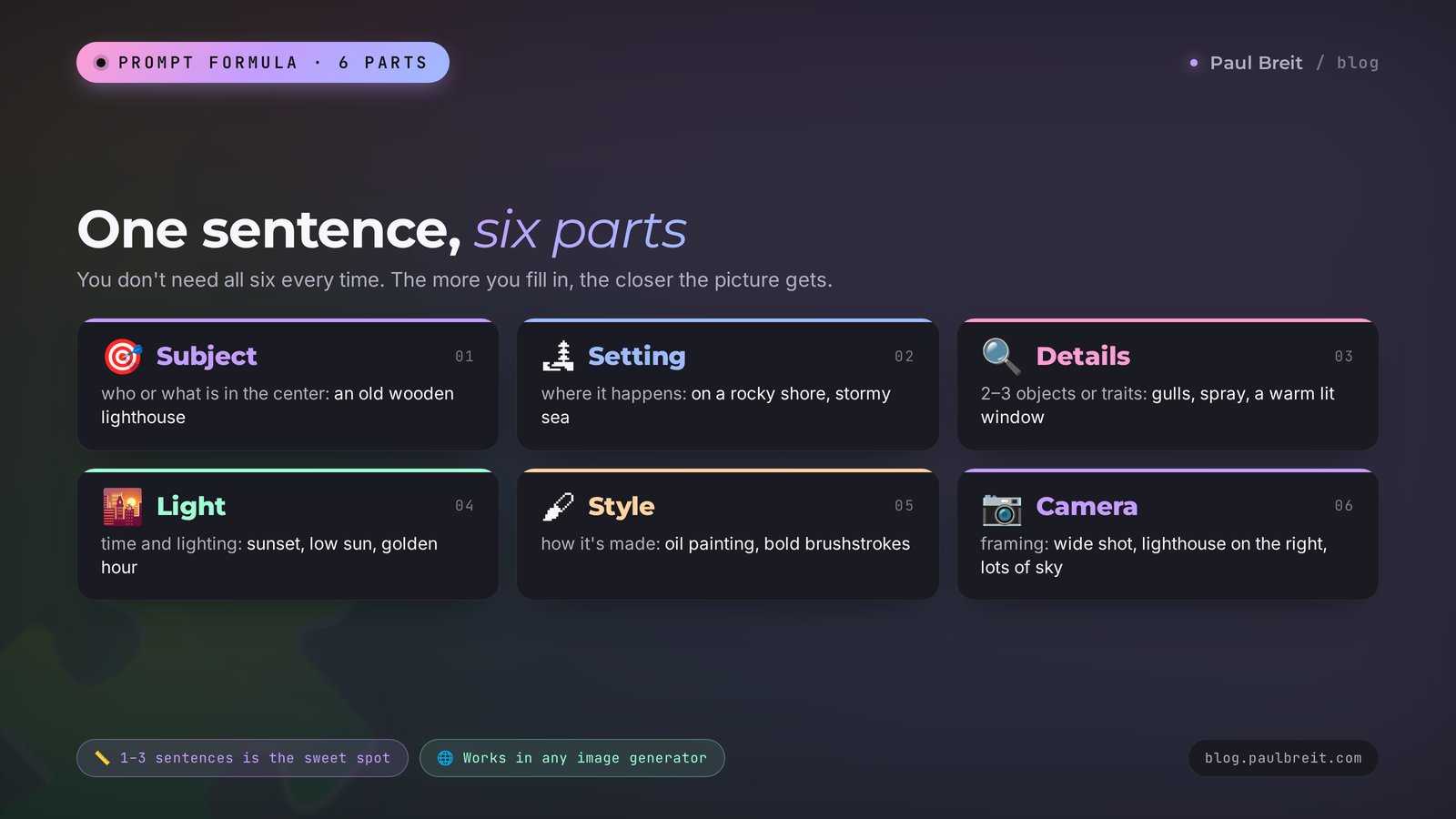
A prompt is the text request you give an AI. For Shedevrum, and honestly for any image generator, a simple six-part formula works. You don't have to fill in all six every time, but the more parts are in place, the more precise the picture.
| Part | What you write | Example |
|---|---|---|
| 1. Main subject | who or what is in the center | an old wooden lighthouse |
| 2. Setting and background | where it happens | on a rocky shore, a stormy sea all around |
| 3. Details | 2-3 objects or traits | seagulls, spray from the waves, a warm light in the lighthouse window |
| 4. Light and time | when and how it's lit | sunset, low sun, golden hour |
| 5. Style | how it's made | oil painting, bold brushstrokes |
| 6. Camera and composition | where we look from | wide shot, lighthouse on the right, lots of sky |
Shedevrum understands requests in any language, so you can write in English. Its strongest language is Russian, which makes sense given its audience, but plain, concrete English descriptions work. One to three sentences is the sweet spot. Too short and you get an average picture; too long and the model gets confused and drops some of the details.
Below are 15 prompts you can copy and adapt. I built them around the tasks of people who sell services, courses, and consulting: covers, backgrounds, illustrations, greeting cards. They're written to be generator-agnostic, so they'll work just as well in ChatGPT, Gemini, Midjourney, or Ideogram.
| Task | Prompt |
|---|---|
| Cover for a post about planning | An open planner with a weekly schedule on a light desk, a cup of tea and a sprig of eucalyptus next to it, soft daylight, top-down view, minimalism, pastel tones |
| Story background for a therapist | A calm morning lake in the mist, a wooden pier stretching into the distance, gentle pink and blue tones, lots of empty space at the top, vertical frame |
| Illustration for a nutritionist | A plate with a healthy breakfast: oatmeal with berries, avocado toast, nuts, on a linen tablecloth, bright natural light, top-down photo |
| Post for a fitness coach | Sneakers, dumbbells, and a water bottle on a yoga mat in a bright gym with big windows, morning light, energetic mood, photo |
| Cover for a tutor | A stack of books, a globe, and a desk lamp on a writing desk in the evening, warm lamplight, cozy atmosphere, watercolor illustration |
| A growth metaphor for a coach | A small green sprout pushing through a crack in the asphalt, drops of dew, morning light, macro photography, inspiring mood |
| Webinar background | Abstract soft waves of lavender and mint, smooth gradients, lots of empty space in the center for text, horizontal format |
| Holiday card for a client | A gift box with a satin ribbon and a pine sprig on a snowy windowsill, string lights blurred in the background, warm evening light |
| Post about travel and remote work | A laptop on a wooden table on a terrace overlooking the ocean, a coconut with a straw next to it, sunset, warm tones, photo |
| Cover for a beginner course | A door slightly open into a bright room, warm light pouring through the gap, a dark hallway around it, a symbol of starting the journey, cinematic shot |
| Illustration for a post about burnout | A burnt-down candle on a desk next to a cold cup of coffee and a stack of papers, dusk, blue and gray tones, quiet melancholy mood |
| Card for a nail artist | Bottles of pastel nail polish in a row on a marble surface, a sprig of dried flowers, soft diffused light, catalog photo |
| Character for a kids' course | A friendly red fox in glasses reading a book under a tree, autumn leaves all around, cartoon style, bright colors |
| Background for a quote | Crumpled cream-colored paper with a soft shadow of monstera leaves, top-down view, minimalism, lots of empty space |
| Visual for selling a consultation | Two armchairs facing each other in a bright office, a coffee table with two cups between them, a plant in the corner, warm light, a feeling of a calm conversation |
Notice there are no people with faces in these prompts. That's deliberate. AI draws people well, but faces and hands still come out strange sometimes, and Shedevrum doesn't allow images of real, well-known people at all. Objects, landscapes, and metaphors come out reliably on the first try, and for a post they work just as well as a portrait.
Section 06Styles and formats for each platform
Shedevrum has preset styles: photo, anime, pixel art, oil painting, watercolor, comic, Soviet-era poster, and others. You can pick a style with a button in the menu or write it out in the prompt. Writing it out gives you more control: "watercolor with soft bleeds on white paper" gives a more precise result than the plain "watercolor" button.
Choose the aspect ratio before generating; you can't change it afterward without making a new image. Shedevrum offers square 1:1, vertical 3:4 and 9:16, and horizontal 4:3 and 16:9. Here's how that maps to platforms:
| Platform and placement | Format | Prompt hint |
|---|---|---|
| Telegram channel post | 1:1 or 4:3 | main subject centered, calm background |
| Stories on Instagram, Facebook, Telegram | 9:16 | "lots of empty space at the top" for text and stickers |
| Reels and short-video covers | 9:16 | a bright, high-contrast subject, close-up |
| Carousel | 3:4 or 4:3 | one style for all slides, change only the subject |
| Article, webinar, or YouTube cover | 16:9 | "subject on the right, empty space on the left for a headline" |
| Facebook or LinkedIn feed post | 1:1 or 4:3 | large details; small ones get lost on a phone screen |
| Channel or bot avatar | 1:1 | one simple, recognizable symbol, no fine detail |
A trick for a post series: keep one shared "tail" on every prompt. For example, end every cover prompt for the month with "minimalism, pastel lavender and mint tones, soft diffused light, top-down view." Only the subject at the start changes, and your feed looks like a designer runs it. I go deeper into building covers in one style in my piece on the AI banner maker.
There's also a separate mode for your own photos. You upload a picture and Shedevrum redraws it in one of eight styles: plush toy, knitted figure, cartoon, pixels, and others. For a personal brand it's a fun move: a cartoon-style avatar for a holiday post, or a "knitted" version of your team for an introduction post.
Section 07Text on images without typos
For a long time every AI image generator wrote gibberish on pictures. With the 2026 update, Yandex's model got noticeably better at lettering. Mistakes still happen, but with the right prompt a short caption comes out right on the first or second try.
Yandex itself published three tips for lettering, and they work in other generators too:
Put the text in quotes
That's how the model knows these words should appear on the image. "A coffee shop sign that says "GOOD MORNING"."
Write hard words in capitals
If a word is long or unusual, put it in capitals inside the quotes: "a mug with the word "MENTOR" on it." The model renders capital letters more carefully.
Split long text into parts
Say where each part goes: "large at the top "FALL INTENSIVE", small at the bottom "starts October 20"." One long phrase will almost certainly break somewhere in the middle.
You type into Shedevrum: A neon sign on a brick wall in a cozy cafe, the sign says "SALES WITHOUT STRESS", warm evening light, potted plants nearby, photo.
What you get: usually one version comes out with clean lettering, and in the other a letter may slip. You pick the clean one and use it as your post cover.
My working rule: give short captions of 1-3 words to the AI, and put long headlines with numbers, dates, and prices on top of the image yourself in Canva, an Instagram story editor, or any design app. The AI draws the background, you add the exact text. That way no date in an announcement drifts and no price quietly turns into a different number.
Before publishing, read the text on the image out loud, letter by letter. The AI can drop a letter or swap in a look-alike, and on a small preview that's easy to miss. Readers spot it instantly. One typo on a course cover costs more than five extra generations.
Section 08Video: bringing a picture to life
Shedevrum makes short clips a few seconds long. It works in two steps: first the model draws a starting frame from your description, then it turns that frame into a moving video. The finished clip saves as an MP4, and you can download it after publishing.
What this kind of video is good for: a moving story background, a short intro before a live stream, an animated reels cover, an animated greeting card for a client. You won't get a full clip with a storyline and speech out of Shedevrum – that takes other tools – but it does a few seconds of beautiful motion well.
Switch to video mode
In the create menu, choose video instead of image. That's also where you pick the video model: as of early 2026 the list had several of Yandex's own models plus Wan 2.2 from Alibaba, the latter subscription-only.
Describe the scene and the motion
The key difference from an image: you have to say what moves. "Steam rises over a cup of coffee, snow falls slowly outside the window, the camera slowly pushes in."
Check the first frame
Shedevrum shows the first frame before making the video. If you don't like it, regenerate it right away. A video from a bad frame turns out just as bad, and the video limit is lower than the image limit.
Create the clip and publish
Video takes longer than an image, usually anywhere from several dozen seconds to a couple of minutes. To download the file you need to publish the clip; with Pro you can download before publishing, and without a watermark.
Simple, slow motion works best: steam, water, clouds, leaves, fire, a smooth camera push. Fast, complex actions like a running person or dancing still come out shaky. Keep one motion per clip and the result stays clean.
You type into Shedevrum: A cozy room in the evening, a candle burns on the windowsill, snow falls slowly outside, the candle flame flickers gently, the camera slowly moves toward the window, warm light.
What you get: a few seconds of calm winter video. It works as a story background for a winter cohort announcement or a holiday greeting to your followers.
If you need longer video with voice or editing, see my breakdown of AI video from text in minutes. Different tools, different approach.
Section 09Your own photos, Studio, and edits
With Alice AI ART 2.0, Shedevrum learned to edit images from a plain sentence. You take a finished picture and write what to change: "make the background lighter," "remove the cup on the right," "turn fall into winter." The model edits that part and tries to keep the rest. That saves a lot of generations: before, changing one detail meant redrawing the whole thing and hoping everything else matched.
Pro subscribers get Shedevrum Studio. It's a separate working mode with tools you need when you make images in volume:
- Batch generation. One request gives you many versions at once, and you pick the best ones for a post series.
- Collages. Studio combines several images into one layout, handy for a carousel or a roundup cover.
- Portrait retouching. You can adjust your own photo, for example the light or the background.
- Background removal. Cuts out an object or a person so you can place it on another background or a banner.
- Your own seed. A seed is a number that fixes the randomness of a generation. With the same seed and a similar prompt, images come out similar, which makes a consistent series style easier to hold.
- Five built-in models. You can run one task through different models and pick whichever did best.
Pro also lets you animate your own photo: upload a picture and Shedevrum turns it into a short clip with gentle motion. For an introduction post or a holiday greeting it feels warm and unexpected.
A separate warning about your own photos. Upload only images you have the rights to, and only people who agreed to it. A client's photo used without asking, even "just to make it pretty," violates their rights, and Shedevrum's own rules forbid depicting real, existing people in the feed.
Section 10Let another AI write your prompts
If writing descriptions feels like a chore or you run out of words, hand it to another AI. I use Claude for this: it holds a style well, gets the task from half a sentence, and produces a whole batch of prompts for a post series at once. You describe the task in your own words and copy the finished prompts into the image generator.
You type into Claude: I'm a therapist and I run a channel about anxiety. This week I'm publishing 5 posts: on morning anxiety, on sleep, on boundaries with family, on the fear of making mistakes, and on resting without guilt. Write 5 prompts for an AI image generator, one per post. No people or faces, only objects and landscape metaphors. One shared style: soft watercolor, pastel blue and peach tones, lots of air. Square format. Each prompt one or two sentences.
What Claude returns: five ready prompts, for example for the sleep post: "A warm knitted blanket on a windowsill at night, the moon and stars outside, a mug of herbal tea beside it, soft watercolor, pastel blue and peach tones, lots of air." Every prompt keeps the shared style while the subject changes to fit the post.
Then you paste the prompts into Shedevrum one at a time and get a series of covers in one style. If one image came out wrong, go back to Claude and write: "the second one is too dark, rewrite it lighter." After a couple of rounds you'll have your own tested style "tail," and you can ask Claude to remember it for the weeks ahead.
How to get Claude: sign up at claude.ai with a Google account or email. The free plan is more than enough for writing image prompts. For more on how to phrase requests, see my guide to Claude prompts: a formula and ready examples.
ChatGPT or Gemini will do the same job if that's what you already use. The skill that matters is the brief: what the posts are about, what to leave out, and one shared style line. Any good chat model turns that into usable prompts.
Section 1110 ways these images work for your business
An image in the feed has one job: stop the scroll so the person reads your text. Here's where an AI image generator saves the most time for people who sell services, courses, and consulting.
| Use case | What you do | Format |
|---|---|---|
| Post covers for your channel | a week's series in one style in 15 minutes | 1:1 or 4:3 |
| Story backgrounds | calm backgrounds with room for text and a poll | 9:16 |
| Live stream or webinar announcement | an atmospheric image, date and time added in an editor | 16:9 and 9:16 |
| Illustrations for articles and guides | a metaphor for every section of a lead magnet | 16:9 |
| Client greeting cards | a holiday greeting or a congrats on a result | 1:1 |
| Carousels | one metaphor image per slide | 3:4 |
| Course lesson covers | one visual system for all program modules | 16:9 |
| Bot or channel avatar | a simple, recognizable symbol | 1:1 |
| Moving reels background | a few seconds of video under a voiceover | 9:16 |
| Ad visuals | several creative variants for a test | per platform |
Here's the catch: the last two rows and almost every work image in this table count as commercial use. In Shedevrum that means Pro. If Pro isn't available to you, make your business visuals in a generator with a commercial license you can pay for. For the full landscape of tools, see the best AI tools of 2026.
Run the numbers on your own channel. Say you publish four posts a week and spend half an hour hunting for an image for each one – two hours a week. With an AI generator it looks different: on Sunday you ask Claude for four prompts for the week, and in 15 minutes you have covers in one style. Give the hour and a half you free up to replying to followers in your DMs, because that's where client requests are born.
Section 12Usage rights: what Yandex allows
Please read this section carefully. Shedevrum's rules are stricter than most users think, and plenty of people put free images into ads without knowing they're breaking the agreement.
Here's what Shedevrum's user agreement (version dated April 10, 2026) and Yandex's help pages say:
- Free tier – personal, non-commercial use only. Images, videos, and texts from the free tier can be used for yourself. The help pages add that non-commercial use requires a link to Shedevrum or to the post with the work.
- Commercial use without a subscription requires Yandex's written consent. According to the help pages, rights to generated content belong to Yandex, and commercial use needs a separate request.
- On Pro, commercial use is allowed without approval. The subscription page says so directly. For work tasks it's the simplest and most honest route.
- Yandex gets a license to your content. By publishing work, you give Yandex a free, non-exclusive license to use it. If a prompt or image is part of your trade secrets, Pro lets you hide it from the feed.
What counts as commercial in practice? Anything that helps you sell: a cover on a post that sells a consultation, a course banner, a landing page image, an ad creative, the cover of a paid guide. A personal card for your mom or an avatar on a private account is non-commercial.
What you can't generate at all, even on Pro: drugs, weapons, violence and cruelty, gambling, erotica, politics and religion, shock content, and specific real people. Moderation runs on three levels: an automatic filter, a moderator, and a review panel, and complaints are reviewed within 24 hours. Requests on banned topics simply won't run.
Making something for yourself – use the free tier and link back to Shedevrum. Making something for your business – use Pro, about 100 rubles (roughly a dollar) a month, and the question is closed. If Pro isn't an option where you live, don't use free Shedevrum images in your marketing. The general picture on copyright for AI-made content is in my article who owns AI-generated content.
Section 13When something goes wrong
Here are the most common problems and what to do about them. Most of these fixes apply to every image generator.
The image won't generate or says it failed
Most often the request tripped a filter: it mentions a real person, politics, religion, weapons, or something that reads like violence. Sometimes the filter fires on harmless words, like "bathers" or "spray gun." Rephrase the request and remove anything that could sound ambiguous. The second common cause is that you've used up the daily limit; wait until tomorrow or switch to Pro.
You got something completely different from what you wanted
The model read a word differently. Words with several meanings, like "bat," "crane," or "bow," produce surprising pictures. Be specific: "a baseball bat," "a paper crane," "a violin bow." And add details using the formula from Section 05.
Weird hands, faces, or extra fingers
This is every AI's weak spot, though newer models are much better. Take people out of the frame, or show them from behind, from far away, or as a silhouette. For a post, an object metaphor works just as well as a portrait.
Text with typos
Cut the text down to 1-3 words, put it in quotes, write it in capitals, and try two or three more times. Still no luck – ask for an image "with empty space for text" and add the lettering yourself in an editor.
The image looks drawn, but you need a photo
Shedevrum's photorealism is weaker than its illustrations. Pick the photo style and add camera words to the prompt: "photograph, natural light, shallow depth of field, shot on a DSLR." If it still looks artificial, lean into illustration: in the feed it often grabs attention even better.
Stuck in the queue for a long time
At peak hours, free generations wait behind subscribers. Try early morning or late evening Moscow time, when there are fewer people, or switch to Pro, which has no queue.
Can't download without the watermark
On the free tier, the Shedevrum watermark goes on every downloaded image; that's the service's rule. Cropping or painting it out for a work post isn't worth it: the image stays non-commercial either way. Watermark-free downloads come with Pro.
The video jerks or breaks the subject
You asked for too much motion. Keep one slow action: steam, snow, waves, a camera push. And check the first frame before generating the video.
Every image in a series comes out in a different style
Lock in the same prompt "tail" for all images: style, palette, light, and angle. On Pro you can also fix the seed in Studio. Change only the subject at the start of the prompt.
Section 14Shedevrum vs Midjourney, ChatGPT, Gemini, and others
Shedevrum isn't the only option, and different tasks suit different services. For a US reader the real question is simple: is Shedevrum worth adding next to the tools you can already pay for? Here's how it sits next to the popular ones in October 2026. I'm sticking to what's widely known about each and leaving out prices, since they change often – check the current plan pages before you subscribe.
| Service | Free option | Strong side | Watch out for |
|---|---|---|---|
| Shedevrum | yes, with a daily limit and a watermark | preset styles, short video, edits by sentence, a public feed of other people's prompts | Russian service; access from the US not officially confirmed; Pro billing built around Russian cards |
| ChatGPT image generation | yes, with limits | draws right inside the conversation and edits the image from follow-up messages | free limits are tight for batch work |
| Google Gemini | yes, with limits | image generation and editing in the Gemini app with the Google account you already have | output style is less painterly by default |
| Midjourney | no, paid subscription | the most artistic, stylized images of the group | you pay before you can try anything |
| Ideogram | yes, limited | known for reliable text inside images | fewer video and editing tools |
| Adobe Firefly | yes, limited | trained on licensed content and positioned by Adobe as safe for commercial use; built into Adobe apps | results can feel more conservative |
How to choose. You need an image fast inside a chat you already use – ChatGPT or Gemini. You need clean text on a cover – try Ideogram first. You need the most artistic image for a course cover and you're ready to pay – Midjourney. You want the cleanest story on commercial licensing – Adobe Firefly. More on Gemini in my guide on how to use Gemini, and the free options are collected in free AI tools.
Where does Shedevrum fit, then? It's a free playground with a very generous feed of prompts to learn from, a quick way to make short moving backgrounds, and a solid option if you work with Russian-speaking audiences. For a US business, I'd treat it as a second tool for experiments, and make the images you'll actually sell with in a service whose license you can pay for.
Personally, I'd keep two tools in my bookmarks: one image generator for covers and backgrounds, and Claude for the texts and the prompts that feed it. That pair covers nearly all the visuals for a channel, at a couple of hours a week.
Section 15Pre-publish checklist
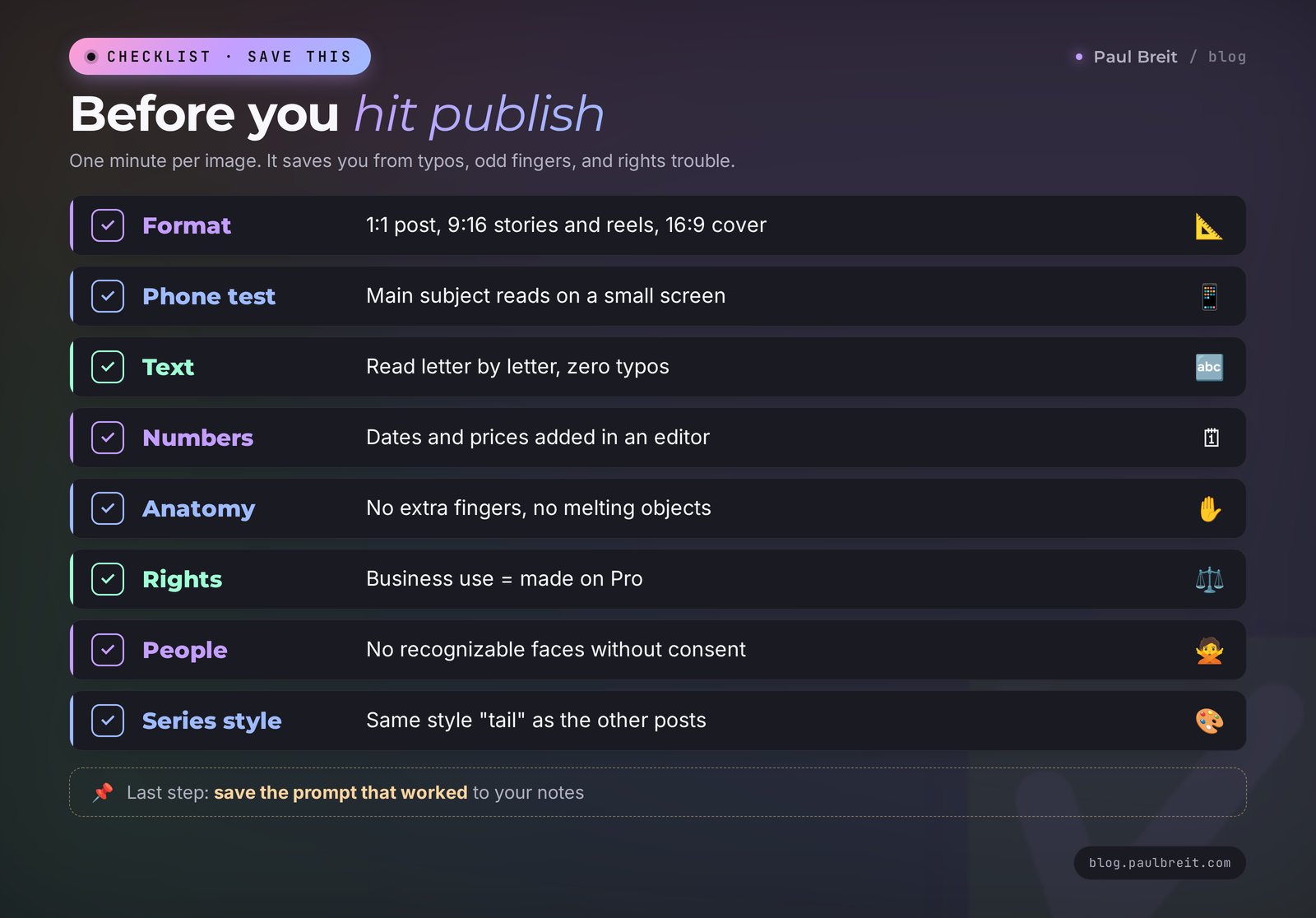
Run through this list before you put an image in a post, an ad, or on your site:
- The format matches the platform: 1:1 for a post, 9:16 for stories and reels, 16:9 for an article cover.
- The image reads on a small phone screen; the main subject is visible without zooming.
- Any text on it has been read letter by letter, with zero typos.
- Dates, prices, and important numbers were added on top in an editor; the AI didn't draw them.
- No extra fingers, strange faces, or objects melting into each other.
- For business use, the image was made on Pro or in a service with a commercial license; for personal use, it links back to Shedevrum.
- No recognizable people without their consent, and no banned topics.
- The style matches the other posts in the series.
- The prompt that worked is saved to your notes for next time.
Section 16The whole path in a minute
- Open shedevrum.ai or find the official Shedevrum app by Yandex.
- Sign in with a Yandex ID; if it won't open for you, use one of the alternatives from Section 14.
- Write the prompt using the formula: subject, setting, details, light, style, camera.
- Pick the platform's format before generating.
- Generate and pick the best version; when you miss, change one detail.
- Keep lettering short, in quotes and capitals; add long text in an editor.
- For video, describe one slow motion and check the first frame.
- Ask Claude to write prompts for the whole post series.
- For business images, use Pro – about 100 rubles (roughly a dollar) a month on top of Yandex Plus – or a generator with a commercial license.
- Before publishing, run the checklist from Section 15.
FAQFrequently asked questions
Is Shedevrum free?
Yes, the core of Shedevrum is free: you sign in with a Yandex ID and generate images and videos within a daily limit. On the free tier each request returns 2 versions and downloaded images carry a Shedevrum watermark. Shedevrum Pro costs about 100 rubles (roughly a dollar) a month on top of Yandex Plus and adds 6 versions, 4K, watermark-free downloads, and commercial use.
Can I use Shedevrum from the US?
Yandex doesn't officially confirm that Shedevrum works outside Russia. The site is shedevrum.ai and sign-in goes through a Yandex ID, so try it and see whether it opens and accepts your phone number. Pro billing is built around Russian bank cards, so a US card may not work. If the service won't open for you, the prompt formula and the 15 prompts in this guide work in any other image generator.
Can I use Shedevrum images for business and ads?
Under the user agreement, images from the free tier are for personal, non-commercial use only; commercial use requires Yandex's written consent. On Shedevrum Pro, commercial use is allowed without approval. Make work post covers, course banners, and ad creatives on Pro, or in a generator with a commercial license you can pay for.
How do I get text on a Shedevrum image without typos?
Put the text in quotes, write hard words in capitals, split long text into parts, and say where each part goes. Captions of 1-3 words work best. Dates, prices, and long headlines are more reliable when you add them on top of the image in an editor.
How do I make a video in Shedevrum?
Switch to video mode and describe the scene plus one slow motion, like steam over a cup or falling snow. Shedevrum first shows the starting frame, then turns it into a clip a few seconds long. The video saves as an MP4 after publishing; on Pro you can download it before publishing.
Why won't Shedevrum generate my image?
Most often the request tripped a filter: it mentions a real person, politics, religion, weapons, violence, or erotica. Sometimes the filter fires on harmless words, and rephrasing the request helps. The second common cause is that the daily generation limit has run out.
How much does Shedevrum Pro cost?
Shedevrum Pro costs about 100 rubles (roughly a dollar) a month, and the first 7 days are free. It requires an active Yandex Plus subscription. Pro gives 6 versions per request, no queue, 4K, watermark-free downloads, Shedevrum Studio, extra models, and commercial use.
Shedevrum or Midjourney, ChatGPT, and Gemini: which should I use?
For a US business, use the tool you can reliably access and pay for: ChatGPT or Gemini for images inside a chat, Ideogram for clean text on images, Midjourney for the most artistic look, Adobe Firefly for a commercially focused option. Shedevrum is a free playground with a large public feed of prompts and short video, and a strong choice if you work with Russian-speaking audiences.