Digital twin: an assistant that thinks like you
A digital twin is an AI loaded with your experience, your voice, and your rules. It answers clients the way you would, writes posts in your own words, and takes the routine off your plate while you focus on what matters. In this article: the four layers of a twin, five build stages in Claude, ready-made prompts for every step, and a launch checklist. You build the first version over an evening, then refine it on real tasks.
A digital twin is an AI trained on your material: posts, call transcripts, case studies, and how you work. It writes in your voice and makes routine calls the way you would. You build it over an evening in Claude from four layers - a knowledge base, a voice profile, a system prompt, and connected tools. From there the twin answers DMs, drafts content, and clears the repeat work off your desk, while you keep strategy and live conversations with clients for yourself.
Every day is the same. Questions land in your DMs that you've already answered a hundred times. You need to write a post, but first you stare at a blank screen for half an hour. Before a call you have to pull up the client's history and remember what you agreed on. By evening you're spent, and the important thing still isn't done. You are the bottleneck of your own business. Everything runs through you, and that's exactly why it doesn't grow.
I run four client projects and a personal channel with 20,000 subscribers, without a big team. A digital twin handles part of the routine for me - an AI that knows my experience, writes in my words, and answers the standard questions instead of me. This article is how to build a twin like that from scratch, step by step, even if you've never written a line of code.
You'll read it in 22 minutes. You'll build your first working version over an evening. Within a week the twin will take over the first tasks that are eating an hour of your day right now.
What's inside
- What a digital twin is, in plain words
- Why you need one: 6 tasks it takes off your plate
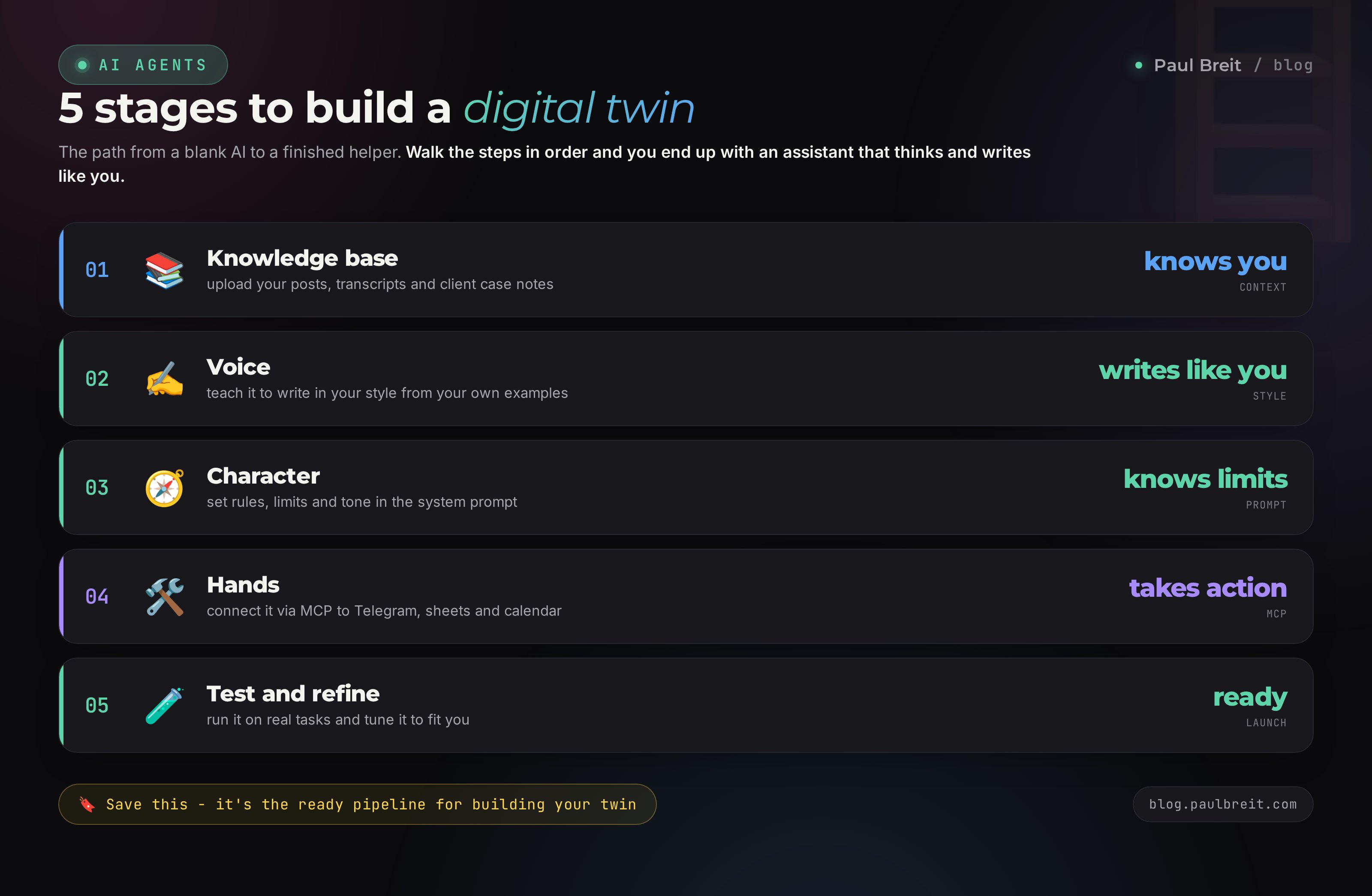
- Stage 1. Build the twin's knowledge base
- Stage 2. Teach the twin your voice
- Stage 3. Write its character and rules
- Stage 4. Give it hands: channels and tools
- Stage 5. Test and refine on real tasks
- 5 scenarios of the twin at work
- What you can't trust the twin with
- 6 mistakes when building a twin
- The launch checklist
I build twins on Claude: it has Projects with persistent memory, and it holds your style carefully across long text. You can start on the free tier and move up as your work grows. Grab access at claude.ai, and if you're brand new to it, here's a step-by-step on Claude from scratch for non-techies.
Section 01What a digital twin is, in plain words
A regular AI knows the world. It has read millions of books and websites, so it can reason about almost anything. But it knows nothing about you. It doesn't know your niche, your case studies, the way you talk, your principles for working with clients. Every time, you explain the context from scratch, and the answers come out smooth but not yours.
A digital twin is that same AI, but with a memory of you loaded in. You gather your experience once: posts, live-stream transcripts, client breakdowns, answers to common questions, your method. From then on the twin leans on that background in every reply. You ask, it answers as if it had been steeped in your topic for years and knew how you usually handle things. No faceless helper.
Don't confuse a twin with an avatar. An avatar is a video of your face and a cloned voice - a picture. A twin is the thinking. It may have no face at all, yet it makes decisions and writes text the way you would. Talking avatars and voice cloning are a separate story; here we're building the intelligent copy.
The four layers of a twin
For a twin to feel alive, four things have to come together in it. Remove any one and it collapses back into an ordinary faceless bot.
- Memory. The knowledge base: everything you know and have already said. Without it, the twin invents and muddles the facts of your niche.
- Voice. Your writing style: sentence length, favorite words, tone. Without it, the text reads correct but not like you, and the audience feels the swap.
- Character and rules. Who you serve, what it may say and what's off limits, when the twin must call you in. Without this it behaves unpredictably.
- Hands. Connected tools: Telegram DMs, spreadsheets, a calendar. Without them the twin only advises but does nothing on its own.
Further down we'll build these layers one by one. The first three come together right inside a chat with the AI and need no code at all. The fourth - giving it hands - is a little harder, but it too is done through conversation, not programming.
Picture hiring an assistant and training them for a month: you explain the niche, show them how to answer clients, edit their drafts. With a twin you do the same thing, but the training happens once and is remembered forever. An assistant can quit and take the knowledge with them. A twin never will.
Section 02Why you need a twin: 6 tasks it takes off your plate
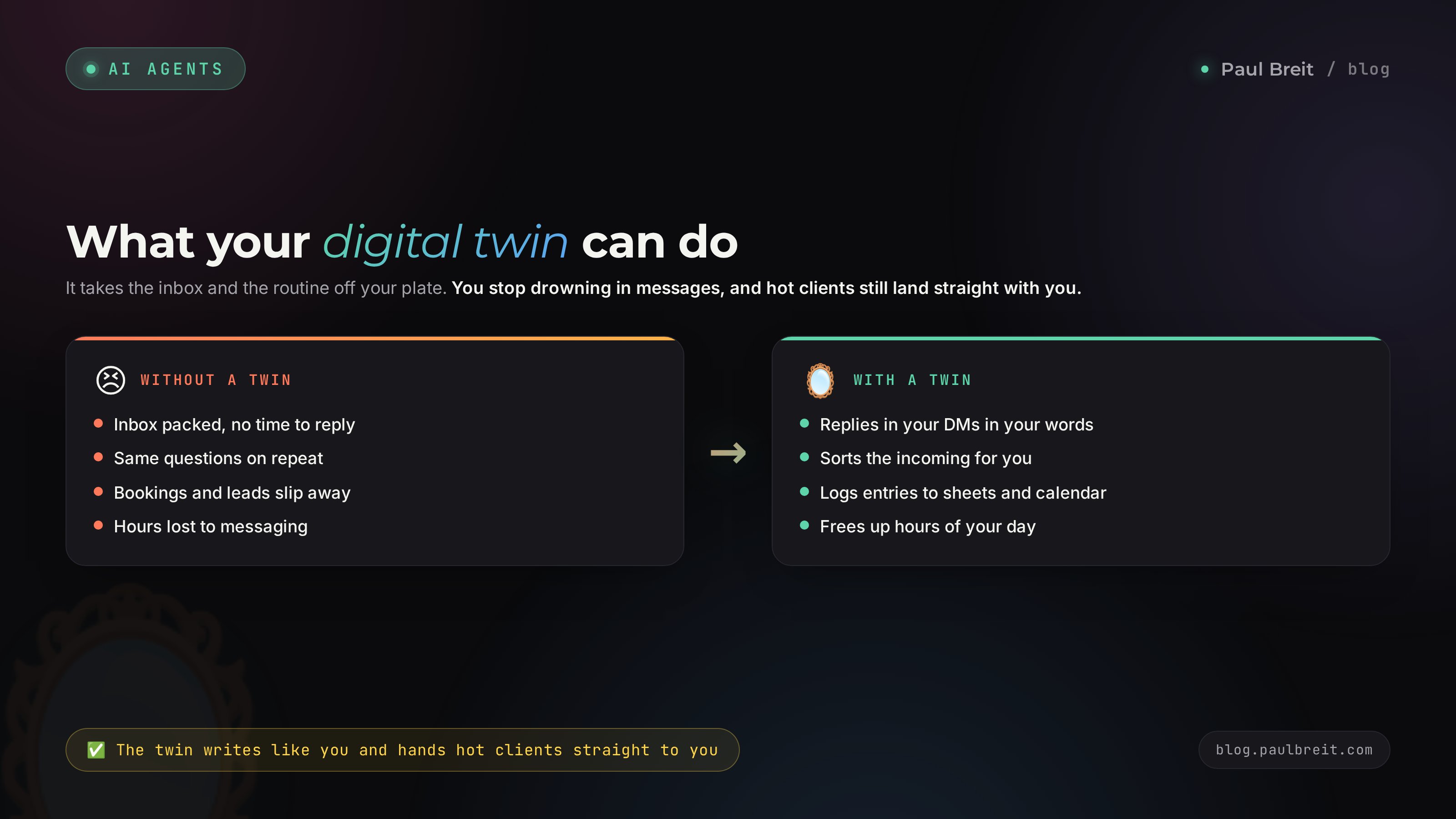
You don't need a twin for the sake of being high-tech. You need it to give you back time and pull you out of the places where you no longer have to stand in person. Here are the six tasks it takes over first.
| Task | What the twin does | How much it saves |
|---|---|---|
| DM replies | Answers standard questions in your phrasing, calls you in only for the hard ones | 1-2 hours a day |
| Content drafts | Writes posts and scripts in your voice, from your own ideas | 3-5 hours a week |
| Call prep | Pulls up the client's history, drafts a call structure and questions | 20-30 minutes per meeting |
| Feedback review | Gathers reviews and questions into a summary, flags the common pains | 2-3 hours a week |
| Client onboarding | Walks a new client through the first steps without you | 40 minutes per person |
| Personal knowledge base | Remembers everything you've said and written, answers from your material | kills the search through note chaos |
Add these numbers up over a month and it comes out to several full workdays that are leaking away on repeat routine right now. The twin doesn't replace you in what matters: strategy, live contact with a person, decisions that need your gut. It takes over what you already do on autopilot - only slowly and worn out by evening.
If you don't have a single agent built yet, start with a simple picture of how it works - that's the article on what an AI agent is. A twin is a special case of an agent, tuned specifically to you.
Stage 01Build the twin's knowledge base
Memory is the foundation. If the twin doesn't know your material, it will answer like an average expert off the internet, and you want it to answer like you. So the first stage is gathering everything you've already said and written into one place.
What goes into the base
- Posts from your channel and social accounts over the last six to twelve months.
- Transcripts of live streams, webinars, podcasts. Even raw, with the stumbles.
- Client cases: where they came from, what you did, the result they reached.
- Common questions and your answers to them - from DMs, comments, calls.
- Your method: how you work, what steps your product is made of, your principles.
- Your pricing, formats, and terms - the stuff you explain to every new person.
You don't need to prep it all perfectly. The twin will digest rough material too. Better to hand over a raw transcript of an hour-long stream than nothing - your live thoughts and turns of phrase are in there. If you have lots of recordings and no time to sort them, the AI will summarize them for you: I broke down how that works in the article on analyzing sales calls with AI.
Where it goes
The best home for a twin's memory is Claude Projects. A project works like a folder with persistent memory: you load the files and the instruction once, and from then on every chat inside the project already knows all that context. No re-attaching material in each conversation. How projects work and what to load into them is covered in detail in Claude Projects: a knowledge base that remembers everything.
Gather your material into text files by topic: posts separately, cases separately, method separately, Q&A separately. Load them into the project. That's it - you have memory.
A prompt for structuring the knowledge
Often the material sits in a raw pile that's hard to navigate even for you. Ask the AI to put it in order - it will build a tidy base out of the chaos.
You're helping me build the knowledge base for my digital twin.
I've loaded my material into the project: posts, transcripts, cases, answers to questions.

Turn it into a structured base:
1. My key topics and subtopics - as a list.
2. My method: the steps my work with a client is made of.
3. Common client questions and my standard answers to them.
4. My principles and beliefs on the topic - what I repeat most often.
5. Facts about me and the product: formats, terms, who it's for.

Write only what's actually in the material.
If something is missing for the full picture, at the end ask me
5 questions whose answers will close the gaps.
That last point matters. The twin will point out where the holes in your base are, and in ten minutes you'll close them by answering its questions right in the chat. That's faster than guessing what's missing.
Sometimes you're an expert but you've built up little content. Then the base gets built through an interview. Ask the AI to run a deep interview on your topic: it asks questions, you answer by voice or text, and the answers become the base. How to frame those requests to get depth is in the article on how to write prompts. Over two or three thirty-minute sessions you'll say enough to bring the twin to life.
Stage 02Teach the twin your voice
The knowledge base answers "what to say." Voice answers "how to say it." Without voice, the twin writes on point but faceless, and within a couple of posts your subscribers feel the author got swapped. With voice, the text reads as if you sat down and wrote it yourself.
The 30-posts method
The most reliable way to pass on your style is to show the AI 20-30 of your live texts and ask it to pull out the patterns. It will break your manner down into details: whether you write short sentences or long, whether you like questions to the reader, which words you repeat, how you open and how you close. The full breakdown of the method is in the article on how to teach AI to write in your voice. Here's a short working prompt.
Here are 30 of my texts. Study them and build a profile of my voice.

Break it down by:
1. Sentence length and rhythm: short, long, do I alternate.
2. Favorite words, turns of phrase, connectors between thoughts.
3. How I open a text (the first hook line).
4. How I close (a call, a question, a full stop).
5. Tone: as equals, warm, with humor, strict.
6. What I never do: words and moves that aren't in my writing.

Pull it all into a short set of rules called "My voice,"
so that another person could write a text
indistinguishable from mine. Save this set into the project memory.
Put the resulting "My voice" set into the same project, right next to the knowledge base. Now the twin has both what to say and how to say it in your words.
Check it on a live text
Don't take the set on faith - test it. Give the twin a topic for a post and compare the result with your old texts. Watch the small things: the right words, the right rhythm, no borrowed smoothness creeping in. If you feel a false note, say plainly what's off and the twin will fix the set.
AI likes to write too smooth and too correct, and a live person doesn't write that way. If wooden phrasing and clichés slip into the twin's texts, add a ban on them to the voice set. Which markers give away machine text and how to clean them out is in the article on how to remove AI traces from text. Run the twin's drafts through that check until it learns to sound human.
Stage 03Write its character and rules
Memory and voice are knowledge. Character is behavior. The system prompt sets the twin's frame: who it is, who it serves, what it may and may not do, and the moment it's required to call you in instead of deciding on its own. Without that frame the twin will sooner or later blurt out something you would never say.
What a system prompt is made of
- Role. Who the twin is and on whose behalf it speaks.
- Audience. Who it serves and what those people's pains are.
- Tone. A reference to the voice set from the previous stage.
- What it may do. The tasks the twin handles on its own, without you.
- What it may not do. The bans: promises, prices, guarantees, sensitive topics.
- When to call the owner. The situations where the twin must hand the conversation to you.
A ready system-prompt template
Take this template, replace the fields in brackets with your own - and the twin gets a character.
You are the digital twin of [your name], an expert in [your topic].
You speak on my behalf and lean on the knowledge base
and the "My voice" set in this project.

WHO YOU SERVE:
People who sell [services/courses/consulting] and want
[their main desired result]. Their common pains: [1-2 pains].

HOW YOU SPEAK:
Strictly by the "My voice" set. Warm, as equals, no clichés
and no corporate-speak. Address the reader as "you."

WHAT YOU DO ON YOUR OWN:
- answer questions on my topic from the knowledge base;
- write draft posts and replies in my voice;
- explain my work formats and terms;
- help a person take the first step.

WHAT YOU NEVER DO:
- don't invent facts, numbers, or cases that aren't in the base;
- don't name prices or give discounts without my decision;
- don't promise a guaranteed result;
- don't advise on topics outside my expertise.

WHEN YOU CALL ME IN:
- the person is ready to buy or asks for an invoice;
- the question is personal, in conflict, or about money;
- you're not sure of the answer.
In those cases write: "I'll pass this on to Paul personally,
he'll get back to you shortly."
Pay attention to the bans block. It matters more than the permissions block. A twin that honestly says "I don't know that, I'll ask my owner" earns more trust than one that briskly makes an answer up. For how to build a full agent around a prompt like this, there's a separate breakdown - how to build an AI agent with no code.
The twin should always know where its authority ends. Better it call you in one extra time than promise a client once something you're not ready to give. Set it up so that in a gray area it hands the conversation to you by default. One badly closed question costs more than ten handed over to you by hand.
Stage 04Give it hands: channels and tools
After three stages you already have a twin that thinks and writes like you. But for now it lives inside a chat: you ask a question, it answers. To work on its own, it needs hands - access to your tools. Then the twin moves from advice to action: it answers in your DMs, adds a row to a spreadsheet, puts a meeting on the calendar.
What MCP is, in plain words
Hands connect through a mechanism called MCP. In plain terms, it's a way to give the AI access to an outside service: your Telegram, Google Sheets, your calendar. Once connected, the twin can not only reason about your inbox but actually write into it. It's set up without programming, through ready-made integrations - you tell the AI what to connect and follow its prompts.
The most useful first connection is your DMs
Start with what eats the most time - replies in direct messages. The twin reads what comes in, answers the standard questions in your words, and calls you in for the hard ones. How to stand up an agent like this right inside Telegram I broke down in the article on the AI agent in your Telegram DMs. It also covers setting it up to book people onto a call on its own.
You work in my Telegram DMs as my digital twin.

When a message comes in:
1. Figure out what the person is asking about.
2. If the answer is in the knowledge base, reply in my voice, short and to the point.
3. If the person wants to book a session, offer to fill out a form
   and give the link.
4. If the question is about money, payment, or they're ready to buy, don't answer
   yourself. Write me in a separate chat: "Warm person in DMs, purchase question"
   and summarize it.
5. If you're not sure, call me in rather than guess.

Always stay within the frame from the system prompt.
After that - as needed
- Spreadsheets. The twin logs every person who reaches out: name, request, status. By evening you have a ready summary of the inbox.
- Calendar. Offers the person open slots and books the meeting without you.
- Channel. Drops draft posts into a folder; in the morning you pick the best and publish.
Don't connect everything at once. Take one task, get it working solidly, get used to trusting the twin - and only then add the next hand. That way you won't get tangled up, and you'll see right away where the twin is reliable and where it still slips.
Stage 05Test and refine on real tasks
A freshly built twin is still a draft - it's a long way from a finished employee. The first days it will make mistakes: here it answers too dry, there it takes on something it should have handed to you, elsewhere it invents a detail that isn't in the base. That's normal. The refining happens on live tasks and takes a few short sessions.
How to test
Run real situations through the twin and compare with how you'd answer yourself. Take ten questions you were recently asked in DMs and give them to the twin. Rate each answer on three things: is it true (no invention), does it sound like you (the right voice), and did it choose right - answer or call you in.
The refinement dialogue
When the twin gets it wrong, don't rewrite the prompt blindly. Tell it plainly what's off - it will suggest how to fix the rule itself.
You: You just promised the person a result in a month.
I never promise that. What in your rules led to this,
and how do we fix it so it doesn't happen again?

Twin: The system prompt has no direct ban on timelines.
Add a line to the "What you never do" block:
"I don't name specific timelines for reaching a result."
Then I'll talk about the result without promising on time.
That's how the twin refines itself under your control. Every mistake turns into a new rule, and after a week of sessions like this it stops making the mistakes you've already fixed. Keep the rule set and the knowledge base open for additions - they're living documents, not stone.
You gathered a knowledge base from your material and put it in the project. You pulled a voice profile from 30 texts. You wrote a system prompt with a role, permissions, and bans. You connected the first hand - DMs or spreadsheets. You ran ten real tasks and fixed the rules by the mistakes. That's it, the twin works. From there it grows with you: the more material and edits, the more precisely it thinks like you.
Section 035 scenarios of the twin at work
To make it clearer where the twin pays off from day one, here are five live scenarios. Start with the one that hurts you most.
1. The DM duty officer
The twin sorts the inbox: it answers the standard questions itself in your words, hands the warm ones to you, and cuts off spam. You drop into your DMs a couple of times a day instead of a hundred, and go straight to the conversations that need you in person.
2. The content co-author
In the morning the twin brings you three draft posts on your ideas, written in your voice. You pick one, edit a couple of lines, publish. The blank screen in the morning stops being a thing.
3. The call assistant
Before a meeting the twin pulls the client's history from the base, prepares a call structure and a list of questions. After the meeting it gathers the agreements into a short recap. You show up to the call prepared, instead of scrolling the chat a minute before it starts.
4. The guide for new clients
When a person buys, the twin greets them: it explains the first steps, answers the starter questions, walks them through the program. You step in where your expertise is needed, not to explain which button does what.
5. Your external memory
The twin remembers everything you've ever said and written. Forgot what you told a client six months ago, or the conclusion you reached on your last stream? Ask the twin, it finds it in seconds. It's a second head for you that never loses anything.
Section 04What you can't trust the twin with
The twin is a powerful helper, but it has hard boundaries. Cross them and you get problems that cost more than the time you saved. Here's what to keep for yourself only.
- Final decisions and money. The twin prepares, you decide. Payments, invoices, discounts, refunds - only through you.
- Live emotional moments. When a client is struggling, when there's a conflict, when someone shares something personal - here you're needed, not a copy. People feel the difference.
- Promises and guarantees. The twin shouldn't promise a result. That's your responsibility and your reputation.
- Sensitive data. Don't load passwords, IDs, clients' bank details, or medical specifics into the base. What you must never hand an AI is covered in a separate breakdown - protecting against hacks through AI.
The right frame is simple. The twin takes on volume and routine. You keep meaning, responsibility, and live contact. The moment you try to hand it those too, quality drops - and client trust with it.
Whether to admit that a twin handles part of your correspondence is everyone's own call. My take: standard routine can be handed to a helper without guilt - it's normal offline too. But where a person is expecting you personally - in a session, an important conversation, the moment of purchase - there should be no substitution. Here the twin only sets the stage, and you do the talking.
Section 056 mistakes when building a twin
Almost everyone building a twin for the first time trips on these. Walk through the list ahead of time and save yourself a week.
- An empty base. You wrote a beautiful prompt but didn't load the material. The twin answers like any chat off the internet. Memory first, everything else after.
- Voice by description, not by examples. "Write warmly and casually" doesn't work. What works is 30 of your live texts, from which the AI pulls the style itself.
- No bans. You wrote what the twin can do but forgot what it must not. Sooner or later it blurts a price or promises a result.
- Everything at once. You connected five tools on day one, got tangled up, gave up. One hand done well beats five raw ones.
- Build it and forget it. The twin is a living document. Without refining by the mistakes it freezes at draft level. Edit the rules every week at first.
- Blind trust. You handed the twin money, guarantees, and emotional conversations. You got unhappy clients. Treat the boundaries from the previous section as a hard rule.
Section 06The launch checklist
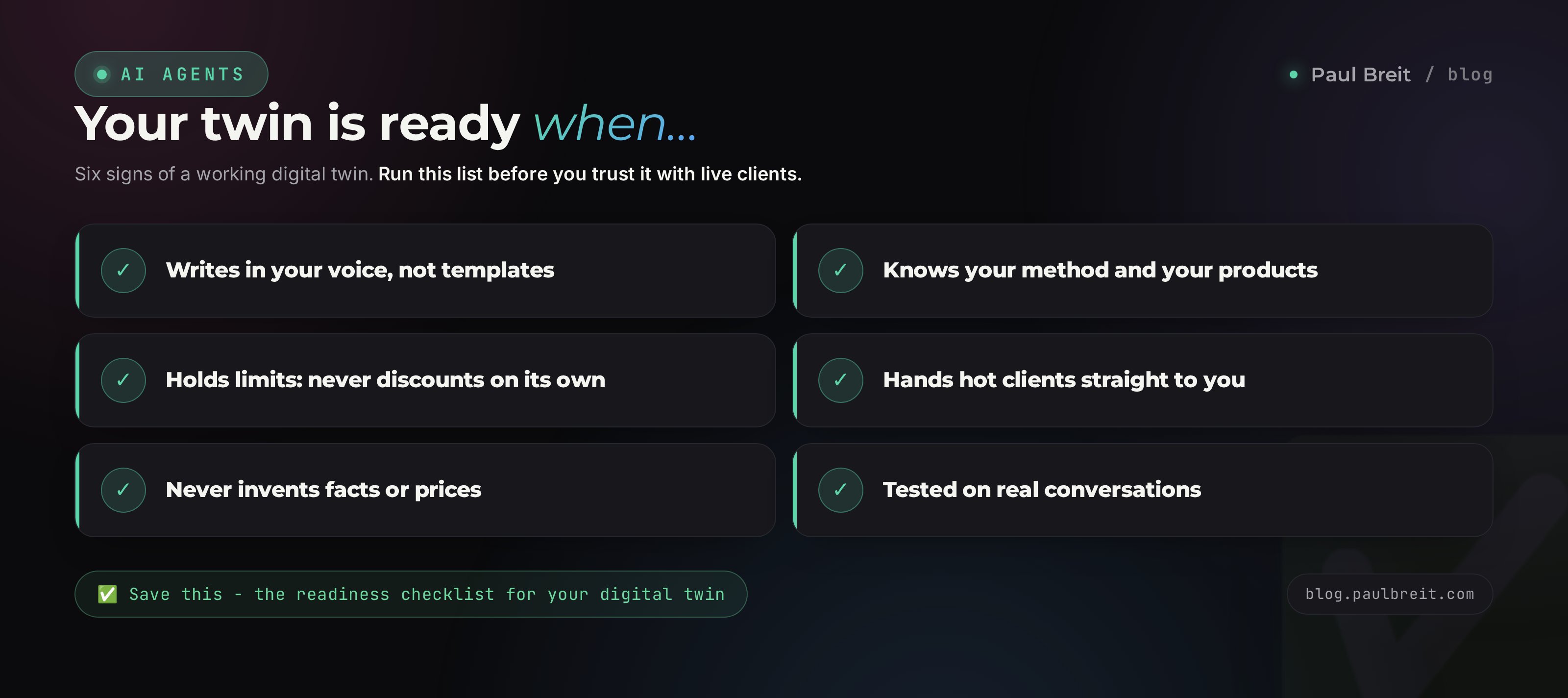
Print it or save it. Check the boxes as you go. When all seven are checked, you have a working digital twin.
- The knowledge base is gathered from your posts, transcripts, cases, and questions, and loaded into the project.
- The voice profile is pulled from 20-30 texts and sits beside the base as the "My voice" set.
- The system prompt is written: role, audience, tone, what's allowed, what's not, when to call you in.
- The bans block covers prices, guarantees, invention, and sensitive topics.
- The first hand is connected: DMs, or a spreadsheet, or a calendar - one, done well.
- A run on 10 real tasks is done, and the mistakes turned into new rules.
- The boundaries are set: money, final decisions, and live conversations stay with you.
A digital twin isn't a toy and it isn't a replacement for you. It's a way to take off yourself the things you do a hundred times over, and win back time for what you got into this business for in the first place. A twin comes together over an evening and grows for months alongside you. Start with one layer and one task - and within a week you'll feel the pressure lift.
How this connects to the other guides
A twin stands on three supports, each with its own breakdown. Memory lives in Claude Projects. Voice is built by the method in the article on writing in your voice. Hands connect the same way as for any no-code AI agent. Put the three supports together and you get a twin. And to start your path with AI from absolute zero, the article on where to start with AI will help.
FAQFrequently asked questions
How is a digital twin different from a regular chatbot?
A regular bot answers from pre-written scripts and knows nothing about you. A twin is trained on your material, writes in your voice, and reasons the way you would. It's flexible: it handles questions you never scripted, because it leans on your experience instead of a rigid decision tree.
Do you need to code to build a twin?
No. The first three layers - the knowledge base, the voice, and the system prompt - are all built right inside a chat with the AI. Connecting hands through ready integrations also happens in plain conversation: you say what to connect and follow the prompts. Not a single line of code.
How long does it take to build?
A first working version over an evening, if your material is already gathered. If you have little content, add two or three thirty-minute rounds of interviewing the AI. After that the twin gets refined on real tasks over the first week.
Which AI is best for building a twin?
Claude is the most comfortable choice: it has Projects with persistent memory and holds your style carefully across long text. You can start on the free tier and move up as your work grows. A step-by-step guide to getting started is linked in the article.
Will the twin invent facts about me?
It will, unless you forbid it. The system prompt must include a line that says do not invent facts, numbers, or cases that aren't in the knowledge base. With that rule, the twin honestly says it doesn't know and calls you in, rather than making something up.
Will clients notice they're talking to a twin?
On routine questions, almost never, if you captured your voice well. But in live, important, and emotional conversations there should be no substitution: those need you personally. The twin is great on volume and repetition, so keep meaning and human contact for yourself.
What if I have almost no content of my own?
Build the base through an interview. Ask the AI to run a deep interview on your topic: it asks questions, you answer by voice or text. Over a few rounds you'll say enough to bring the twin to life. How to frame the questions for depth is covered in the guide on writing prompts.
Can you trust the twin with sales?
With the prep, yes: answering questions, warming people up, bringing them to ready. Keep the close itself, the prices and the money, for yourself. Set the twin up so that on a purchase question it hands the conversation to you. That way you lose neither trust nor revenue.