How to Use ChatGPT on Your Phone: iPhone and Android (2026)
How to use ChatGPT on your phone: install the official app on iPhone or Android in five minutes, sign in without losing your chat history, and spot the copycat apps. Then we set up voice, the camera, projects, memory, the Share sheet, and widgets, and finish with 10 work scenarios and ready phrases for everyone who sells services, courses, and consulting.
To use ChatGPT on your phone, download the free ChatGPT app from the App Store (developer OpenAI OpCo, LLC, iOS 18 or later) or Google Play (developer OpenAI) and sign in the same way you do on chatgpt.com: with Google, Apple, Microsoft, or email. Then type, dictate with the microphone, talk out loud in voice mode, or attach photos and files with the "+" button. Your chats, projects, and plan are shared with your computer, and the free plan is enough to start.
Coaches, consultants, course creators, therapists, tutors, and anyone else who answers clients between meetings, gets post ideas on a walk, and wants to prep calls without opening a laptop. If you use Claude too, I have the same walkthrough for it: how to use Claude on your phone.
What's inside
- What ChatGPT can do on your phone in 2026
- How to install ChatGPT on iPhone
- How to install ChatGPT on Android
- Signing in: use the same method as on desktop
- Older phone? Put the web version on your home screen
- First launch: where everything lives
- Voice: dictation and voice mode
- Camera, photos, and screenshots
- Projects, memory, and files
- Share sheet, widgets, and the Action button
- 10 work scenarios from your phone
- Plans on your phone: Free, Go, Plus, and Pro
- If something goes wrong
- Fake apps and privacy
- The whole path in one minute
- FAQ
It's 7 p.m., and you're in line at the pharmacy. A message comes in from a potential client: three paragraphs of doubts, a question about a payment plan, and the classic "let me think about it." Your laptop is at home, and the answer matters now, while this person is still warm. You take a screenshot of the chat, open ChatGPT, and say into the mic: "Help me answer calmly, no pressure, and offer a short call." Thirty seconds later you have a draft. You change two words, hit send, and it's your turn at the counter.
Those minutes are the reason to keep ChatGPT on your phone. The computer is where you build the big things: articles, spreadsheets, slide decks. The phone is always with you, and it has three things that turn AI into a helper on the go: a camera, a microphone, and a Share button in every app.
In this guide I'll go through everything in order: how to install the official app on iPhone and Android, how to sign in so your history shows up, what to do on an older phone, and what to set up in the first week. I checked every price and requirement on the official pages on November 8, 2026.
Section 01What ChatGPT can do on your phone in 2026
ChatGPT on your phone is the same AI as on chatgpt.com, with the same account, chat history, and plan. Start a conversation at your desk, pick it up in an Uber right where you left off. The models are the same too: on the Free and Go plans you get GPT-6 Luna, and Plus unlocks GPT-6 Sol, GPT-6.1 Sol, and GPT-6 Astra. I covered how they differ in GPT-6 in ChatGPT: what the new model can do.
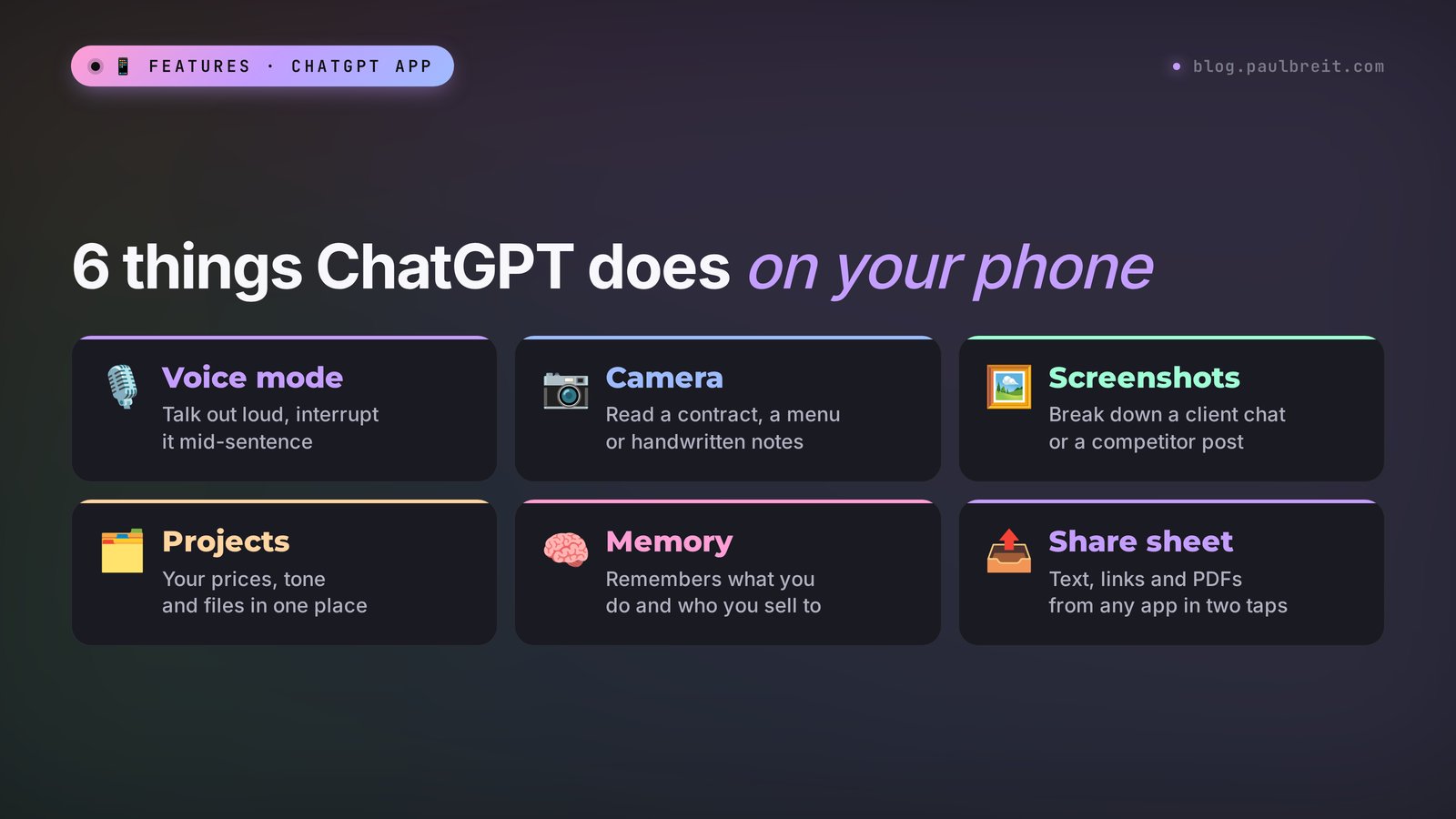
Here's what the app does on a phone:
- Chat and writing. Posts, client replies, service descriptions, Reels scripts, livestream outlines. Everything you do on the website.
- Voice. Dictate a request as text, or switch to voice mode and talk out loud. ChatGPT answers with its voice and handles pauses almost like a real person.
- Video in voice mode. From the Go plan up, you can turn on the camera during a conversation and show an object, a document, or the view in front of you. The free plan has voice mode without video.
- Photos and screenshots. Snap a contract, a menu in another language, a handwritten plan, or a screenshot of a client chat. ChatGPT reads the text in the image and works with it.
- Images. Image generation works from the phone as well. It's limited on Free and more generous from Go up.
- Files and projects. PDFs, spreadsheets, and documents from your phone, iCloud Drive, or Google Drive. Projects you built on your computer open on your phone.
- Quick launch. Home screen widgets, the Share sheet in other apps, the Action button on newer iPhones, and the option to make ChatGPT your default assistant on Android.
Where the phone loses to the computer: long documents, big spreadsheets, building websites and slide decks. You can check the result on the phone, but editing a 20-page file with your thumb is painful. My approach is simple: the phone for quick tasks and voice, the computer for big ones. The history is shared, so the two never get in each other's way.
Section 02How to install ChatGPT on iPhone
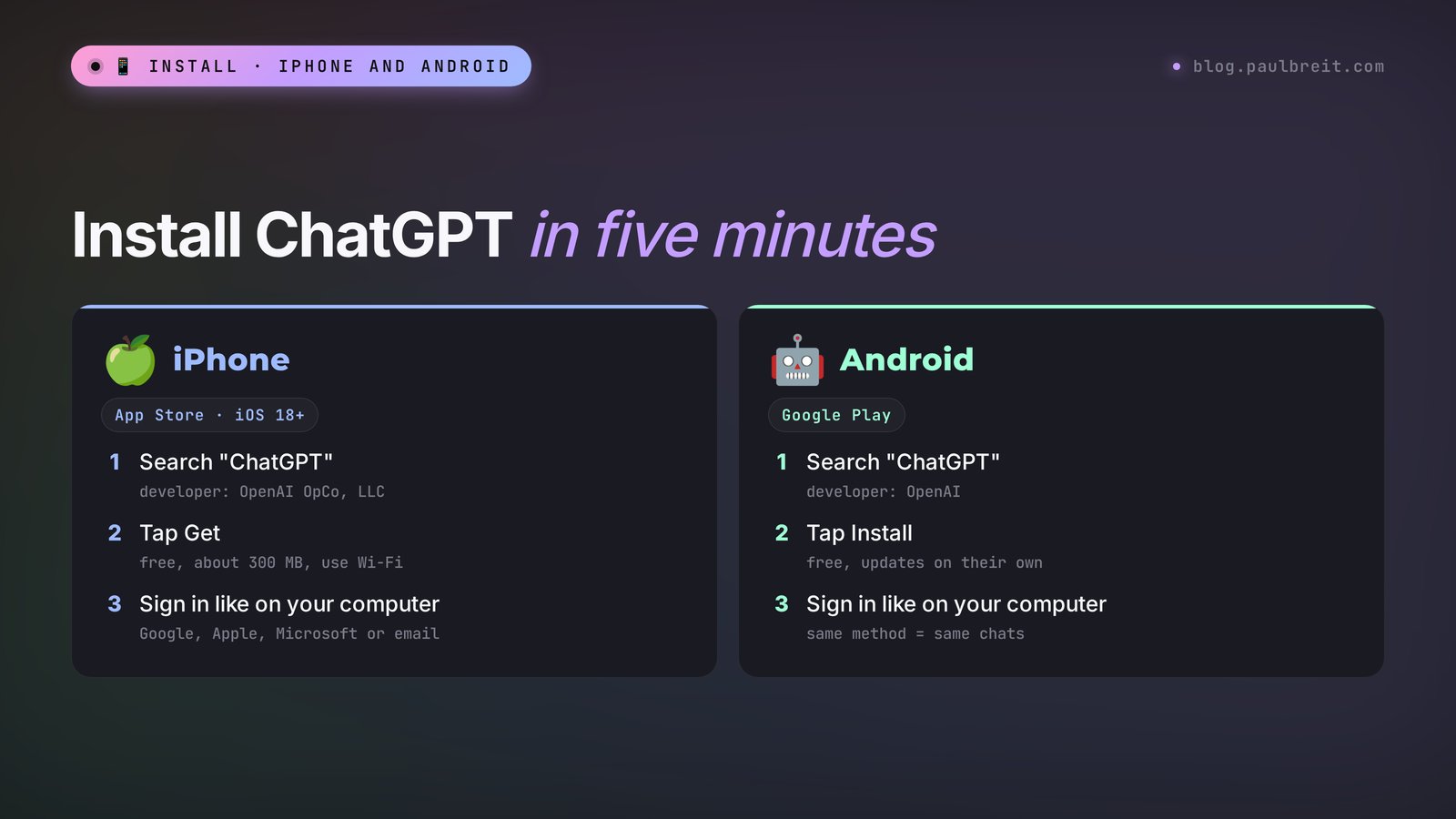
On iPhone the whole thing takes a few minutes. The one thing to watch is the developer name: the App Store search results are full of lookalikes.
Check your iOS version
Open Settings → General → About and look at the iOS Version line. The ChatGPT app needs iOS 18.0 or later, as its App Store page says. iPhone XS, XR, and every newer model can run iOS 18. If your iPhone is older and can't update, skip to Section 05 about the web version.
Find the official app
Open the App Store and type "ChatGPT." The right app is called simply ChatGPT, with the subtitle "Your everyday AI assistant," and the developer is OpenAI OpCo, LLC. The icon is a black knot-shaped flower on a white background. Read the developer line with your own eyes before you tap anything. Apps with names like "AI Chat" or "Chat Assistant GPT" are middlemen with their own subscriptions.
Tap Get
The app is free. It's about 300 MB, so Wi-Fi is the better choice. If you already pay for a plan on the website, you don't need to buy anything inside the app: your plan follows your account.
Open it and sign in
You'll see four options: Continue with Google, Continue with Apple, Continue with Microsoft, and email. If you already have an account, pick the method you signed up with. More on why this matters in Section 04.
Allow the microphone, camera, and notifications
The app asks for each permission the first time it needs it. Tap Allow, or voice and the camera won't work. Notifications help with long tasks: a deep research request can take several minutes, and your phone will ping you when it's done.
On iPad it's the same app and the same steps. On a tablet it's handy to keep ChatGPT in Split View next to a document or your messages.
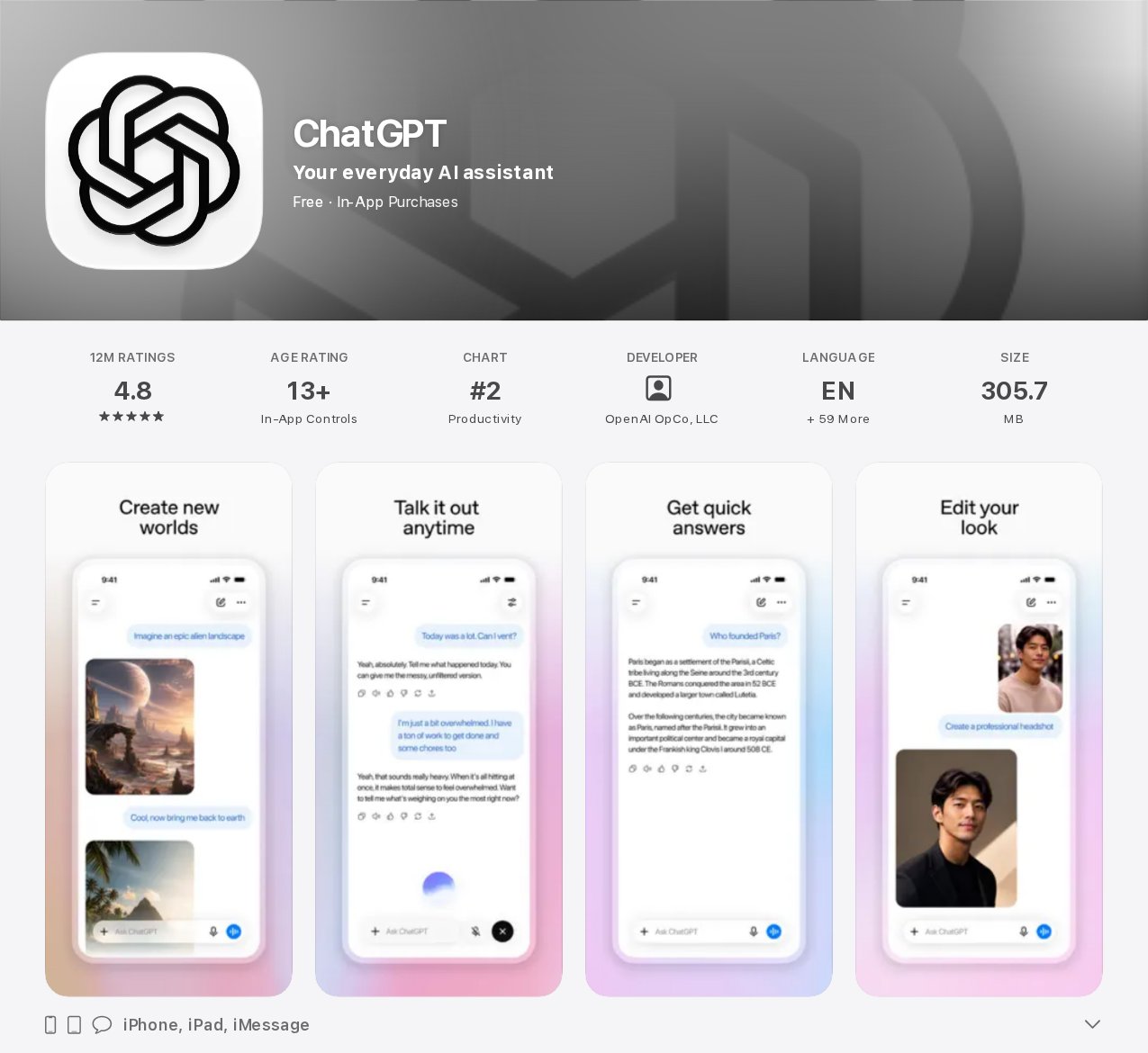
On the ChatGPT page in the US App Store: developer OpenAI OpCo, LLC, requires iOS 18.0 or later, size 305.7 MB, works on iPhone and iPad, rated 4.8 from 12 million ratings. In-app purchases: Go for $8, Plus for $19.99, and Pro for $100, $200, or $500 a month. Plan details are on the official chatgpt.com/pricing page.
Section 03How to install ChatGPT on Android
On Android the path is the same, with Google Play in place of the App Store.
Make sure your phone has Google Play
Samsung, Google Pixel, Motorola, OnePlus, and most other Android phones sold in the US have it. Some Huawei models ship without Google services, and the official ChatGPT app isn't in their AppGallery store. On those phones, go straight to Section 05 and put the web version on your home screen.
Search for ChatGPT from OpenAI
Open Google Play and type "ChatGPT." The developer must say OpenAI. Google Play has plenty of copies with similar icons and names, so check the developer line before you install.
Tap Install
The app is free and updates on its own as long as automatic updates are on in Google Play settings.
Sign in and grant permissions
Use the same sign-in method as on your computer. Allow the microphone for voice, the camera for photographing documents, and notifications for long answers. Grant permissions as you need them; there's no reason to open everything up front.
A word about APK files. Search results will offer you "ChatGPT APK download" from forums and file sites. Skip them. It's easy to install something dressed up as ChatGPT that reads your notifications, texts, and passwords. And a sideloaded app doesn't update itself. Google Play gives you the real thing in a minute.
Section 04Signing in: use the same method as on desktop
The app is installed. Now the important part: signing in so you land in your real account.
If you already have an account
Sign in THE SAME WAY you signed up on your computer. The phone app offers Google, Apple, Microsoft, and email. Signed up with Google? Tap Continue with Google and pick the same Gmail address. If you use a different method, ChatGPT creates a second, empty account, and you won't see your chats, your projects, or the plan you pay for. This is the number one reason behind "where did my history go?"
Not sure how you signed up? On your computer, open chatgpt.com → your name in the corner → Settings. The email shown there is your account. If it's a Gmail address and you remember clicking a Google button, use Google on the phone too.
One trap with Apple: if you chose Sign in with Apple and picked Hide My Email, Apple created a random relay address for you. On the phone, tap Continue with Apple again. Typing that relay address into the email field by hand often leads to a second account.
If you don't have an account yet
The easiest path for a beginner is to sign up on the computer first, make sure everything works, and only then sign in on the phone with the same method. If something goes wrong, it's much easier to figure out where. Any normal email works: Gmail, iCloud, Outlook, or your business domain.
Work and personal accounts
If your company gave you a ChatGPT Business or Enterprise seat, that's a separate account tied to your work email. Keep client work and personal experiments in the right account from day one. The app lets you switch between accounts in settings, so you don't need two phones.
If you're just getting to know ChatGPT and want to understand which AI to use day to day, start with my honest comparison of Claude and ChatGPT and the roundup of free AI tools for 2026.
Section 05Older phone? Put the web version on your home screen
Sometimes the app won't install: an older iPhone stuck on iOS 17 or earlier, a Huawei without Google services, or a work phone where you can't install apps. The web version saves the day. It opens in your phone's browser and does almost everything the app does: text, files, photos, projects. What you lose: the full voice mode, widgets, and the Share sheet.
To make the web version feel like an app, add it to your home screen.
iPhone with Safari
Open chatgpt.com in Safari and sign in. Tap the Share button (the square with an arrow pointing up) → Add to Home Screen → Add. A ChatGPT icon appears on your screen, and the site opens without the address bar, like a separate app.
Android with Chrome
Open chatgpt.com in Chrome and sign in. Tap the three dots in the top right → Add to Home screen → Install or Add. On Huawei the same thing works in the Huawei browser: menu → Add to home screen.
This shortcut is an honest backup plan. I'd keep it even with the app installed: if the app ever acts up after an update, the web version is one tap away.
Section 06First launch: where everything lives
The ChatGPT screen on a phone is simple, but a few things are worth finding right away so you're not hunting for them in a rush later.
- The message field at the bottom. To its left is "+", for attaching photos, files, and camera shots. To its right are the microphone icon for dictation and the sound-wave icon for voice mode.
- The side menu. Swipe right or tap the two-line button in the top left. Your chat history lives there, along with search, projects, and your GPTs.
- The model picker. The name at the top of the screen. On Free there's little to choose; on Plus this is where you switch between GPT-6 Sol and Astra.
- Settings. Tap your name at the bottom of the side menu: personalization, memory, voice, language, and data controls.
First, open Settings → Personalization and fill in the section about you. Three or four lines: who you are, what you do, who your clients are, how you write. For example: "I'm a nutrition coach. I run online programs for women 30 to 45. I write simply and warmly, without medical jargon." After that, the answers sound closer to your voice right away, and you don't have to explain who you are in every request.
While you're there, pick a voice for voice mode. If you tapped Don't Allow on a permission by accident, turn it back on in your phone's Settings → ChatGPT.
Section 07Voice: dictation and voice mode
Voice is the main reason to keep ChatGPT on your phone. Typing a long request with your thumb is slow. Saying it takes a minute, and spoken requests carry more real detail.
Dictation: speak, get the text of your request
Tap the microphone icon next to the message field and talk the way you talk: with pauses, corrections, and "okay, so." ChatGPT turns your speech into the text of a message, you check it and send it. This is the easiest way to hand over long tasks.
You dictate: Okay, so today I had a session with a woman who wants to change careers. She's 42, an accountant, and she's scared it's too late. We talked for an hour and she left fired up. Tomorrow I want a post about how changing careers at 40 isn't too late. No hype, use her story but no name. At the end, invite people to a free discovery call.
What you get: a 150 to 200 word post with the client's story, two or three ideas that came up in the session, and an invitation to the discovery call at the end. All that's left is to adjust a couple of phrases so it sounds like you.
The rule is simple: give more detail than seems necessary. Age, profession, the client's exact words. The text only comes alive from what you give the AI. On a phone, dictating details is fastest, which is why phone requests tend to be the richest.
Voice mode: a spoken conversation
Tap the sound-wave icon. The screen changes, and ChatGPT listens and answers out loud. You can cut in mid-sentence, like with a real person. Voice mode is on every plan, with higher limits from Go up. The whole conversation is saved as text in the chat afterward.
Where it really helps:
- Sales call practice. "Play a client who says it's too expensive and they'll think about it. I'm practicing my answers. After each one, tell me what was convincing and what wasn't." Ten minutes in the car before a call.
- Brainstorming on a walk. A name for a new program, the theme of a challenge, a launch plan. You walk, ChatGPT throws out options and asks questions.
- Livestream prep. Ask for ten questions viewers usually ask and answer them out loud. You'll hear right away where you get fuzzy.
- A second language for work. If you have clients abroad, talk through work topics in their language and ask ChatGPT to correct your mistakes.
After the walk, open that chat and type: "Turn our conversation into a step-by-step plan." You talked, you got a structure.
The camera during a conversation
From the Go plan up, voice mode gets a camera button. Point your phone at a store shelf, your desk, a printout, or a venue and ask out loud. For example, a coach scouting a retreat space shows the room and asks how to arrange chairs for a paired exercise with 16 people. On Free there's no camera inside voice mode, but you can still send a regular photo into the chat.
Section 08Camera, photos, and screenshots
Tap "+" next to the message field: take a photo right away or pick photos and screenshots from your library. ChatGPT reads text from images and understands tables, handwritten notes, and website layouts. I go deeper on this in AI from a photo, screenshot, or voice note.
What's handy to send from a phone:
- A screenshot of a client chat. "Here's the conversation. The client has doubts about the price. Write a reply in my tone, short, no discount, with an offer of a call."
- A competitor's post or story. "Break down what this post is built on: the hook, the pain point, the call to action. Don't copy it. Suggest three topics for me on the same pain point."
- A photo of handwritten notes. After a brainstorm on paper: "Rewrite my notes cleanly and group them into sections."
- A document or contract. "Explain in plain words what I'm signing and flag the clauses worth a closer look." The decision to sign is still yours and your lawyer's.
- A receipt or invoice. "Add the expenses from this receipt to a table: date, item, amount."
Before you send screenshots, cover clients' personal data: phone numbers, last names, addresses. On iPhone you can mark them out right in the screenshot editor; on Android, use Edit in your Photos or Gallery app.
Section 09Projects, memory, and files
To stop explaining your context from scratch every time, use projects and memory. They're what turn ChatGPT into an assistant that knows your business.
Projects
A project is a folder for your materials and chats on one topic. For example: "Content," "Client replies," "Course launch." You add files inside: your offer description, prices, past posts, common client questions. Every chat inside the project sees those materials. It's easier to build a project on the computer and use it from the phone: open the side menu, pick the project, start a new chat, and ChatGPT already knows your prices and tone.
I walked through how projects work and how to build your own GPT for business tasks in how to build a custom GPT in one evening.
Memory
Memory lives in Settings → Personalization → Memory. When it's on, ChatGPT remembers the important parts of your conversations: what you do, what your program is called, which tone you like. You can review and delete anything it has saved in the same place. Tell it directly in a chat: "Remember: my main offer is a 6-week group coaching program for $600." From then on, every chat on your phone takes that into account.
Files
Tap "+" → Files to attach a document from your phone, iCloud Drive, Google Drive, or a download from a messaging app. PDFs, Word documents, spreadsheets. File uploads are limited on Free and fully available from Go up. If a file is large, open the analysis on your computer: a long breakdown is hard to read on a small screen.
Section 10Share sheet, widgets, and the Action button
The phone's real advantage is speed: from a thought to a request should take five seconds. Set up these four things for that.
The Share sheet
Select text in your messages or email, tap Share, pick ChatGPT, and the text is already in a new chat. The same works for links, images, and PDFs. If ChatGPT isn't in the row of apps, scroll to the end, tap More, and drag it up toward the front. This is the fastest way to break down long client messages, articles behind a link, and other people's posts.
Widgets
On iPhone, press and hold an empty spot on the home screen → Edit → Add Widget → ChatGPT. On Android, press and hold an empty spot on the home screen → Widgets → ChatGPT. The widget opens a new chat, voice mode, or the camera in one tap. Put it on your first screen, next to your messaging apps.
The Action button on iPhone
On iPhone 15 Pro and newer, the Action button on the side can launch ChatGPT: Settings → Action Button → Controls → ChatGPT. Press it and start talking. It's the closest thing to having an assistant in your pocket.
ChatGPT as the default assistant on Android
On Android you can make ChatGPT your digital assistant in place of Google's: Settings → Apps → Default apps → Digital assistant app. The menu names differ a little on Samsung, Motorola, and other brands, so search settings for "assistant." After that, a long press on the home button or the side button opens ChatGPT.
Section 1110 work scenarios from your phone
Below are tasks that are easier to handle from a phone than from a computer. Copy the phrases as they are and fill in your details. If you want more ready-made wording, check out the library of 100 prompts.
Answering a client's doubt
Screenshot of the chat plus: "This client is hesitating. Write a reply in my tone: acknowledge the doubt, show the value with one example, offer a 15-minute call. No discounts, no pressure. Under 80 words."
A post from a voice note
By voice: "I'm going to tell you a story from today's session. Turn it into a post for Instagram. Short paragraphs, no emoji on every line, a question for readers at the end." Then talk for two minutes.
Story ideas for the day
"I'm a business coach. Give me five story ideas for today: one about a common mistake my clients make, one behind the scenes, one quick tip in 30 seconds, one poll, and one soft pitch for a free strategy call."
Breaking down someone else's post
Send a colleague's post through the Share sheet: "What makes this post grab attention? Break down the hook, the pain point, and the call to action. Suggest three topics for me on the same pain point, in my own words."
A livestream outline on the road
"In two hours I'm going live on this topic: how a consultant can land the first clients without ads. Outline 40 minutes: an intro, three blocks with examples, answers to common questions, and an invitation to book a consultation."
Sales practice by voice
Voice mode: "Play a client who wants to join my online course but is afraid she won't have the time. Push back for real. After the conversation, give me a breakdown: where I was convincing and where I lost her."
Replies to reviews and comments
Screenshot of a comment: "Write a calm reply to this negative comment. Acknowledge that the person is frustrated, briefly explain how things work in my program, and invite them to message me directly."
Notes after a meeting
By voice right after the call: "Write up the meeting with my client: what they want, what I promised, deadlines, the next step. Make it a short list and draft a follow-up email to the client with these agreements."
Translation for an international client
"Translate my message into Spanish, friendly and professional. Then translate it back into English so I can check the meaning." Useful when you have clients in Latin America or Europe.
A to-do list for the day
In the morning, by voice: "Here's what I've got today," and list everything as it comes. Then: "Sort this by priority, mark what can wait, and tell me what I can hand to AI right now."
Try at least five of the ten in your first week. Within a few days you'll notice that some small tasks never make it to the computer: you close them from your phone in the moment.
Section 12Plans on your phone: Free, Go, Plus, and Pro
The app itself is free. You pay for an account plan if you need one, and one plan covers all your devices: pay on the website and it works on the phone, and the other way around.
| Plan | Price in the US App Store | What you get on your phone |
|---|---|---|
| Free | $0 | GPT-6 Luna, voice mode without video, limited files, images, and memory. Good for trying it out. |
| Go | $8 a month | The same Luna model with higher limits: full file and image access, extended voice, the camera inside voice mode. This plan may show ads. |
| Plus | $19.99 a month | GPT-6 Sol, GPT-6.1 Sol, and GPT-6 Astra, deep research, Codex, and the most room for everyday work. |
| Pro | $100, $200, or $500 a month | The highest limits and the strongest modes. For people who work in ChatGPT all day. |
I checked the prices on November 8, 2026, on the ChatGPT page in the US App Store and the plan details on the official chatgpt.com/pricing page. Outside the US, store prices can differ: the App Store and Google Play convert them to local currency and add local taxes.
My advice: spend a week on the free plan. Every day, handle at least one task from Section 11 on your phone. If you keep hitting the voice or file limits, look at Go. If you need a stronger model for long texts and analysis, go with Plus.
One billing rule that saves money: cancel a subscription where you started it. If you subscribed inside the iPhone app, cancel in Settings → your name → Subscriptions. If you subscribed in the Android app, cancel in Google Play → your avatar → Payments and subscriptions. If you subscribed on the website, cancel in ChatGPT settings. Deleting the app doesn't stop the charges.
Section 13If something goes wrong
The most common problems and what to do about them.
| What happens | Why | What to do |
|---|---|---|
| Search shows only lookalike apps | A typo, or the fakes are ranked higher | Search for "OpenAI" and pick ChatGPT from OpenAI OpCo, LLC (App Store) or OpenAI (Google Play). |
| The app won't install on iPhone | iOS older than 18 | Update iOS or put the web version on your home screen (Section 05). |
| Google Play says "not compatible" | An old Android version or no Google services | Update the phone or use the web version in Chrome. |
| Endless loading or a sign-in error | Unstable connection or hotel Wi-Fi blocking new services | Switch between Wi-Fi and cellular, close the app completely, open it again. |
| Signed in, but no chats | A different sign-in method created a second account | Log out and sign in the same way as on your computer. |
| The login code doesn't arrive | Spam filter or a work email filter | Check Spam and Promotions, wait a minute, request the code again. |
| Voice mode stays silent | No microphone access | Phone Settings → ChatGPT → turn on Microphone. |
| Voice mode interrupts itself | Background noise or its own sound from the speaker | Put on earbuds and move somewhere quieter. |
| Photo read badly | Glare, low light, an angle | Shoot straight on in good light; send a long document as one PDF. |
If nothing helps, open chatgpt.com in your phone's browser. If the site works, the problem is the app: delete it and install it again from the store. If the site doesn't load either, it's your network: try another Wi-Fi or cellular data.
Section 14Fake apps and privacy
A whole industry of copycats lives off ChatGPT in the app stores. They look polished, they have thousands of ratings and icons in the same colors. Telling them apart is simple: look at the developer. In the App Store it's OpenAI OpCo, LLC; in Google Play it's OpenAI. Everything else is a middleman that charges its own subscription, often weekly, and may run older models under the hood.
A few more rules that will save you headaches:
- Never share your account password. Not with "cheap subscription" sellers, not with an assistant. If someone pays for you, use a method where your password isn't needed.
- Don't send what isn't needed. Social Security numbers, card numbers, passwords, and clients' health details with names have no place in an AI chat. Blur them on screenshots.
- Check the training setting. Settings → Data Controls → Improve the model for everyone. Turn it off, and your conversations aren't used to train the models.
- Use a temporary chat. For a one-off sensitive question, turn on Temporary Chat: it doesn't stay in your history and doesn't go into memory.
- Lock your phone. A phone with ChatGPT open and your client conversations inside needs a passcode or Face ID. It sounds obvious, and people still forget.
If you work with client documents a lot, my guide on protecting your accounts and AI tools from hacking covers the rest.
Section 15The whole path in one minute
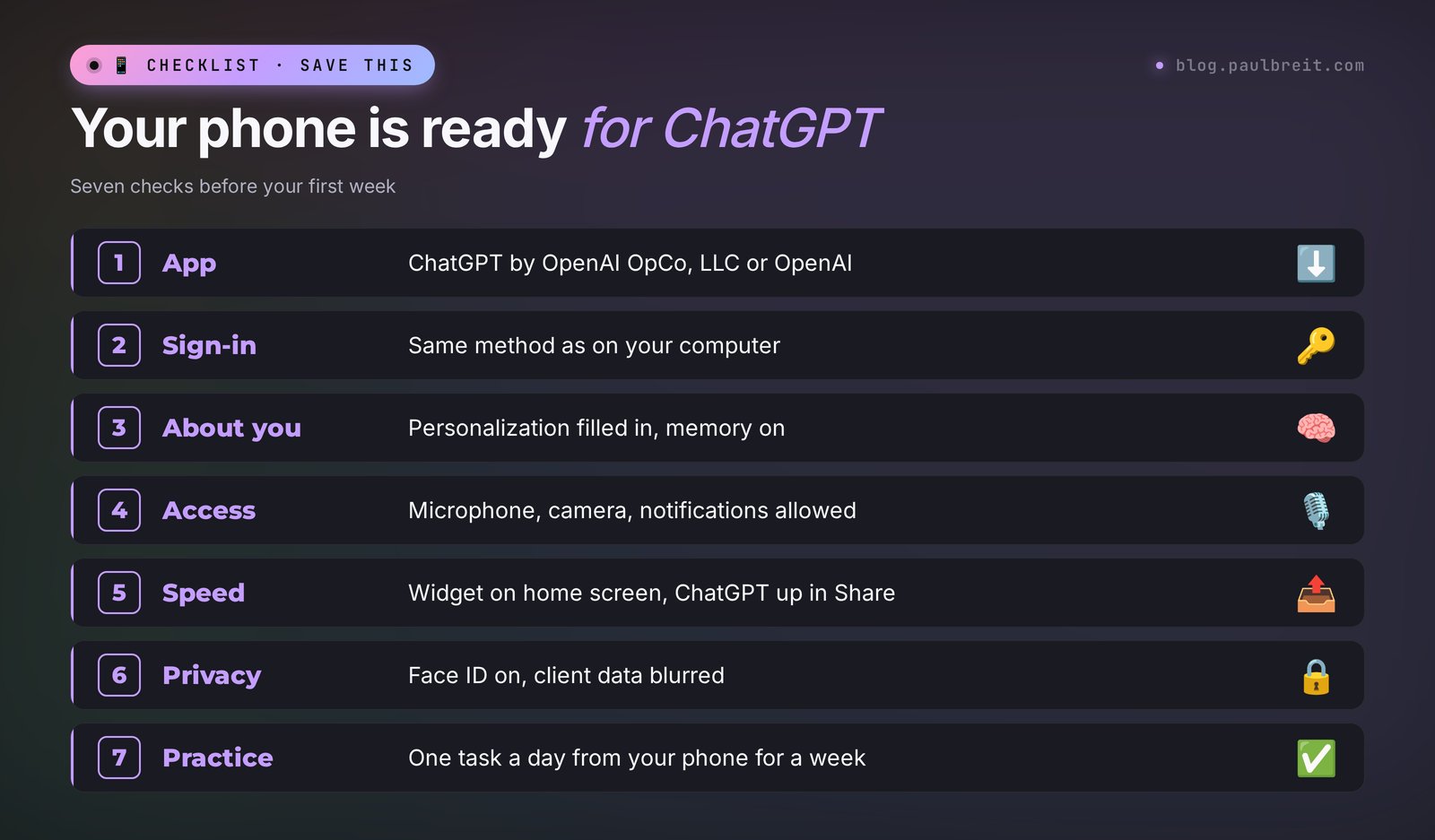
- Check your phone: an iPhone on iOS 18 or later, or an Android with Google Play. If not, put the web version on your home screen.
- Download ChatGPT from OpenAI OpCo, LLC (App Store) or OpenAI (Google Play). Check the developer.
- Sign in the same way as on your computer: Google, Apple, Microsoft, or email.
- Fill in Personalization, turn on memory, allow the microphone and camera.
- Add the widget, move ChatGPT up in the Share sheet, set up the Action button or the default assistant.
- Build two or three projects on your computer: content, client replies, your launch.
- For a week, handle at least one task a day from your phone, then decide on a plan.
That's it. After a week, your phone stops being just a feed and a messenger. A post idea turns into a draft on a walk, and a hesitant client gets an answer while they still remember what they asked. If you want to see how to build a whole workday around a smartphone, read AI on your phone: a full workday from a smartphone.
FAQFrequently asked questions
How do I download ChatGPT on iPhone?
Open the App Store, search for "ChatGPT," and pick the app from developer OpenAI OpCo, LLC. Tap Get, open it, and sign in the same way you do on chatgpt.com. The app is free and needs iOS 18 or later.
How do I install ChatGPT on Android?
Open Google Play, search for "ChatGPT," and check that the developer is OpenAI. Tap Install and sign in with the same method you use on your computer. Don't install APK files from third-party sites.
How do I tell the real ChatGPT app from a fake?
Look at the developer line. In the App Store the official app comes from OpenAI OpCo, LLC, and in Google Play from OpenAI. The app is called simply ChatGPT and has a black knot-shaped icon on white. Apps with other developers are middlemen with their own subscriptions.
Is the ChatGPT app free?
Yes, the app is free, and the Free plan includes GPT-6 Luna and voice mode. Paid plans in the US App Store as of November 8, 2026: Go for $8, Plus for $19.99, and Pro for $100, $200, or $500 a month. One plan covers your phone and your computer.
Why can't I see my computer chats in the ChatGPT app?
Most likely you signed in with a different method and created a second account. Log out and sign in the same way as on your computer: the same Google, Apple, or Microsoft account, or the same email. Your chats, projects, and plan will show up.
What if ChatGPT won't install on my old phone?
Open chatgpt.com in your phone's browser, sign in, and add the site to your home screen: in Safari via Share → Add to Home Screen, in Chrome via the menu → Add to Home screen. The web version handles text, files, photos, and projects.