Train AI on the content of your own website
A step-by-step guide to making AI answer from your site and nowhere else: pull your content into a knowledge base, drop a chatbot onto your pages, and stand up an AI consultant that knows your services, prices, and articles. Five working methods, a tool comparison, and real conversation examples. No developer required – just someone who can copy text and type in a chat.
To train AI on your website's content, you don't train a model from scratch. You collect your site's text into one set of files, load them into an AI knowledge base (easiest in Claude Projects or a chatbot builder like Chatbase), tell it to answer only from those materials, and check it against control questions. The basic version comes together in one evening and costs from $0. The result: AI answers with your facts, your prices, and your wording, instead of generic lines from the internet.
You open ChatGPT or Claude, ask something about your niche, and get a smooth but generic answer. It doesn't know your services, doesn't remember your articles, quotes someone else's prices, and recommends things you'd never advise on your own site. Every time, you re-explain the context, paste chunks of text, and correct it. The thought writes itself: I wish AI would learn my site once and speak for me from then on.
That's real, and it takes zero lines of code. I've built knowledge bases like this for myself and for four client projects. Below is the whole system: what it means to train AI on your content, the ways it's done in 2026, and how to check that AI is really answering from your site rather than making things up.
Twenty-two minutes to read. One evening to build. After that you have an assistant that knows your site by heart and works on it around the clock.
What's inside
- What "train AI on your site" actually means
- 5 ways to give AI your site's knowledge
- Step 1. Collect your content in one place
- Step 2. A knowledge base in Claude Projects
- Step 3. A chatbot right on your site
- Step 4. Check that AI knows your site
- How to keep the base updated
- 6 jobs for your business
- 5 beginner mistakes
- Getting access to Claude
- The whole path in a minute
Section 01What "train AI on your site" actually means
The word "train" is where the confusion starts. When someone says "train AI on my site," they usually picture something like teaching a pet: you feed it your text, the model memorizes it and gets smarter. In practice, that phrase hides three completely different things, and you only need one of them.
Three meanings of the word "train"
- Training a model from scratch. That's a company with billions of dollars and a data center training a model on terabytes of text. It has nothing to do with you.
- Fine-tuning. You take a ready model and nudge it on your own examples. Expensive, needs engineers and hundreds of labeled conversations. For an expert's site, it's a cannon to swat a fly.
- A knowledge base, also called context. You give AI your text as a reference it consults before every answer. The model doesn't relearn anything; it simply reads your materials and answers from them. This is the one you want.
Almost every time people say "train AI on my site's content," they mean the third option. The technical name is a knowledge base, or RAG. The acronym doesn't matter; the idea does: AI keeps your site in front of it and answers based on that, not on generic knowledge from the internet.
Picture a new hire. Fine-tuning a model is like sending them back to school for five years to relearn everything. A knowledge base is like handing them a folder with your policies and saying: answer clients strictly from this folder. The second path takes an evening and works right away.
Why pasting text into the chat isn't enough
You could, of course, paste a piece of the site into every conversation. People do that at the start, and it's fine. The problem is threefold. First: pasting by hand gets old by the third try. Second: a chat has a length limit, and the whole site won't fit. Third: the moment you close the conversation, it's all forgotten, and tomorrow you start over. A knowledge base removes all three pains at once. Load it once, and AI remembers your site in every new conversation.
How it differs from a plain site search
Plenty of sites have a search box. It matches words on pages and returns a list of links, and then the person reads it themselves. A knowledge base works differently, on the level of meaning. You ask a question in plain language, AI understands what you want, assembles an answer from different pieces of your materials, and replies with finished text. Search gives you ten blue links; an assistant gives one clear answer and points to the next step.
That difference matters to the client. A visitor rarely wants to read three articles to work out a price. They want to ask and get an answer. A smart assistant closes that request in one message, and the person stays on your site instead of leaving to find the answer at a competitor's. In effect, you turn your content from a library you have to dig through into a conversation partner that helps right away.
If you're just getting started and want to understand what kinds of AI exist and what they can do, look through the rundown of free AI tools for 2026 and the roundup of the best AI tools for real work. Here we'll assume you have the basics down and get straight to it.
Section 025 ways to give AI your site's knowledge
There are exactly five ways, from the simplest to the most powerful. The first three you build by hand in an evening; the last two give more control and take a bit more effort. First a table for a quick pick, then a breakdown of each.
| Method | What it does | Who it's for | Cost |
|---|---|---|---|
| Claude Projects | A personal assistant that holds your whole site in memory and writes in your voice | You, for working on content and answers | Claude Pro ~$20/mo |
| Website chatbot (builder) | A widget in the corner that answers visitors from your site on its own | Anyone who wants a consultant for clients right on the site | Free tiers, then ~$15-30/mo |
| Custom GPT | Your own assistant inside ChatGPT, shareable by link with a team | People already living in ChatGPT who want to share a helper | ChatGPT Plus ~$20/mo |
| NotebookLM | Q&A over uploaded sources, plus an audio recap | Anyone who wants to quiz their content free and fast | Free |
| Your own agent via API | Full control: a bot in your chat app, on the site, in your CRM, with custom logic | People who've outgrown builders and want their own solution | Pay per token usage |
Now, in order, what each one is.
1. Claude Projects
The simplest and, for you personally, the most useful method. Inside Claude you create a project, drop your site's files into it, and from then on, in any conversation inside that project, AI answers while remembering all your content. It holds your voice well, writes long pieces, and is great for content and for answering clients by hand. I put together a full walkthrough of the tool itself in a separate piece on Claude Projects as a knowledge base.
2. A website chatbot through a builder
If what you need is a consultant for visitors that answers in a box on the site, you use a ready builder. You give it your site's address, it crawls the pages, reads them, and turns them into a base. Then you paste one snippet of code onto the site, and a chat appears in the corner. What the finished result looks like and how to polish it, I showed in the piece on an AI consultant on your site.
3. Custom GPT
If you live in ChatGPT, it has a builder for your own assistants. You upload the site's files, write an instruction, and you get a helper you can share by link with colleagues. The upside: the whole team can use it. The downside: to open it, everyone needs a paid subscription.
4. NotebookLM
A free tool from Google. You upload sources and it answers strictly from them, always showing which chunk the answer came from. Hallucinations are rare because it holds on to the sources tightly. Ideal for testing an idea fast and quizzing your content with no spend. Weaker at creative tasks and long writing.
5. Your own agent via API
The top tier. When you've outgrown builders and want a bot with its own logic, you set up your own search over the base and connect a model through the API. This edges into development, but even here a lot can be assembled without deep code. Where to start that path, I laid out in the guide on how to build an AI agent with no code.
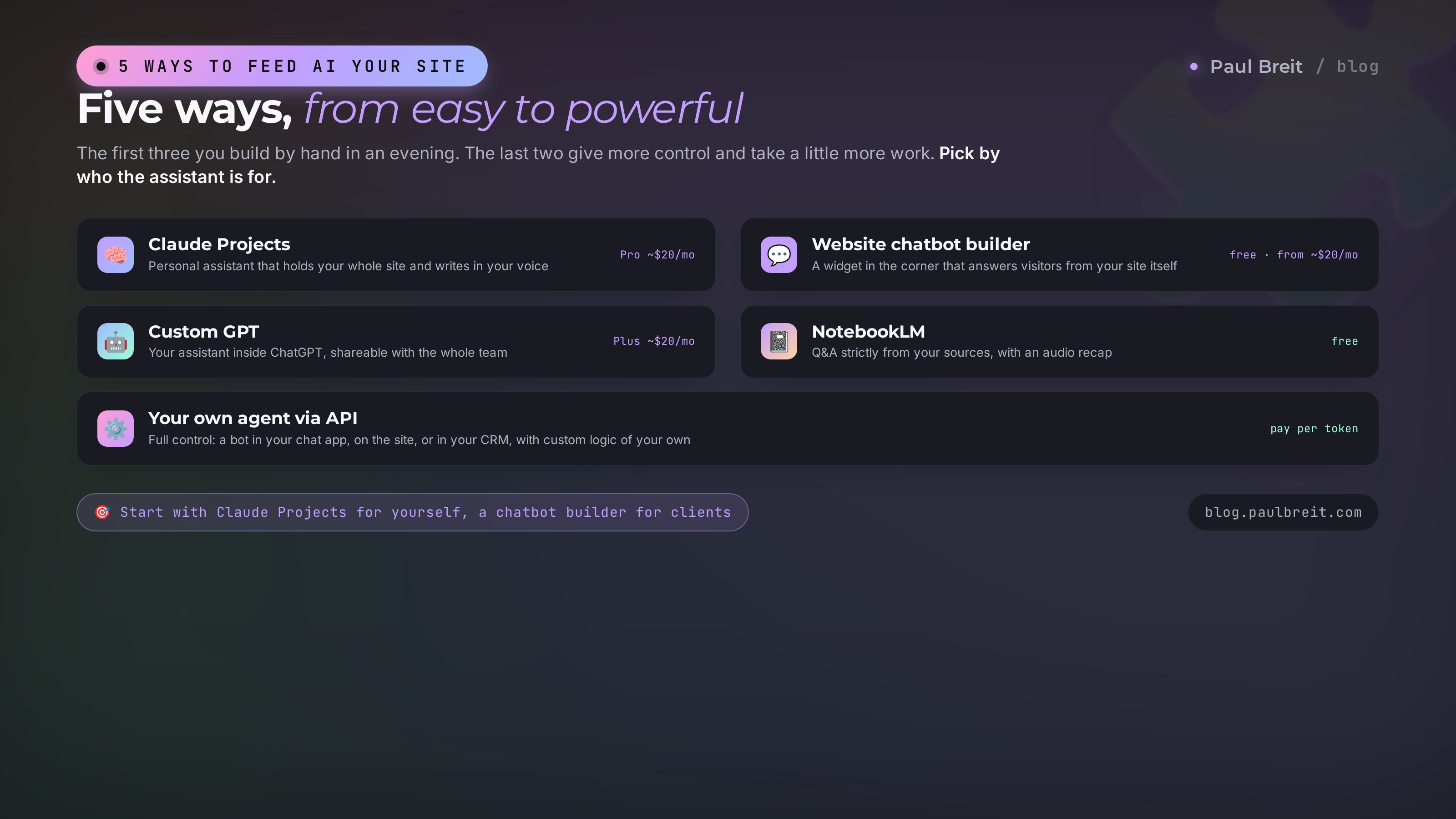
Start with Claude Projects if you need the content for your own work and writing. Start with a chatbot builder if you need a consultant for clients right on the site. Add the other three later, once you see what's actually missing. Don't build everything at once; that's the surest way to quit halfway.
Step 01Collect your content in one place
Every method starts the same way: AI needs your content in a form it can read. Garbage in, garbage out, so this step decides half the result. Let's go through it in order.
List your pages
Open your site and write down every page that carries meaning: services, prices, about, blog posts, FAQs, case studies, reviews. A quick way to see all the addresses at once: type your site's address in the browser and add /sitemap.xml at the end. A list of all pages opens up. No sitemap? Just walk the menu.
Pull the text into files
From each page that matters, copy the text into documents. Plain text files or Word docs are easiest, one per topic: services in one, prices in another, blog in a third. Images and styling aren't needed; AI works with text. Give files telling names: services.txt, prices.txt, about.txt.
Clean the text of clutter
Strip out menus, buttons, repeated header and footer captions, phone numbers on every line. Leave the substance. The cleaner the text, the sharper the answers. It's a dull step, but it's exactly what separates a bot that answers to the point from one that gets confused.
Add what's not on the site
Often half your knowledge doesn't live on the site at all. It's in your head or in client conversations. Common questions, objections, the fine print of your plans, what's included and what isn't. Collect this into a separate faq.txt. That one file is often more useful than all your pages combined, because it answers what people actually ask.
Don't want to clean by hand? Hand it to AI. Copy a page as is, paste it into the chat, and write: strip the menu, buttons, contacts, and repeats from this text, leave only the meaningful body, and return it as clean plain text. A second later you have a ready chunk for the base. That's how you get through a whole site in half an hour.
Step 02A knowledge base in Claude Projects
Now the fun part. I'll walk through the main method step by step, using Claude Projects. The logic is the same everywhere, so once you get one tool, you'll figure out the rest.
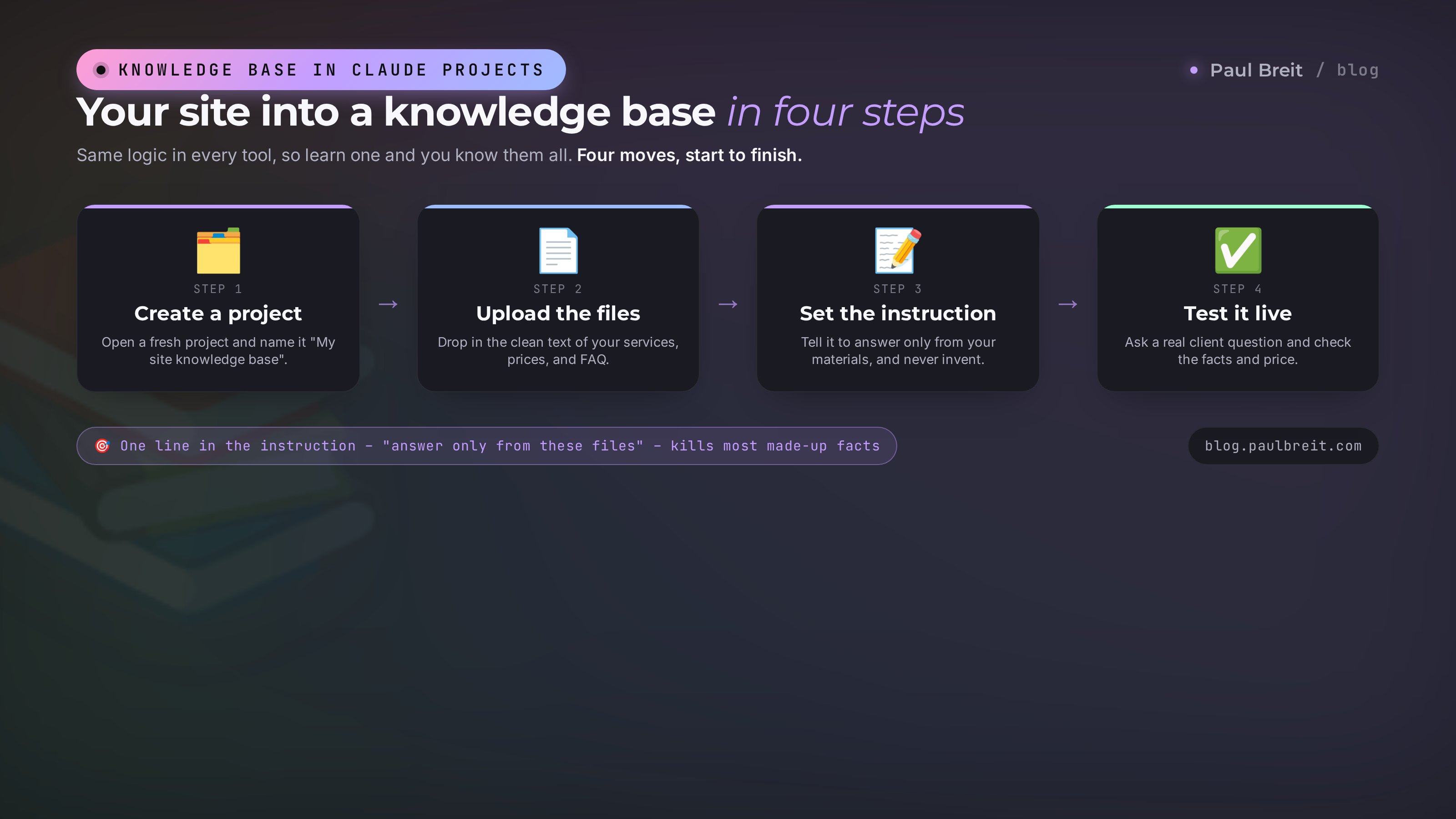
Create a project
Go to claude.ai, find Projects in the left menu, and create a new one. Give it a name, say "My site knowledge base." A project is a separate room where Claude always remembers everything you put in it.
Upload your site's files
A project has a knowledge area where you add files. Drag in all the documents you collected in the previous step. Claude reads them and keeps them in front of it in every conversation inside the project. Update a service, swap the file, and the bot instantly knows the new version.
Set the behavior instruction
A project has a field for a standing instruction. This is your rulebook for the AI. Here you explain who it is, how it answers, and, above all, that it relies only on your materials. A ready text is below; copy it and adjust for yourself.
You are the consultant for [company name] and you answer on its behalf.
Answer only from the uploaded site materials.
If the answer isn't in the materials, say so honestly and offer to
write to us directly. Never invent facts or prices.
Write in English, short and to the point, warm and human.
At the end of a fitting answer, gently steer toward the next step:
leave a request, book a consultation, ask a question.
Test it on a live question
Type a question your clients ask often into the project. Watch whether Claude answers with your facts and prices. Here's what a correct exchange looks like.
You: How much is a consultation and what's included?

Claude: Per the site, a consultation is $70 and runs one hour.
You work through your specific question, get an action plan,
and a summary afterward. If you'd like, I can help you pick a
time – just leave a request through the form on the contact page.
See how the answer is built from your data, not out of thin air. If the bot quotes numbers that aren't yours, either the base is missing a file or the "answer only from the materials" instruction is written too weakly. How to tighten the wording, I cover in the piece on how to write prompts.
A knowledge base holds a lot, but not infinitely. If the site is huge, don't load everything wholesale. Take the essentials: services, prices, answers to common questions, a dozen of your best articles. Extra text doesn't make the bot smarter; it distracts it. Smaller and sharper beats large and jumbled.
Step 03A chatbot right on your site
Claude Projects is an assistant for you. If instead you need a consultant for visitors right on the site, one that answers them in a box on its own, you use a chatbot builder. There are many: Chatbase, site-builder bots, and others. The principle is the same in all of them.
Feed the bot your site address
The builder has a "source" field. Paste your site's address, and the service crawls the pages, reads the text, and builds a base from it. That's the same content crawl you did by hand in the other methods. You can also upload the files you collected earlier, like faq.txt.
Write its character and rules
As in Claude Projects, you set the instruction: who the bot is, how it greets people, that it answers only from the site, and where it points them. The same instruction from the previous section can be pasted in with almost no changes.
Drop the widget onto the site
The service gives you a short snippet of code. On most site builders you paste it into an HTML block or into the site settings, in the field for scripts. After you save, a chat appears in the corner. That's it, the consultant runs around the clock.
Set up the handoff to a human
Always decide what the bot does when it doesn't know an answer. The right move: say so honestly and offer to leave a request or reach you. The wrong move: make something up. A good practice is to forward tricky messages to you in your chat app. How to wire up that forwarding, I showed in the piece on a Telegram bot with no programmer.
A bot on the site talks to real people, in your name. One invented price or a promise you never made hurts trust more than ten right answers help it. So the instruction to answer only from the materials, and to admit honestly when it doesn't know, isn't a nice-to-have. It's direct protection for your reputation.
Step 04Check that AI knows your site
Building the base is half the job. The other half is making sure AI really answers from your content rather than inventing something plausible. The check takes fifteen minutes and saves a mountain of grief later.
Write ten control questions
Jot down ten questions whose answers you know for certain and that are on the site. Prices, timelines, what a service includes, refund terms, how you're different. Ask the bot each one and compare every answer to reality.
Test three traps
- The price trap. Ask the cost of something you don't offer. A good bot says there's no such service and offers to connect you. A bad one makes up a number.
- The fact trap. Ask about something the site never mentions. The bot should admit it has no information, not fabricate.
- The voice trap. See whether the answer sounds like you. If the bot spouts corporate jargon while you write warm and plain, strengthen the tone description in the instruction.
If the bot still invents, three things help, in order. First: tighten the instruction, adding a line about honestly admitting when it doesn't know. Second: check whether the needed fact is even in the base; a fabrication is often just a hole in the content. Third: add the missing file. Nine times out of ten it's an empty spot in the base, not a bad attitude from the AI.
Let a friend test the bot
You know the answers and ask convenient questions. Ask someone who isn't in the loop to grill the bot like a real client. They'll ask crooked, real, unexpected questions, and you'll see holes you missed. Separately, check how the bot handles rudeness and provocation: calm, polite, no arguing. A couple of these checks spare you an unpleasant surprise when real visitors start testing it for weak spots.
Section 03How to keep the base updated
A site is alive: prices change, services appear, articles ship. The knowledge base won't update itself by magic, so someone has to watch it. The good news: it takes minutes, not hours. A stale base is the one real danger of the whole thing, which is why setting up a clean update routine once matters more than building the base perfectly at the start.
Manual updates
In Claude Projects and Custom GPT, just swap the outdated file for a fresh one. Prices changed? Update prices.txt and re-upload. Running through the base once a month is enough for most.
Auto-crawl in builders
Many chatbot builders can re-read the site on a schedule. Turn on a weekly refresh and the bot pulls fresh text from the pages without you. Check for this setting when you connect it.
Set yourself a monthly reminder: five minutes to check the base. Ask the bot a couple of control questions and update whatever changed. A stale bot quoting last year's prices is worse than no bot at all. Five minutes a month keeps it in shape.
Section 046 jobs for your business
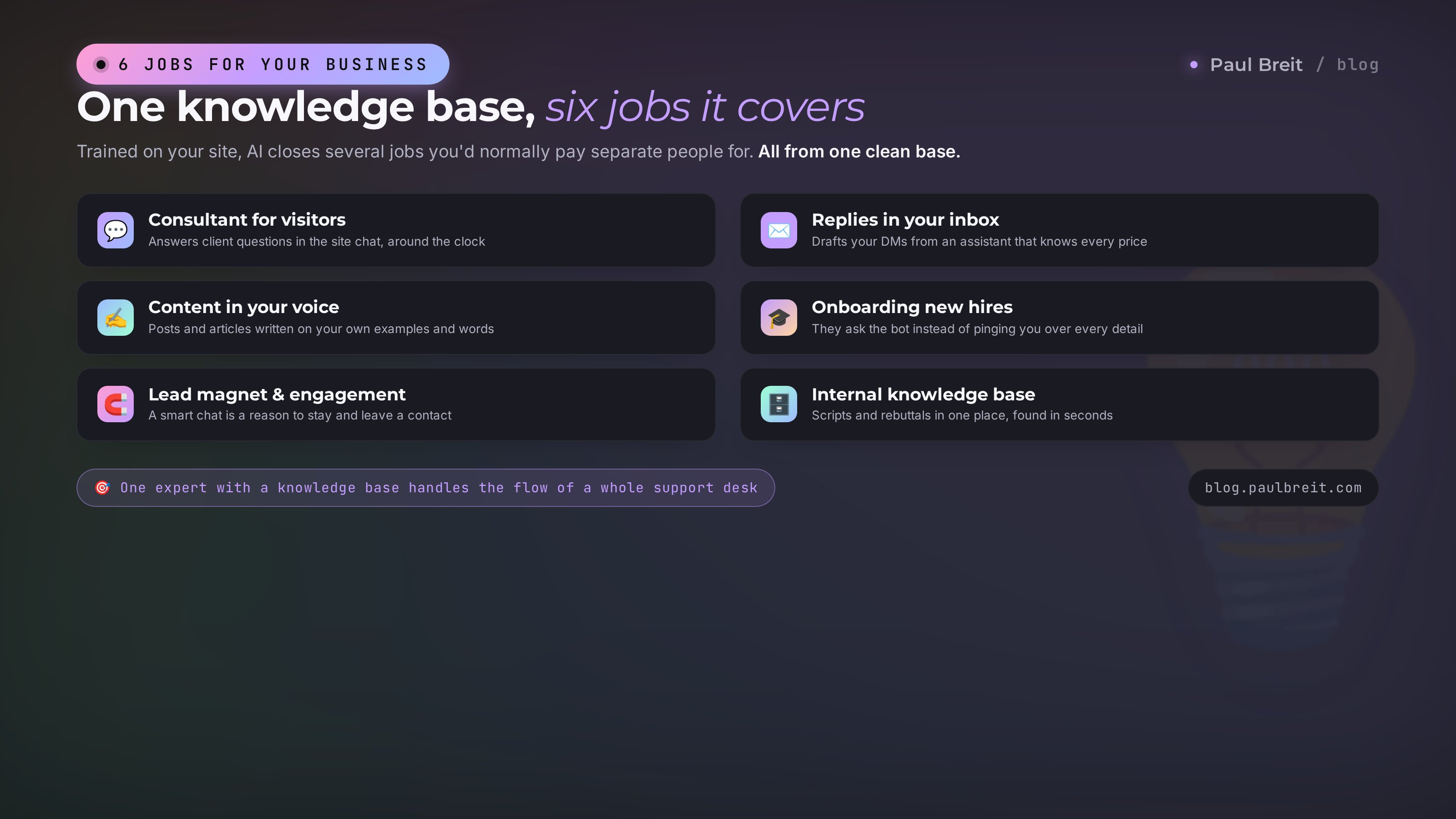
What's it all for, in short. AI trained on your site covers several jobs at once that people usually pay separate staff for. One expert with a knowledge base handles the flow of questions that would otherwise need a dedicated support person.
A live example from my practice. One client, a therapist with a site, got 20 to 30 identical messages a day: how much, how it works, do you help with this. She answered by hand in the evenings and it drained her more than the sessions themselves. We collected her services, prices, and answers to common questions into a base, put a chatbot on the site, and forwarded the tricky messages to her chat app. Within a week the bot was handling four of every five messages on its own, and only the ones that truly needed a human reached her. Her evenings came back, and requests went up, because people got answers instantly instead of a day later.
- A consultant for visitors. Answers client questions in the site chat around the clock, taking the flood of repetitive messages off you.
- Replies in your inbox. You write to the client yourself, but you get the draft from your helper, which knows all your services and prices by heart.
- Content in your voice. Ask it to write a post or article, and the text comes out on your examples and in your words, because AI has read your blog. How to make the voice indistinguishable, see in the breakdown on the best AI for writing.
- Onboarding new hires. You bring on an assistant, give them access to the bot, and they ask it instead of pinging you over every little thing.
- Lead magnet and engagement. A smart chat on the site is a reason in itself to stay and ask a question, and therefore to leave a contact.
- Internal knowledge base. Policies, scripts, answers to objections in one place, and anyone on the team pulls what they need in seconds.
Section 055 beginner mistakes
I've built dozens of these bases and I watch people step on the same rakes. Check yourself against the list before you let a bot loose on real people.
Dirty content in the base
You loaded pages straight up, with menus, buttons, and footers. The bot gets lost in the clutter and answers off the mark. The fix: clean text, meaning only. Five minutes of cleanup saves hours of untangling.
No instruction to answer only from the site
With no explicit ban, AI happily adds generic knowledge from the internet and quotes prices that aren't yours. The fix: a hard line in the instruction about relying only on your materials and honestly admitting when it doesn't know.
Dumping the whole site in a pile
You loaded three hundred pages, old news and admin sections included. The bot drowns in the volume. The fix: the essentials only, services, prices, questions, best articles. Base quality beats base size.
Forgetting to update
You built it once and walked away. Six months later the bot names last year's prices and services that no longer exist. The fix: five minutes a month to check and swap files.
Shipping with no testing
You put the bot on the site without asking a single control question. The first one to catch it is a client, and it goes badly. The fix: ten control questions and three traps before launch, and ideally a friend test on top.
Section 06Getting access to Claude
If you picked Claude, a couple of setup notes. The service itself is excellent for a knowledge base and for writing, but it's worth getting the account right from the start.
- Free vs Pro. The free tier is enough to build and test a knowledge base. Once you hit message limits or want a proper Project that holds your whole site, the Pro plan (about $20/month) pays for itself.
- Region. Anthropic supports most of the US, the UK, the EU, and many other countries. If you're somewhere it isn't available yet, a VPN with a US or EU location gets you in; avoid regions on Anthropic's blocklist.
- Payment. A standard card works for Pro. With a VPN on, if you need one, checkout tends to go through more smoothly.
If Claude doesn't fit for some reason, the same knowledge-base principle works in NotebookLM, which is simpler to reach, and in most chatbot builders. For the account and billing details, I put together a separate piece on how to pay for Claude.
Section 07The whole path in a minute
Here's it all as a short checklist. Run down it top to bottom and you'll have AI that knows your site.
- Got the main idea. No need to train a model; you need a knowledge base from your content.
- Picked a method. Claude Projects for yourself, a chatbot builder for clients on the site.
- Collected the content. Listed the pages, copied the text into files, cleaned out the clutter, added common questions.
- Loaded the base. Created a project or bot, added the files, set the instruction to answer only from the materials.
- Checked it. Ten control questions, three traps, a friend test.
- Set up updates. Five minutes a month to check and swap what's stale.
Training AI on your site isn't about complex technology. It's about order in your content plus one honest instruction. Assemble a clean base, tell AI to rely only on it, and you get an assistant that speaks with your facts and in your voice. In one evening, and almost free.
FAQFrequently asked questions
Do I need to code to train AI on my site?
No. The basic methods (Claude Projects, a chatbot builder, NotebookLM) are built with a mouse and by copying text. A developer is only needed at the top tier, when you build your own agent via API with custom logic.
Is this the same as fine-tuning a model?
No. Fine-tuning rewrites the model itself, costs a lot, and needs engineers. What you want is a knowledge base: AI relearns nothing. It simply reads your materials before every answer. For an expert's site, that's the right and sufficient path.
How much does an assistant like this cost?
From zero. NotebookLM is free, and chatbot builders have free tiers. Paid options are Claude Pro or ChatGPT Plus at about $20 a month, plus builder plans from roughly $15-30 a month for the limits lifted.
Why does the bot invent facts and prices?
Two reasons. Either the instruction has no hard rule to answer only from your materials, or the needed fact isn't in the base and AI fills the gap. Fix it by strengthening the instruction and adding the missing file. In most cases it's a hole in the content.
How many pages can I load?
Many, but not infinitely. Loading the whole site wholesale hurts: extra text distracts the AI. Take what matters: services, prices, common questions, a dozen of your best articles. A sharp, small base beats a huge, cluttered one.
How do I put a chatbot on my site?
Through a chatbot builder. You give it the site address, it builds the base, then hands you a snippet of code. You paste it into an HTML block or the site settings, in the field for scripts. After you save, a chat appears in the corner. No coding on your part, just paste the ready snippet.
How do I update the knowledge when content changes?
You manually replace the stale file with a fresh one in the base, or turn on the builder's scheduled site crawl. Build the habit of spending five minutes a month checking control questions and updating what changed.