Kimi AI: how to use it in 2026
Kimi is an AI assistant from the Chinese company Moonshot AI. It chats in plain English, builds slide decks, documents, and spreadsheets, runs research across a hundred sources, and can even publish simple websites. Here's how to sign in, what the free plan gives you, what the paid plans cost, how the K3 and K3.1 Pro models differ, and which prompts get you useful work on the first try.
To use Kimi, open kimi.ai, click Log in, and choose Continue with Google. The interface switches to your browser language, and Kimi replies in whatever language you write in. For free you get chat on the K3 model, one agent task at a time, and two projects. Paid plans start at $19 a month, or $15 a month billed yearly, and you pay with a regular credit or debit card. For a finished file, use the Slides, Docs, Sheets, or Deep Research mode.
Everyone who sells services, courses, and consulting and wants ready-to-use work files fast. A therapist gets a webinar deck on anxiety in 10 minutes. A nutritionist gets a weekly meal plan with a shopping list in a spreadsheet. A tutor gets a course plan with homework as a document. A coach gets research on what competitors in the niche promise and what their clients praise. A freelancer gets a one-page website without a site builder.
What's inside
- What Kimi is and who makes it
- Is Kimi available in the US, and is it safe
- Sign up in two minutes
- Interface and answer language
- What you get for free
- Plans and payment
- K3 and K3.1 Pro: which model to pick
- Your first prompt: a formula that works
- A deck in Slides mode
- Deep Research for your niche
- Docs, Sheets, Build, and Scheduled tasks
- 10 ready prompts for your work
- What not to upload to Kimi
- If something goes wrong
- Kimi, DeepSeek, Qwen, and Claude
- The whole path in one minute
- FAQ
Section 01What Kimi is and who makes it
Kimi is a chatbot plus a set of work tools from Moonshot AI, a company based in Beijing. Moonshot was founded in March 2023, and the first version of Kimi came out that October. Back then its big strength was reading very long texts: whole books and stacks of contracts in one go. In China, Kimi quickly became one of the most popular AI assistants.
The rest of the world really noticed Kimi in the summer of 2025. In July, the K2 model came out, and Moonshot released its weights openly: any developer could download it and run it on their own hardware. In January 2026, K2.5 learned to work with images and video. On July 16, 2026, K3 arrived – a model with 2.8 trillion parameters and a context window of a million tokens. That's roughly 700,000 words at once, several thick books in a single conversation. In October 2026 it was joined by K3.1 Pro, tuned for coding and long agent tasks.
You'll see the word "agent" all over Kimi, so let me explain it right away. A regular chat answers with text. An agent takes a task and runs several steps in a row on its own: searches the web, writes code, assembles a file, checks the result. You ask for "a 10-slide deck about my course," and you get a finished file to download.
Kimi has two addresses, and this is the first thing that trips up beginners. kimi.com is the version for mainland China: you sign in with WeChat or a Chinese phone number with the +86 code. That one isn't for you. kimi.ai is the international version: you sign in with Google or a phone number. The kimi.ai sign-in window even says that mainland China users should go to kimi.com. So everyone else goes to kimi.ai.
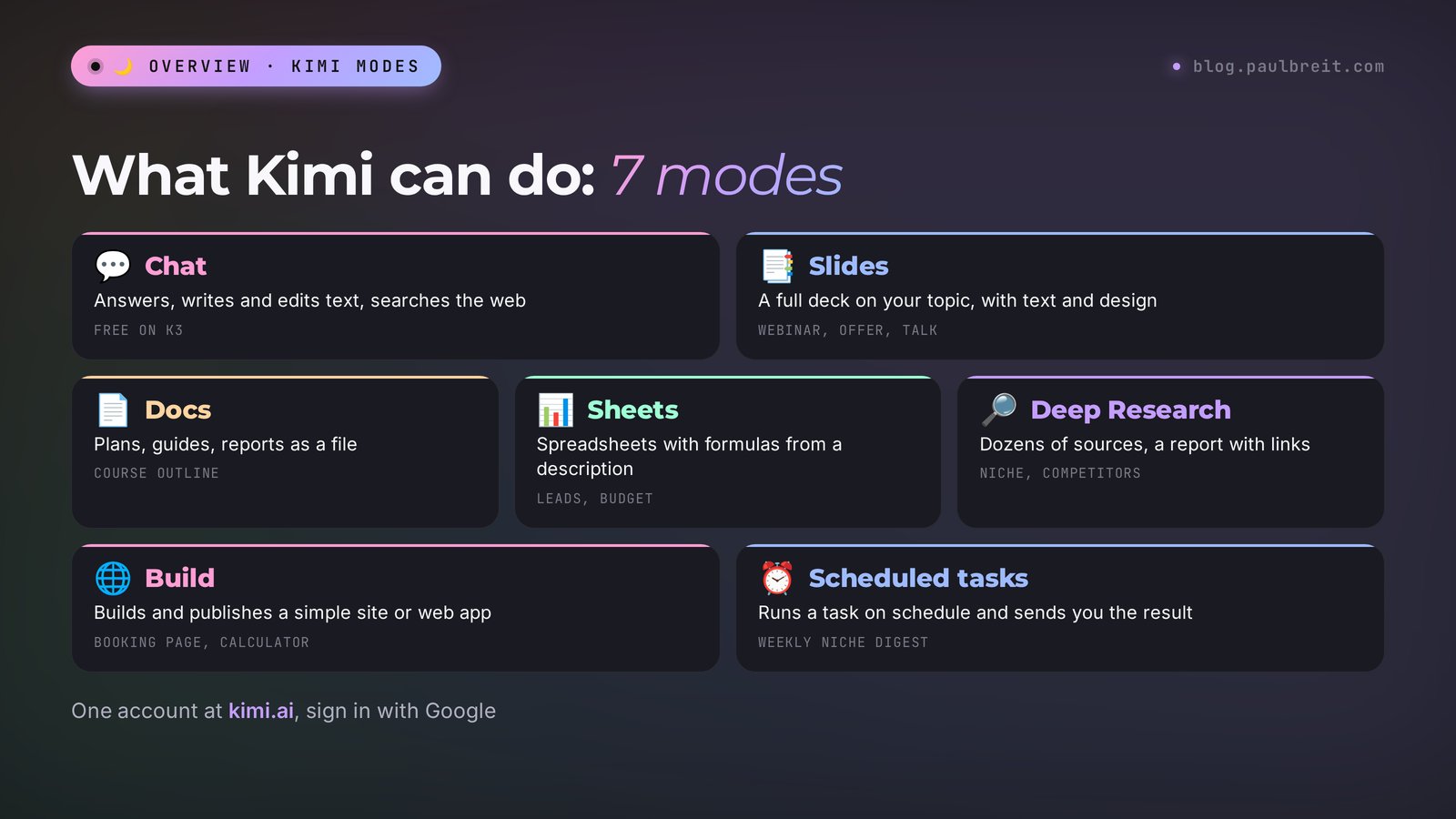
Here's what you'll find inside if you open kimi.ai today:
| Mode | What it does | Why you need it |
|---|---|---|
| Chat | Answers questions, writes and edits text, searches the web | Posts, emails to clients, replies to objections |
| Slides | Builds a deck on your topic, with design and copy | A webinar, a consultation, a client proposal |
| Docs | Writes a long document: a plan, a guide, a report | A course outline, a client handout, a draft agreement |
| Sheets | Builds a spreadsheet with formulas from your description | A content plan, a lead tracker, a meal plan, an ad budget |
| Deep Research | Reads dozens of sources and writes a report with links | A look at your niche, competitors, market prices |
| Build | Makes and publishes a simple website or web app | A one-page site, a booking page, a mini calculator |
| Scheduled tasks | Runs a task at a set time and sends you the result | A morning niche news digest, a weekly report |
| Design and 3D Make | Images, mockups, and simple 3D models | Covers, illustrations, a product mockup |
Section 02Is Kimi available in the US, and is it safe
Yes, Kimi works in the US. kimi.ai is the international version for everyone outside mainland China, including the US, Canada, the UK, and Europe. kimi.com is the version for mainland China. You open kimi.ai in a regular browser, sign in with Google, and start working. No special setup needed.
Payment is just as simple. Paid plans are billed in dollars, and you pay with a regular credit or debit card. More on the plans in Section 6. If you'd rather not pay at all, the free plan is enough for your first tasks.
Now the safety question, and here I'll be direct. Kimi is a service from a Chinese company, with its own servers and its own data storage rules. My rule is the same for any AI tool: only send it what you'd calmly show an outside contractor. With Kimi, I'm especially careful about three things:
- client personal data: names together with phone numbers, chat histories, health or therapy details;
- passwords, logins, and access keys;
- financial details: bank data, financial reports, deal terms with partners.
Your own posts, service descriptions, public competitor pages, and anonymized client questions are fine. The full list of what to keep out and how to anonymize a real case is in Section 13.
For marketing work, Kimi is safe to use as long as you treat it like a capable outside contractor: give it the task and the public context, keep anything private in your own files. That way you get all the speed of the agent modes without wondering where your client data ended up.
Section 03Sign up in two minutes
Signing up for Kimi is easier than for most AI tools: no forms, no long questionnaires. Here's the whole path.
Open the international version
Type kimi.ai into your browser. If you landed on kimi.com and see a WeChat sign-in with a +86 code, you're on the Chinese version. Close it and open kimi.ai.
Click Log in
The button is in the top right corner. A window opens with two options: a phone number with a country code, and Continue with Google. You can't send anything to the chat without signing in: the moment you try, Kimi shows this same window.
Choose Google
This is the most reliable route. One click, and you're in with your regular Gmail account. No codes to wait for, no extra passwords to remember.
Check the terms box
At the bottom of the window there's a circle to agree to the Terms of Service and the Privacy Policy. Without it, the sign-in button won't work. This is where many people get stuck: they click Google, nothing happens, and it looks like the site is broken.
Make sure you're in
After you sign in, your Google avatar shows up at the bottom left, and your history starts saving under Chats. That's it, you can work. On your phone the path is the same: the Get App menu on kimi.ai has links to the iPhone and Android apps, and there's also a desktop app. If you'd rather not install anything, open kimi.ai in your phone's browser: the web version does everything the app does.
Section 04Interface and answer language
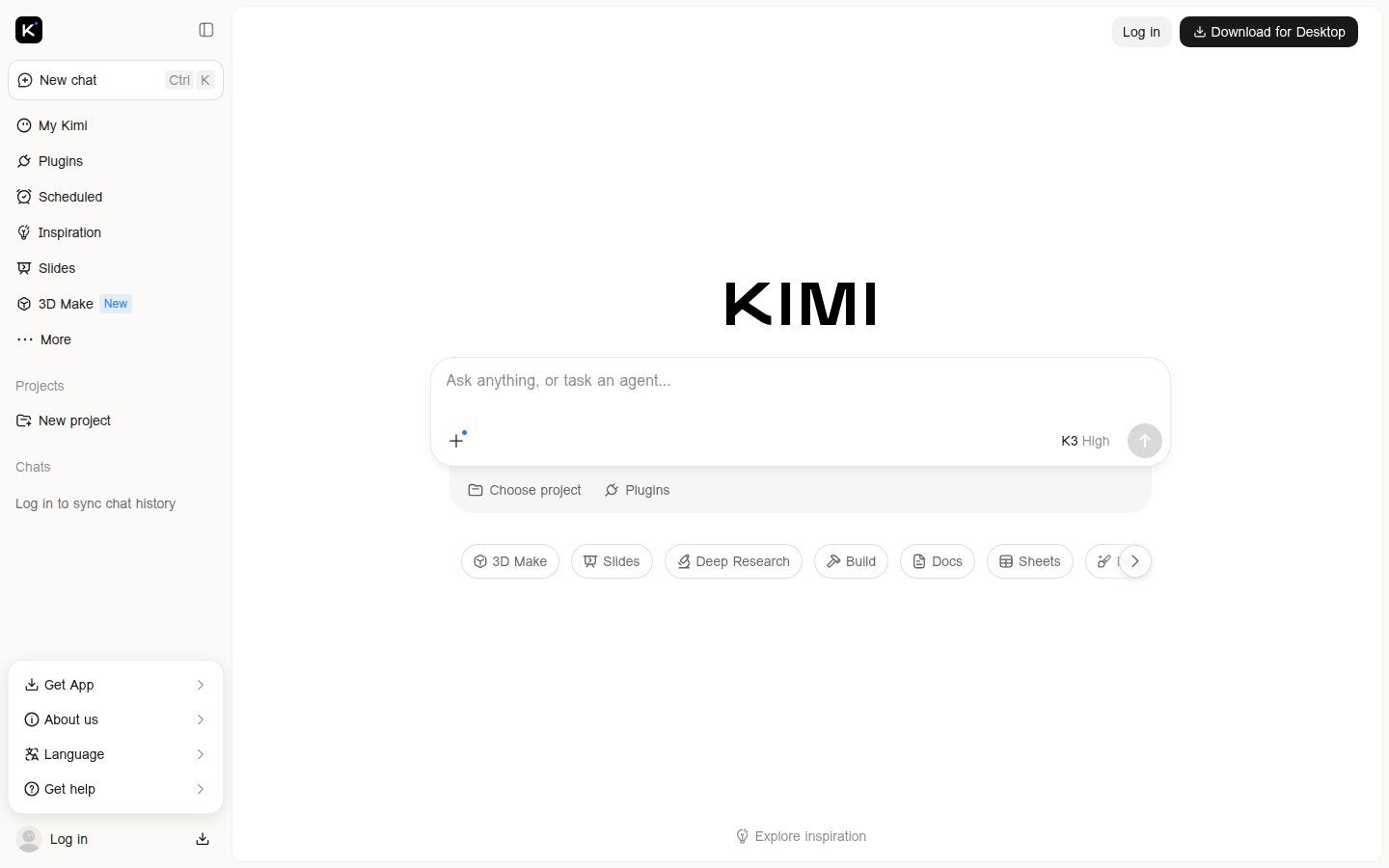
I opened kimi.ai on November 2, 2026, in a browser set to US English, and the whole interface was in English: New chat, Scheduled, Slides, Deep Research, Build, Docs, Sheets, and an input box that says "Ask anything, or task an agent…". Kimi detects your browser language and translates the menus on its own. Among the options are English, 简体中文, and other languages. To switch by hand, open Language at the bottom left and pick the one you want.
Kimi answers in the language you ask in. Write in English and you get English. Write in Spanish and you get Spanish. The writing is clean, but sometimes the sentences run long and a little formal. For posts and client emails, one line at the end of the prompt fixes it: "Write in plain, conversational English, short sentences, no corporate jargon." This trick works in any AI tool, more on it in Section 8.
If you work with clients in several languages, you can keep the interface in English and simply write each prompt in the language you need. Kimi switches with you, and you don't have to change any settings.
Section 05What you get for free
You can use Kimi for free, with no trial period and no card on file. According to the official pricing table as of November 2, 2026, the Free plan includes the following:
| Feature | Free | Plus | Pro |
|---|---|---|---|
| Chat on the K3 model | yes | yes | yes |
| Agent tasks at the same time | 1 | 2 | 2 |
| Priority agent queue | no | 4x faster | 4x faster |
| Scheduled tasks | 2 | 10 | 15 |
| Projects | 2 | 20 | 20 |
| Project storage | 500 MB | 20 GB | 20 GB |
| Swarm (several agents in parallel) | no | 2 subtasks | 4 subtasks |
| Kimi Code for programming | no | yes | yes |
Regular chat on the free plan has no hard message counter, but answers can slow down when the servers are busy. The agent modes – Slides, Docs, Sheets, Deep Research, Build – spend agent credits. The official page doesn't say how many credits the free plan gets: it only says paid plans have more, 2x, 5x, and 10x. In practice, the free allowance is enough to try each mode and see whether you need it.
My advice: don't burn your free agent credits on "let's see what happens" experiments. Pick one real task that's been sitting on your list, like the deck for your next live session. Then your very first try brings real value, and you can honestly compare Kimi with what you use now. For more AI tools you can use without a subscription, see free AI tools in 2026.
Section 06Plans and payment
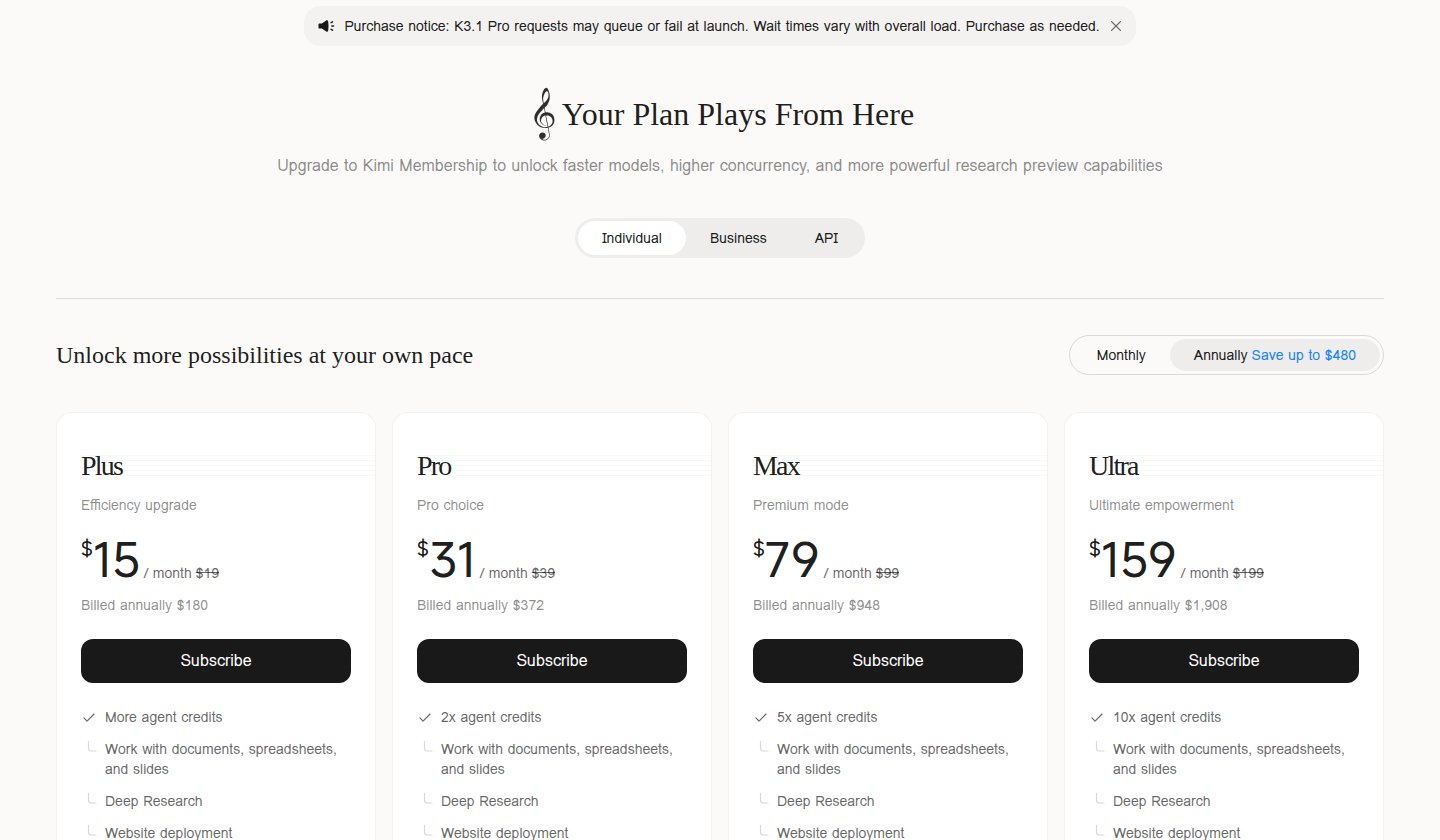
Kimi has four paid plans for individuals. Prices as of November 2, 2026:
| Plan | Monthly | Billed yearly | What you get |
|---|---|---|---|
| Plus | $19 | $15 a month ($180 a year) | More agent credits, docs, sheets, slides, Deep Research, website deployment |
| Pro | $39 | $31 a month ($372 a year) | 2x agent credits, K3.1 Pro Highspeed, Goal mode |
| Max | $99 | $79 a month ($948 a year) | 5x credits, 4 tasks at once, long chats up to 1 million tokens |
| Ultra | $199 | $159 a month ($1,908 a year) | 10x credits, the most tasks and subtasks |
Plans, limits, and features were checked on the official page kimi.ai/membership/pricing. The same page shows a notice: K3.1 Pro requests may queue or fail at launch, and wait times depend on load. Kimi changes its plans several times a year, so check that page before you pay.
Which one to pick. If you use Kimi mostly as a chat and make a deck or a research report once a week, the free plan is enough. If the agent modes have become part of your work and your credits run out by mid-month, get Plus. Pro makes sense when you keep hitting the K3.1 Pro queue or run lots of tasks in parallel. Max and Ultra are for people who run Kimi all day, and a typical small business owner won't need them.
Paying is straightforward. On the pricing page, choose Monthly or Annually, click Subscribe, and pay with a regular credit or debit card. A few details worth knowing:
- Yearly billing saves up to 20%. Plus drops from $19 to $15 a month, but you pay $180 up front. Try a month first, then switch to yearly if Kimi sticks.
- Gift codes. The pricing page has a Redeem button for a subscription code. Handy if someone gives you a subscription as a gift.
- Business and API. The same page has Business and API tabs. For working in the chat, the Individual plans are all you need.
Subscriptions renew automatically. If you paid for one month as a test, turn off auto-renewal in your subscription settings right away, so there's no surprise next month. There's also a Kimi API for developers: pay per token, no subscription, through platform.kimi.ai. You don't need it to work in the chat.
Section 07K3 and K3.1 Pro: which model to pick
At the bottom right of the input box you'll see the model name and the thinking level, for example "K3 High." This is your main quality switch.
K3 has been the main model since July 2026. It understands text, images, and video, holds up to a million tokens in memory, and it's the default for everyone, including the free plan. For posts, emails, reviews, decks, and research, it's more than enough.
K3.1 Pro is the newest model, released in October 2026. Moonshot focuses it on coding, financial analysis, and long agent tasks. The faster K3.1 Pro Highspeed is available from the Pro plan up. At launch, as Kimi itself honestly warns, requests to it may wait in a queue.
The thinking level is how long the model thinks before answering. "High" gives a more considered result but takes longer. For simple asks like "rephrase this paragraph," you can lower the level and get a faster answer. For strategy, numbers, and niche analysis, keep it on high.
As of October 31, 2026, the K2 model family is closed to new API users. By the end of December, Moonshot will shut it down completely. In the chat this doesn't affect you: K3 is already there. But if an older guide tells you to "select Kimi K2," that guide is out of date.
Section 08Your first prompt: a formula that works
Kimi, like any strong AI model, answers exactly what you ask. Ask for "post ideas" and you get five bland topics that could fit anyone. Tell it who you are and who you write for, and you get topics you can publish tomorrow.
A four-part formula that works in any AI tool:
- Who you are. Your profession, how you work, who you serve. "I'm a therapist in private practice online, working with anxiety in women 30–45."
- The task. What exactly to do. "Come up with 5 Telegram post topics that will bring clients to a consultation."
- The format. How to lay out the answer. "For each topic, a headline and one line about what the post covers."
- The limits. Language, style, what to avoid. "Write in English, keep it short, no jargon, no promises to cure anything."
I ran this kind of prompt myself. Kimi won't let you send a message without signing in – the site opens the sign-in window right away – so the answer below comes from Claude. The formula works the same way in any strong model, and in Kimi you'll get your own version at the same level.
Prompt: I'm a therapist in private practice online. Come up with 5 Telegram post topics that will bring clients to a consultation with me. For each topic, a headline and one line about what the post covers. Write in English, keep it short.
Answer:
1. Why you snap at the people you love by evening – how a day's fatigue turns into irritation, and what to do before the argument starts.
2. Putting things off? It might be fear of getting it wrong – why procrastination often grows out of anxiety, and how to spot it in yourself.
3. When you need a therapist and when a vacation will do – five signs that rest has stopped helping.
4. What happens at the first session – step by step: what I'll ask, how long it takes, what you'll leave with.
5. The story of one request – shared with the client's consent: what she came with and what changed over six sessions.
Look at the fourth topic. A post on "what happens at the first session" removes a new client's biggest fear – the unknown. Posts like this usually bring in more bookings than the smartest expert content. The AI suggested it on its own because it had the context: therapist, online, needs clients.
Three more moves that make Kimi's answers noticeably better:
- Give it a sample. Paste two of your old posts and write, "Write in the same style." Kimi picks up your paragraph length, tone, and favorite words.
- Ask for options. "Give me 3 different headlines: one bold, one with a number, one as a question." Choosing from three is easier than rewriting one.
- Keep the conversation going. The first answer is a draft. Say it plainly: "point two is too general, add a real-life example," "cut it in half." Kimi remembers the whole conversation.
Section 09A deck in Slides mode
This mode is why many people come to Kimi. You describe the topic, Kimi writes the copy, builds the structure, and designs the slides. You end up with a deck you can download and polish.
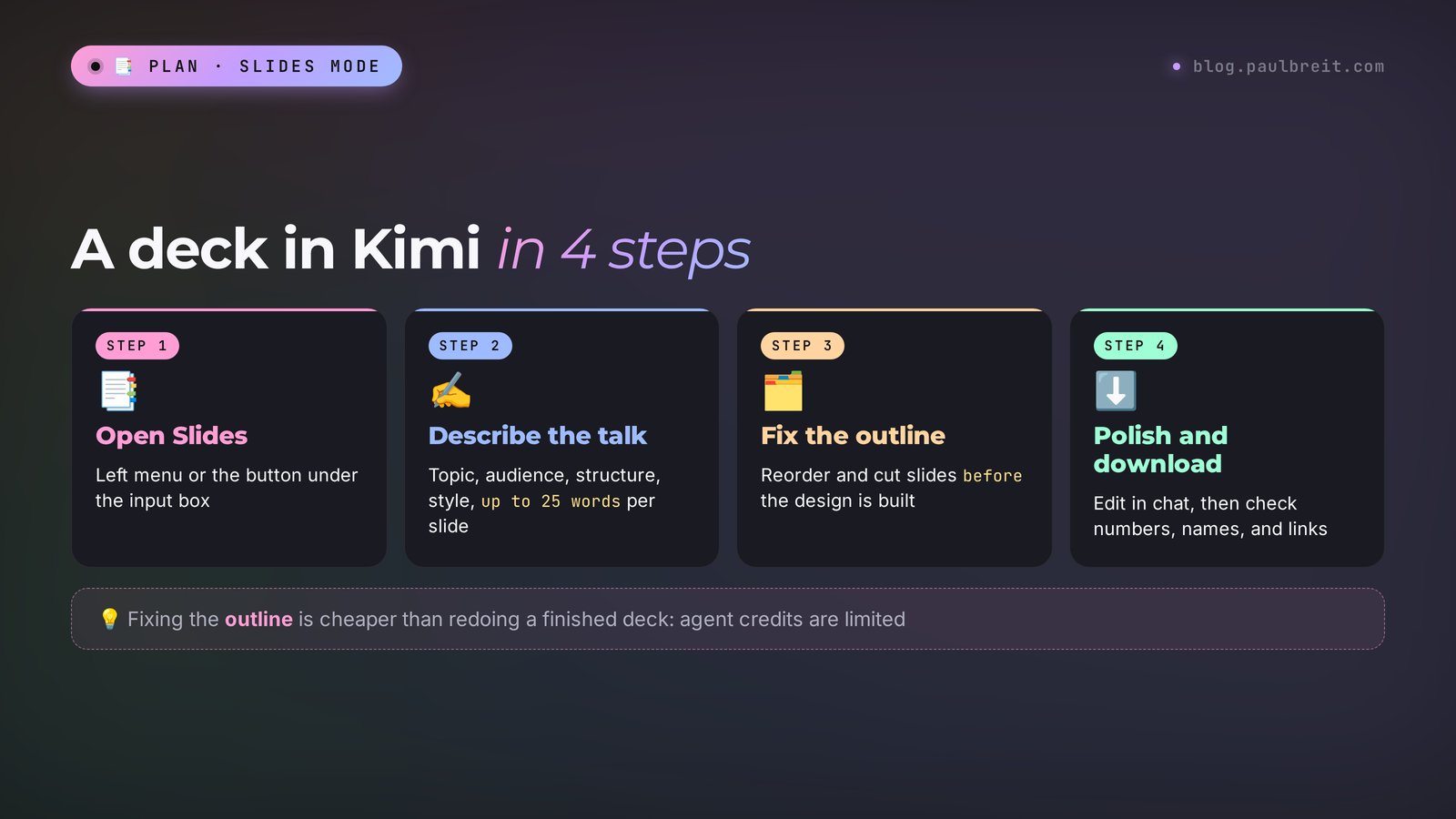
Open Slides
It's in the left menu, and there's a button under the input box on the home page. This mode spends agent credits, so prepare your prompt first.
Describe the whole talk
Weak: "a deck about anxiety." Strong: "A 12-slide deck for a therapist's free webinar. Topic: why anxiety keeps you up at night and what to do about it. Audience: working women 30–45 with kids. Structure: an intro story, 3 causes of anxiety, 3 simple exercises, a client case, an invitation to a consultation with a discount for attendees. Calm design, pastel colors, large readable font. Short text on slides, up to 25 words each."
Check the outline before the design
Kimi usually shows the structure first. Read it and fix it while the slides aren't built yet: "swap 4 and 5," "drop the definitions slide, nobody reads those." Fixing the outline costs less than redoing a finished deck.
Polish and download
Edit the finished slides right in the chat: "slide 7 has too much text, keep three points." Then download the file and check it with your own eyes: numbers, names, links. AI sometimes makes up facts, especially statistics. Anything that sounds like "studies show 73% of people…" without a source is better cut.
Kimi makes a deck fast, but the design has a recognizable "AI-made" look. For a live session with your own followers, that's enough. For a sales webinar to a cold audience, I'd polish the slides by hand or in a dedicated tool. Compare with how Gamma makes a presentation in 10 minutes: it has more ready templates and easier design edits. And if you're preparing a full sales webinar, see how to build a webinar script and deck with Claude.
Section 10Deep Research for your niche
Deep Research is the mode where Kimi spends a few minutes reading the web before it answers. It opens dozens of pages, compares what each one says, and puts together a report with links to sources. For client work it's one of the most useful modes, because this kind of work used to take a full day by hand.
What you can hand to Deep Research:
- Competitor review: who in your niche sells similar services, at what prices, what they promise on their sites.
- Audience pain points: what people write on forums and in reviews about the problem you solve.
- Trends: what changed in your field over the past year, what's worth telling your followers about.
- Idea check: whether there's demand for a new product you want to launch.
A sample prompt for a nutritionist:
Research the market for online nutritionist consultations in the US in 2026. Find 10 specialists with websites or landing pages, and for each one list: consultation price, format (one-off, ongoing support, group program), and the main promise on their site. Separately, collect what clients complain about in reviews of nutritionists. At the end, give me 5 ideas for how I can stand out. Include links to sources. Write in English.
The report arrives in a few minutes. Read it as a draft from a sharp assistant: check the links and spot-check the numbers. AI can mix up dates or pull a price from an old page. Still, in 10 minutes you get a map of the market that used to take a day.
If you prefer a "search engine with sources" format, see how Perplexity works. And if you want an agent that runs long chains of tasks in the browser for you, read about Manus, the AI agent that works for you.
Section 11Docs, Sheets, Build, and Scheduled tasks
Docs
The mode for long texts you need as a file: a course outline, a client handout, instructions for an assistant, a draft agreement. Write the prompt the same way as for a deck: who you are, who the document is for, which sections it needs. For example: "Write a handout for clients of my fitness challenge: what to buy before the start, how to keep a food journal, what to do if you miss a workout. 2 pages, friendly tone." Always show legal documents from Kimi to a lawyer: AI doesn't know the latest changes in your local law.
Sheets
Kimi builds spreadsheets with formulas from a plain description. "Make a lead tracker: date, name, source, service, amount, payment status. At the bottom, the total of paid amounts and the lead-to-payment conversion rate." You get a file that opens in Excel or Google Sheets. For a monthly content plan, an ad budget, or a tutor's class schedule, it saves an hour of fiddling with cells.
Build
Here Kimi makes a simple website or web app and publishes it at a link. A one-page site, a consultation booking page, a service price calculator, a mini quiz for your followers. Describe what should be on the page and which buttons it needs. Publishing sites with a database is available on paid plans. For a full sales site with payments and lead forms you'll want a proper site builder. For testing an idea in an evening, Build is plenty.
Scheduled tasks
Kimi can run a task at a set time on its own and send you the result. For example, every Monday at 9 a.m., collect the top news in your niche for the week and suggest three post topics. The free plan gives you two such tasks, Plus gives ten. This is the first step toward what people call AI agents: a helper that keeps working while you're busy with something else. For more on how these helpers work, see what an AI agent is.
Projects
A project is a folder where Kimi remembers your files and context. Upload a description of your services, sample posts, and common client questions, and every new chat inside the project starts with that knowledge. The free plan gives you two projects and 500 MB, enough for one work topic.
Section 1210 ready prompts for your work
Copy, fill in your details in the square brackets, and send. Every prompt follows the same structure: who you are, the task, the format, and the limits.
I'm a [profession], I work with [audience], I sell [service] for [price]. Build a 4-week Telegram content plan, 3 posts a week: 40% value, 30% stories from my practice, 20% personal, 10% sales. For each post, give a headline, the main idea in one line, and how to end it. Lay it out as a table.
A client writes to me: "[message text]". I'm a [profession], my service costs [price]. Write 3 direct-message replies: one warm, one focused on value, one offering a payment plan. No pressure, sound human, up to 60 words each.
Make a 10–12 slide deck for a free live session. Topic: [topic]. Audience: [who]. Structure: intro, the problem, 3 causes, 3 solutions, a client story, an invitation to [product]. Short text on slides, a large readable font, calm colors.
Run research: find 10 [specialists in my niche] in the US who sell [service] online. For each one, list the price, format, main promise, and a link. At the end, give 5 ways to stand out. Write in English, with links to sources.
Describe my service [name] for a page on my website. Who it's for, what people come with, what happens in our sessions, what result they get, what it costs, how to book. Plain language, no guarantees, up to 250 words.
Come up with 5 ideas for a free resource for [audience] that solves one problem in 10 minutes and leads to [my service]. For each idea, give a title, a format (checklist, spreadsheet, mini course), and what the person gets.
Make a client tracking spreadsheet for a [profession]: name, contact, first session date, plan, sessions left, next payment date, notes. Highlight the rows where payment is due in 3 days or sooner.
Write a script for a 30-second vertical video about [topic]. The first line has to hook within 3 seconds, then one idea and one simple tip, and at the end a call to DM me the code word [word]. Write it the way people talk out loud.
My client [name] finished [service] with me and went quiet 2 months ago. Write a warm message to ask how they're doing and gently offer [next product]. Not pushy, up to 70 words.
Every Monday at 9:00 a.m. my time, collect the 5 top news stories and discussions of the week on [niche]. For each one, give a one-line summary and a link. At the end, suggest 3 post topics for my channel based on this news.
Section 13What not to upload to Kimi
Kimi is a service from a Chinese company, with its own servers and data storage rules. The same caution applies to any AI tool, so I use one rule for all of them: only what you'd calmly show an outside contractor goes into the AI.
- Don't upload client personal data: full names together with phone numbers, message histories, medical or therapy details, ID numbers. If you need to work through a real case, change the name and remove the details that could identify the person.
- Don't upload passwords, logins, or bank details. In any form, not even as a screenshot.
- Be careful with company documents. Financial reports, partner agreements, and commercial terms are better anonymized before you upload them.
- Fine to upload: your own posts, service descriptions, public competitor pages, anonymized client questions, drafts of articles and decks.
There's another side too. Chinese models answer politically sensitive topics related to China differently: they dodge the question or give the official view. For marketing, copy, and decks it doesn't get in the way, but for geopolitical analysis Kimi is a poor source.
Section 14If something goes wrong
| What happened | What to do |
|---|---|
| kimi.ai won't open or keeps loading | Refresh the page, try another browser, or turn off ad-blocking extensions for the site. |
| A WeChat sign-in with a +86 number opened | You're on the Chinese version, kimi.com. Go to kimi.ai. |
| I click Continue with Google and nothing happens | Check the terms agreement circle at the bottom of the sign-in window. Make sure your browser isn't blocking pop-ups. |
| The phone code doesn't arrive | Sign in with Google instead. It's one click and needs no code. |
| The interface is in Chinese or another language | Open Language at the bottom left and pick English. Or switch your browser language to English. |
| Kimi answers in the wrong language | Add to the end of the prompt: "Reply only in English." |
| An agent task is stuck in the queue | The servers are busy. Wait or run it later. On the free plan you get one task at a time, the next one waits in line. |
| Agent credits ran out | Use regular chat until the limit resets, or move to Plus. |
| My card is declined | Check that your card allows international online payments and 3-D Secure confirmation, or try another card. |
| The deck uses an awkward font | Ask Kimi to switch to a clean font like Montserrat or Inter. |
| The report has made-up numbers | Ask: "give a source link for every number, and remove any number without a source." Check the links by hand. |
Section 15Kimi, DeepSeek, Qwen, and Claude
Kimi often gets compared with other Chinese AI tools and with Western ones. In short, who each one suits:
| AI tool | Strength | Sign-in and payment | When to use it |
|---|---|---|---|
| Kimi | Ready modes: slides, docs, sheets, research, websites | Google sign-in, regular card | You need a finished file: slides, a sheet, a report |
| DeepSeek | A strong free chat with reasoning | Google or email sign-in, chat is free | Text and questions for free |
| Qwen | Chat, images, and video in one window from Alibaba | Google sign-in, free to start | Try everything at once for free |
| Claude | The best writing, agents, Claude Code | Google or email sign-in, regular card | Work where the quality of text and meaning matters |
Step-by-step guides for each: how to use DeepSeek and how to use Qwen, Alibaba's free AI. For a wider overview, see the best AI tools of 2026.
My take. Keep Kimi handy for its agent modes: when you need a deck, a spreadsheet, or a research report in 10 minutes. For copy that sells – posts, emails, scripts – I still use Claude: it holds a natural voice and the author's style better. How to start with it from zero is in Claude from scratch. And if you're choosing between the two big Western assistants, here's an honest comparison of Claude and ChatGPT.
Section 16The whole path in one minute
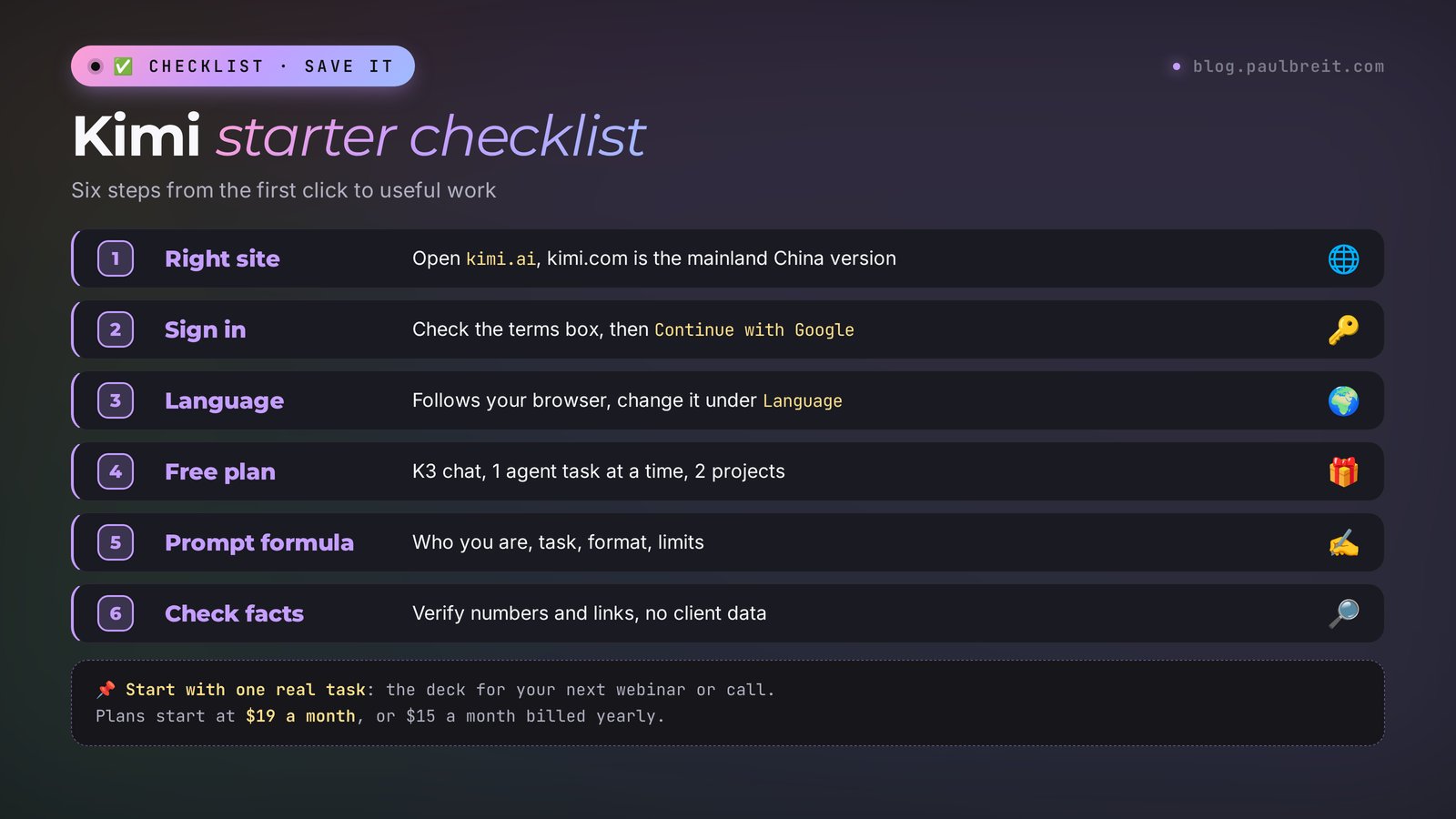
Open kimi.ai; kimi.com is the mainland China version. Click Log in, check the terms box, and choose Continue with Google. The interface follows your browser language. For free you get chat on K3, one agent task at a time, two scheduled tasks, and two projects. Write prompts with the formula: who you are, the task, the format, the limits. For finished files, use Slides, Docs, Sheets, and Deep Research. Check the numbers and links in the answers. Keep client personal data out. Plans start at $19 a month, or $15 a month billed yearly, paid with a regular card.
Start today with one action: take a live session, consultation, or webinar you have coming up, and make a deck for it in Slides mode with prompt #3. In 10 minutes you'll have a draft, and you'll see for yourself whether Kimi earns a spot in your work week.
FAQFrequently asked questions
Is Kimi free?
Yes, Kimi has a Free plan with no card required. As of November 2, 2026, it gives you chat on the K3 model, one agent task at a time, two scheduled tasks, two projects, and 500 MB of storage. The agent modes – slides, docs, research – spend a limited number of credits. Paid plans start at $19 a month.
Who owns Kimi?
Kimi is made by Moonshot AI, a Chinese company based in Beijing and founded in 2023. The international version runs at kimi.ai, and the mainland China version at kimi.com. The newest models are K3 (July 2026) and K3.1 Pro (October 2026).
How much does Kimi cost?
As of November 2, 2026: Plus is $19 a month or $15 a month billed yearly, Pro is $39 or $31, Max is $99 or $79, and Ultra is $199 or $159. Paid plans give you more agent credits, more tasks at the same time, and access to the faster K3.1 Pro mode. You pay with a regular credit or debit card.
Is Kimi safe to use?
For marketing work, yes, with one rule. Kimi belongs to a Chinese company with its own servers and data storage rules, so don't upload client personal data, passwords, or financial details. Your own posts, service descriptions, public competitor pages, and anonymized questions are fine to use.
Is there a Kimi app?
Yes, there are apps for iPhone and Android, plus a desktop app. The links are in the Get App menu on kimi.ai. If you'd rather not install anything, open kimi.ai in your phone's browser: the web version works the same way.
How is Kimi different from ChatGPT and DeepSeek?
Kimi's strength is its ready-made agent modes: Slides, Docs, Sheets, Deep Research, and Build hand you a finished file or page. DeepSeek is a strong free chat for text and questions. ChatGPT is OpenAI's general-purpose assistant. If you need a deck or a research report as a ready file, start with Kimi.