How to Use DeepSeek: a Step-by-Step Guide to the Free AI Chat
DeepSeek is a Chinese AI chat that writes, does the math, reasons step by step, reads documents and screenshots, and searches the web for fresh information. The chat is free, there is no subscription, and it opens directly in any browser. Inside: sign-up step by step, how the chat works after the September 2026 update, 17 ready-to-use prompts for your work, what DeepSeek can't do and what to pair it with, and what you should never upload. For everyone who sells services, courses, and consulting and wants a strong assistant for $0.
To use DeepSeek, open chat.deepseek.com or the official DeepSeek app, sign in with email or Google, and type your task in plain words into the box at the bottom of the screen. The chat is free and works directly, no workarounds needed. For complex tasks, turn on reasoning mode (the DeepThink button); for fresh facts, turn on Search. Documents, spreadsheets, and screenshots go in through the paperclip. Write your prompt with a simple formula: who you are, who the result is for, what to do, and in what format. DeepSeek doesn't create images. Keep client personal data out of it.
Anyone who wants a strong AI for writing, math, and documents without paying for another subscription. A therapist who writes posts for her audience. A tutor putting together a lesson plan. A coach pricing a new program. A freelancer who needs to pull apart a client brief in ten minutes. If you need images or video too, you'll pair DeepSeek with a second tool – more on that below.
What's inside
- What DeepSeek is in 2026
- Is DeepSeek available where you live
- Signing up for DeepSeek: step by step
- How the chat works: buttons and features
- Your first conversation: step by step
- Writing for work: 8 ready prompts
- Documents, spreadsheets, and screenshots: 3 prompts
- Math and reasoning: 3 prompts
- Web search: 3 prompts
- What DeepSeek can't do and what to pair it with
- How much DeepSeek costs
- DeepSeek on your own computer
- DeepSeek vs ChatGPT, Claude, Gemini, and Qwen
- Privacy, censorship, and mistakes
- When something goes wrong
- Your first week with DeepSeek: a checklist
- The whole path in a minute
In January 2025, a Chinese app almost nobody had heard of passed ChatGPT on the US App Store within a week. Nvidia's stock dropped so hard in a single day that every business paper in the world covered it. The app was called DeepSeek, and since then even people who have never touched AI know the name.
For a small business owner, that story has a very practical side. ChatGPT and Claude have good free plans, but the moment you lean on them every day, the limits push you toward $20 a month. Then Gemini wants its own plan, and the subscriptions pile up. DeepSeek costs nothing, has no paid tier for the chat at all, and handles writing and reasoning at a level that held its own against the big names. Open it, type the task, get the answer.
But everyone who opens the chat for the first time runs into the same questions. Which button do I press? Why does the answer read like a high school essay? Can I upload a contract? Why does the site sometimes say the server is busy? I'll answer all of them in order, with examples you can take into your work today.
If you're still deciding which AI deserves a spot in your workflow, start with how to choose an AI tool. This guide has a different job: teaching you to work inside DeepSeek itself, from the first login to a finished piece of copy.
Section 01What DeepSeek is in 2026
DeepSeek is both a Chinese company based in Hangzhou and its chatbot. The company was founded in 2023 by Liang Wenfeng, who previously ran an investment fund that traded on the stock market using algorithms. The logo is a blue whale, which is why some people online simply call DeepSeek "the whale."
The defining thing about DeepSeek is that the company releases its models openly under a permissive license. Any developer can download them, run them on their own hardware, and build them into their own product. That's why hundreds of third-party services around the world run on DeepSeek under the hood, and why the model improves so fast: thousands of people test it and build on it.
A short history, so you know what the names you'll hear actually mean:
- DeepSeek V3 and R1 – the models that made the company famous in late 2024 and early 2025. R1 was the first free model to show its reasoning before answering, and people saw an AI "thinking out loud" for the first time.
- DeepSeek V4 – the new generation. A preview came out on April 24, 2026. Over the summer two models appeared: the fast V4 Flash and the larger V4 Pro. Both hold up to 1 million tokens in a single conversation, which is several thick books at once.
- DeepSeek V4.1 Flash – released on September 10, 2026, and the model answering you in the chat right now. According to the company's own tests, it beat V4 Pro on both quality and speed, so DeepSeek is retiring V4 Pro. The new model understands images: you upload a screenshot, and it works out what's on it.
For a regular user, the September update matters more than everything else. Before it, you had to switch by hand between a fast mode, an expert mode, and an image-recognition mode. Now all of that is merged into one smart mode: the model judges how hard your question is and switches on its vision whenever it sees a picture.
You don't need to memorize version numbers; in a few months they'll change again. Remember this instead: the DeepSeek chat always runs the company's newest model, and you never have to pick it by hand. If words like "model," "token," and "context" still feel foggy, take a look at AI terms for beginners explained in plain words.
Section 02Is DeepSeek available where you live
In most of the world, yes. As of October 2026, chat.deepseek.com opens directly in the US, the UK, Canada, Australia, and across most of Europe, on home Wi-Fi and on mobile data. The app is in the App Store and Google Play. You don't need a VPN, a special account, or a foreign card.
That's DeepSeek's main practical advantage: a top-tier model with no paywall in front of the useful features. If you want a full map of what else you can use without paying, I collected it in free AI tools that actually work. DeepSeek sits among the strongest there for writing and logic.
Three things worth knowing in advance:
- Outages happen. In spring 2026, DeepSeek had several major technical failures, and on those days the site didn't respond to users anywhere in the world. Speed also depends on the time of day and how busy the servers are. If the chat won't load, waiting an hour or switching from the website to the app fixes it most of the time.
- Access depends on decisions outside your control. In 2025, Italy's data protection authority ordered the app blocked there, and several countries restricted DeepSeek on government devices. Regular users elsewhere were not affected, but rules can change. I wouldn't build all my work on one AI and would keep a second one ready, for example Qwen or Gemini.
- Copycats are everywhere. Search for "DeepSeek online" or "DeepSeek free" and you'll get dozens of lookalike sites and bots that ask for payment. Many of them simply forward your question to the same DeepSeek and charge you for it. There's one official chat address: chat.deepseek.com. The company's main site is deepseek.com.
The official DeepSeek chat is free. If a site or a bot asks you to pay for "DeepSeek access," a "premium account," or "unlimited messages," you're dealing with a middleman. It sees everything you write to it and may keep those conversations. Close it and open chat.deepseek.com.
Section 03Signing up for DeepSeek: step by step
Sign-up takes two or three minutes. Let's walk through it on a computer; on a phone the steps are the same.
Open the official site
Type chat.deepseek.com into the address bar, or go to deepseek.com and click through to the chat. Check the address with your own eyes: exactly chat, dot, deepseek, dot, com. No extra letters, no hyphens, no words like "free" or "pro" tacked on.
Choose how to sign in
The login screen offers several options. The simplest are email or a Google account. Any inbox works: Gmail, Outlook, iCloud, your work address. Phone sign-in doesn't cover every country, so if your number isn't accepted, don't waste time on it and go with email.
Confirm your email
Enter your address, click the button to send a code, and open the email from DeepSeek. Paste the code into the box on the site and create a password. If nothing arrives within five minutes, check your Spam folder and the Promotions tab, then request the code again.
Accept the terms and open the chat
The site will ask you to agree to the terms of use and the privacy policy. After that, an empty chat opens with a text box at the bottom. Read the privacy policy at least once, by the way: it's where the company says your data is stored in China, and we'll come back to that in Section 14.
Install the app on your phone
Find DeepSeek in the App Store or Google Play and check the developer: the listing should say DeepSeek. Don't install apps with a blue whale icon from other publishers; there are plenty of them. Sign in the same way you did on the site, and your chat history will sync across all your devices.
No phone number, no bank card, no ID needed for the chat. A couple of minutes in, you're looking at an empty screen and a box for your first prompt.
Section 04How the chat works: buttons and features
The DeepSeek screen is simpler than ChatGPT's, and that's mostly a plus. On the left is a list of your past chats and a button to start a new one. In the center is the conversation. At the bottom is the input box, with a paperclip for files and the mode toggles next to it. DeepSeek moves its buttons around from time to time, especially after big updates, so look for a button by its icon and meaning: its position may shift.
Here's what the chat offers as of October 2026, and how to use each part:
| Feature | What it does | How to use it in your work |
|---|---|---|
| Regular chat | Writes, rewrites, shortens, and changes the tone of text | Posts, emails, client replies, service descriptions |
| Reasoning (DeepThink) | Thinks step by step before answering and shows its train of thought | Math, comparing options, plans, untangling a tricky situation |
| Search | Looks up fresh information online and links to sources | Industry news, competitor prices, facts for a post |
| Files | Reads PDFs, Word files, text files, and spreadsheets | Summaries of documents, report breakdowns, lecture notes |
| Images and screenshots | Understands what's in a picture and reads text from it | Stats screenshots, photos of handwritten notes, receipts |
| Long memory | Holds up to 1 million tokens in a single chat | A whole book, an archive of messages, an entire course |
| Chat history | Saves every conversation; you can rename and delete them | A separate chat for every task and every client |
The reasoning button deserves its own paragraph. In DeepSeek it's called DeepThink. When it's on, the AI first writes out its thinking in gray: what you're asking for, what the options are, where a mistake could hide. Then it gives the answer. It's slower, and noticeably more accurate on tasks where you need to calculate, compare, or build a plan. Since the September update, the model can switch on deep reasoning by itself when it sees a hard task, but the button is still a reliable way of saying: think carefully here.
DeepSeek doesn't publish exact daily message limits. In practice, a regular person has plenty of room for writing and documents. The limits show up in other ways: at peak hours the chat may reply "server is busy," and a very long conversation will eventually hit the length ceiling, at which point the site suggests starting a new chat.
Section 05Your first conversation: step by step
Let's walk through your first conversation, from an empty screen to text you can actually use. It takes about fifteen minutes.
Open a new chat
Click the new chat button in the left column. For a first try, leave reasoning mode alone: on a regular writing task the model answers fast and decides for itself whether it needs to think longer.
Introduce yourself in one paragraph
DeepSeek knows nothing about you. Until it understands who you are, who you work for, and how you talk to clients, its answers will be smooth and faceless, like a brochure in a doctor's waiting room. A short introduction at the start of the chat solves half the problem.
Give one task and name the format
One message, one task. Say exactly what you want back: a list of 10 items, a table, a 200-word post, a half-page email. The tighter the frame, the fewer rewrites.
Edit in the same chat
Treat the first answer as a draft. Follow up with: "shorter," "drop the third point," "open with a scene from a client's life," "fewer exclamation points." DeepSeek remembers the whole conversation in that chat and edits that exact text. For a new topic, open a new chat so the old context doesn't throw the model off.
Take the result
There's a copy button under each answer. If you don't like the answer at all, press the regenerate button with the circular arrow, and DeepSeek will write a different version of the same request.
Here's what that looks like in a real example:
You: I'm an online test-prep tutor. I get high school juniors and seniors ready for the SAT and ACT. My clients' parents are busy people aged 38–50, and they want to see their kid's progress in numbers. My tone is calm and to the point. Give me 10 post ideas for my Instagram aimed at parents, and for each one, write a single line on which parent worry it puts to rest. Format it as a table.
DeepSeek: Here are 10 ideas. 1. How many points you can realistically gain in six months – the fear that it's already too late. 2. Why your kid knows the material but freezes on test day – confusion about what they're paying for. 3. How to tell if tutoring is working before the next practice test – worry about wasted money…
You: Take idea 3. Write a 200-word post. Open with the question a mom asked me last week: "How will I even know he's making progress?" Give three signs of progress a parent can spot at home without quizzing their kid. End by offering a free diagnostic session.
Notice the order: context first, then a list of ideas, then one idea to work on. In three messages you have a post written about your actual client and their real worry.
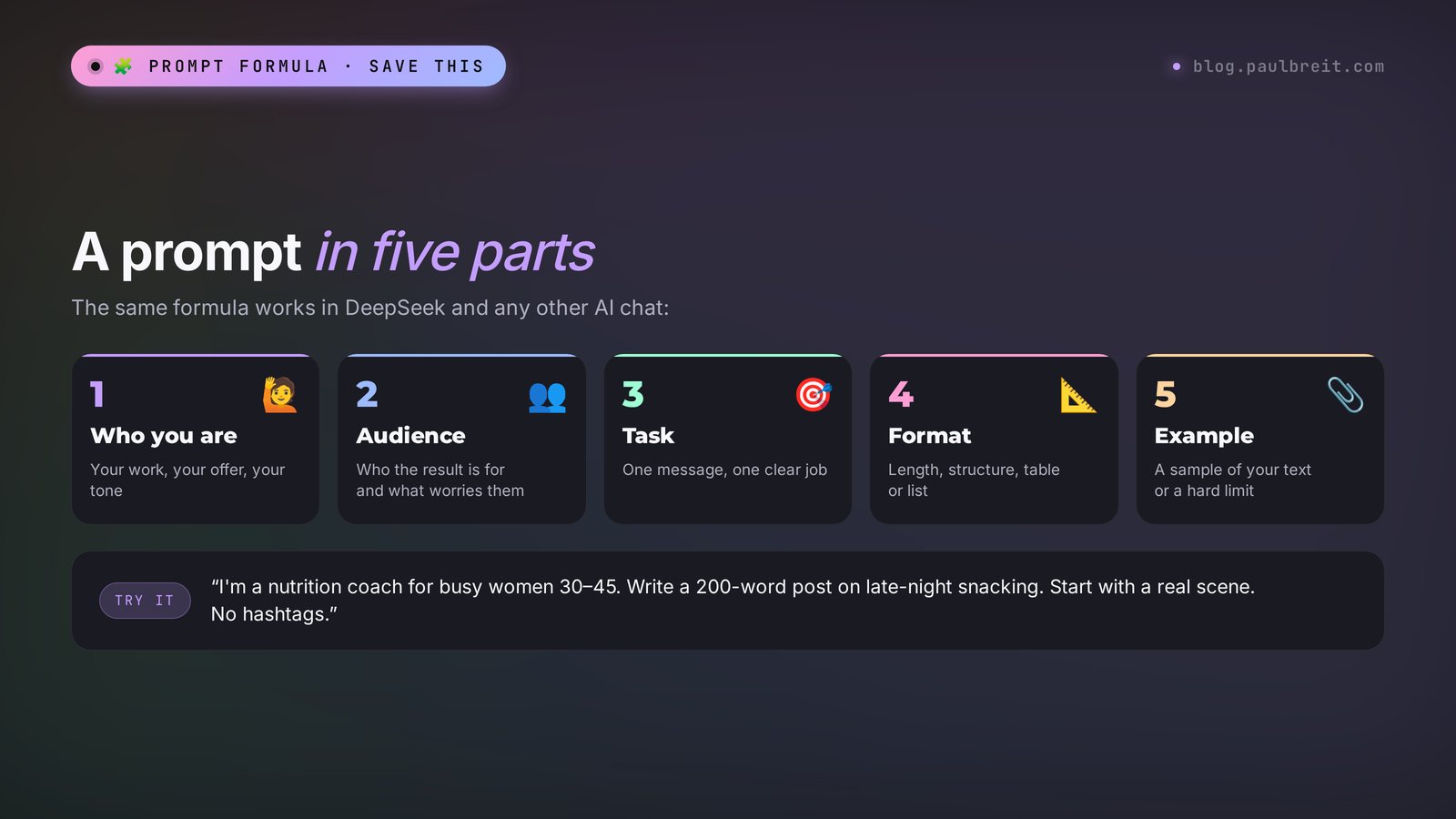
The working prompt formula is the same for any AI: who you are + who the result is for + what to do + in what format + an example or a limit. I broke it down in detail in how to write prompts: a five-part formula. Every prompt below is built on it. Copy them and swap out the details in square brackets.
Section 06Writing for work: 8 ready prompts
Writing is DeepSeek's strongest side. It holds structure well, doesn't lose the thread in long pieces, and writes clean, grammatical English. It has one weakness: without a sample of your style, it slides into a polished "magazine" tone full of pretty words. Two things fix that: context at the start of the chat and a sample of your own writing.
1. An introduction that saves time on every task
Remember this context for this chat. I'm a [nutrition coach] working online with [women aged 30–45 who are tired of diets and relapses]. I sell [8 weeks of coaching for $240]. My tone is warm, no scare tactics, no medical promises. When I ask for a piece of writing and you're missing details, ask up to three clarifying questions. Reply with one word: "Got it."Why it works: from here on in this chat, you can keep your requests short. "Write a post about late-night sugar cravings" – and DeepSeek already knows who it's for and whose voice to use.
2. Your blog's voice, from samples
Below are three of my posts that my audience liked most. Describe my style point by point: sentence length, how I open posts, words I like, how I address the reader, and what never shows up in my writing. From now on, write everything in this chat strictly according to that description.

[post 1]
[post 2]
[post 3]
Why it works: AI copies what it sees. Three real examples give it more than any adjectives like "write in a lively, heartfelt way."
3. A social media post
Write a [200]-word post for my [Instagram] on [why a Friday-night slip has nothing to do with weak willpower]. Open with a short scene from my client's life. Then give [3] simple steps she can take this weekend. Paragraphs of 2–3 sentences. No hashtags, no emoji on every line, no exclamation points. End with one question for my readers.Why it works: you set the length, the scene-first opening, the structure, and the ending. Banning exclamation points and emoji strips out the "AI-written" tone readers spot in the first line.
4. A content plan for the month
Build a content plan for [4 weeks] for my [Instagram], [3] posts a week. Alternate: a helpful post, a client story, an answer to a common question, and a sales post once a week. Format it as a table: week, day, post type, topic, opening line. The topics should form a chain: from the problem, to the solution, to my product [name and price].Why it works: a table with the opening line shows you at a glance whether a topic hooks or not. The problem – solution – product chain turns a pile of posts into a small funnel. For more ready-made commands, see social media prompts, and for a full evening routine, a content plan in one evening.
5. Replying to "it's too expensive"
A client sent me a DM: "[Sounds interesting, but $240 is a lot for me right now, I'll think about it]." Write 3 reply options: a soft one, one with a question, and one with a concrete breakdown of the math. Each under 70 words. No pressure, no discount in the first message, no words like "unique" or "exclusive." Explain which option fits which situation.Why it works: three options let you match the reply to the actual person, and the explanation teaches you to handle objections yourself, with or without AI.
6. A service description for your site or profile
Write a description of my service [a 60-minute session with a therapist on burnout, $55] for a page on my website. Structure: who it's for (3 situations a client will recognize themselves in), what happens during the session step by step, what the person walks away with, answers to 3 common doubts, and a call to book. Length up to [250] words. Use plain words, no therapy jargon.Why it works: the structure is borrowed from sales pages that convert well. All that's left for you is to swap generic phrases for your own details.
7. A short video script
Write a script for a [40]-second vertical video on [3 mistakes parents make when choosing a tutor]. Format: an opening line that stops the scroll, then 3 mistakes, one line each with a short explanation, and at the end a call to DM me the word [DIAGNOSTIC]. Write in spoken language, the way people talk out loud. Next to each line, in brackets, suggest what to show on screen.Why it works: DeepSeek doesn't shoot video, but it writes voiceover text well. The on-screen hints save you time on set. More on this in AI reels scripts.
8. A follow-up email after a webinar
I ran a free webinar on [how to reach $1,300 a month from consultations]. [120] people showed up, [45] stayed to the end. Write an email to people who registered but didn't attend. The goal is to get them to watch the replay within 48 hours. Subject line: 5 options. Body up to 170 words: one key idea from the webinar that sparks curiosity, a link to the replay, and the deadline when the replay comes down.Why it works: the email does one job, and five subject lines let you test which one gets opened. If you send newsletters regularly, see an email newsletter with AI.
If the text comes out too "smooth," don't rewrite it yourself. Tell DeepSeek: "Remove every pretty generalization and empty adjective. Keep facts, verbs, and specifics. Vary the sentence length." The second version almost always sounds more alive. To understand why AI writes in templates and how to fix it for good, read how to make AI write like a human.
Section 07Documents, spreadsheets, and screenshots: 3 prompts
The paperclip next to the input box lets you upload files: PDFs, Word files, text documents, spreadsheets, and images. You can add several files at once and ask one question about all of them. With memory of up to a million tokens, DeepSeek can comfortably chew through an entire book or the transcript of a multi-hour workshop.
9. A summary of a long document
Read the attached file. Write a summary for a busy person: the 5 main takeaways, one sentence each. Then 3 things I can apply in my work [an online English school for adults] this week. If the document contains numbers, pull them into a separate list. Don't add anything of your own; rely only on the text of the file.Why it works: "rely only on the text of the file" lowers the risk that the AI mixes in its own guesses.
10. Reading a stats screenshot
The screenshot shows my [Instagram] insights for the past month. Break it down: which posts got the most views and reactions, what they have in common in topic and format, and which ones flopped. Give me 3 conclusions and 5 topics for next month that build on what worked.Why it works: since the September update, DeepSeek recognizes images by itself, so there's no separate mode to turn on. It reads a screenshot full of numbers the same way it reads text. Just make sure the screenshot doesn't show your followers' names or photos.
11. Analyzing a sales spreadsheet
The file is an export of my sales for the past six months: date, product, price, client source. Calculate revenue by month, average order value, and each source's share of revenue. Find which source brings in the highest-paying clients. Show the result as a table, and under it, 3 conclusions in plain words: where I should put more of my time.Why it works: turn on reasoning mode for calculations. The model will lay out how it did the math, and you'll spot any error in a formula right away. For more spreadsheet tricks, see AI for spreadsheets.
Before uploading, remove clients' full names, phone numbers, addresses, ID numbers, and health information from your files. A sales export can keep the product names and amounts; delete the column with last names. More on privacy in Section 14.
Section 08Math and reasoning: 3 prompts
Math and logic are where DeepSeek first made its name. Its reasoning models solve math and programming problems at the level of the best Western ones. For you, that means DeepSeek is good at unit economics, comparing options, and finding holes in a plan. Turn on DeepThink for the prompts in this section.
12. Pricing a new product
Help me price a group program. Inputs: [8 weeks, 2 calls a week at 90 minutes each, up to 12 people per group, my 1:1 session costs $65 an hour, platform costs $40 a month, I set aside 25% for taxes]. Suggest 3 price points: budget, optimal, and premium. For each, calculate how much I earn per group after costs and taxes, and what that comes to per hour of my time. Compare it to my 1:1 session.Why it works: you gave it every input, so the model has nothing to make up. The comparison with your 1:1 rate shows right away whether a group is worth launching at all.
13. Stress-testing your launch plan
Here's my launch plan for [an online drawing course for adults]: [paste the plan point by point with dates]. Find the 5 weakest spots: where I'm overestimating conversion, where I'm short on time, where I have no backup option. For each weak spot, suggest a specific fix. Be strict: I need tough criticism, skip the praise.Why it works: AI tends to praise by default. A direct request for strict criticism changes the tone of the answer, and reasoning mode makes the model walk through the plan step by step.
14. How many leads you need to hit your goal
I want to earn [$2,000] a month from consultations at [$100] each. About [20%] of people who book a free discovery call end up buying. About [5%] of people who message me end up booking a call. Calculate how many calls and how many incoming messages I need per month and per week. Show the math step by step. Give me 3 ideas for improving the weakest number in this chain.Why it works: working backward from your goal to incoming messages shows right away whether your current flow of people is enough. It's a simple model of a sales funnel, and DeepSeek calculates it without mistakes as long as the inputs are honest.
Section 09Web search: 3 prompts
A regular model only knows the world up to the date its training ended. To have DeepSeek look at fresh information, turn on the Search button next to the input box. Then it visits websites itself, assembles an answer, and shows links to its sources. Always open the links: search speeds up your work, and you still have to check the facts.
15. What your competitors are offering
Search the web for 5 online schools or specialists selling [SAT prep courses]. For each, list the format, the price, the main promise on their website, and what sets them apart from the rest. Format it as a table with links. Then suggest 3 ways I can stand out from them.16. Fresh industry news for a post
Find the 5 biggest news stories from the past month on [online education in the US]. For each: one sentence on what happened, a link to the source, and why it matters to my clients [parents of high school students]. Pick one story worth writing a post about and suggest an opening line.17. Fact-checking before you publish
I want to say this in a post: "[the claim you plan to publish]." Check it against reliable sources. Tell me whether it's true, partly true, or false, and give links. If a number is outdated, find the current one.Why it works: make the third prompt a habit. AI sometimes confidently names numbers that don't exist, and search with links lets you check them in a minute.
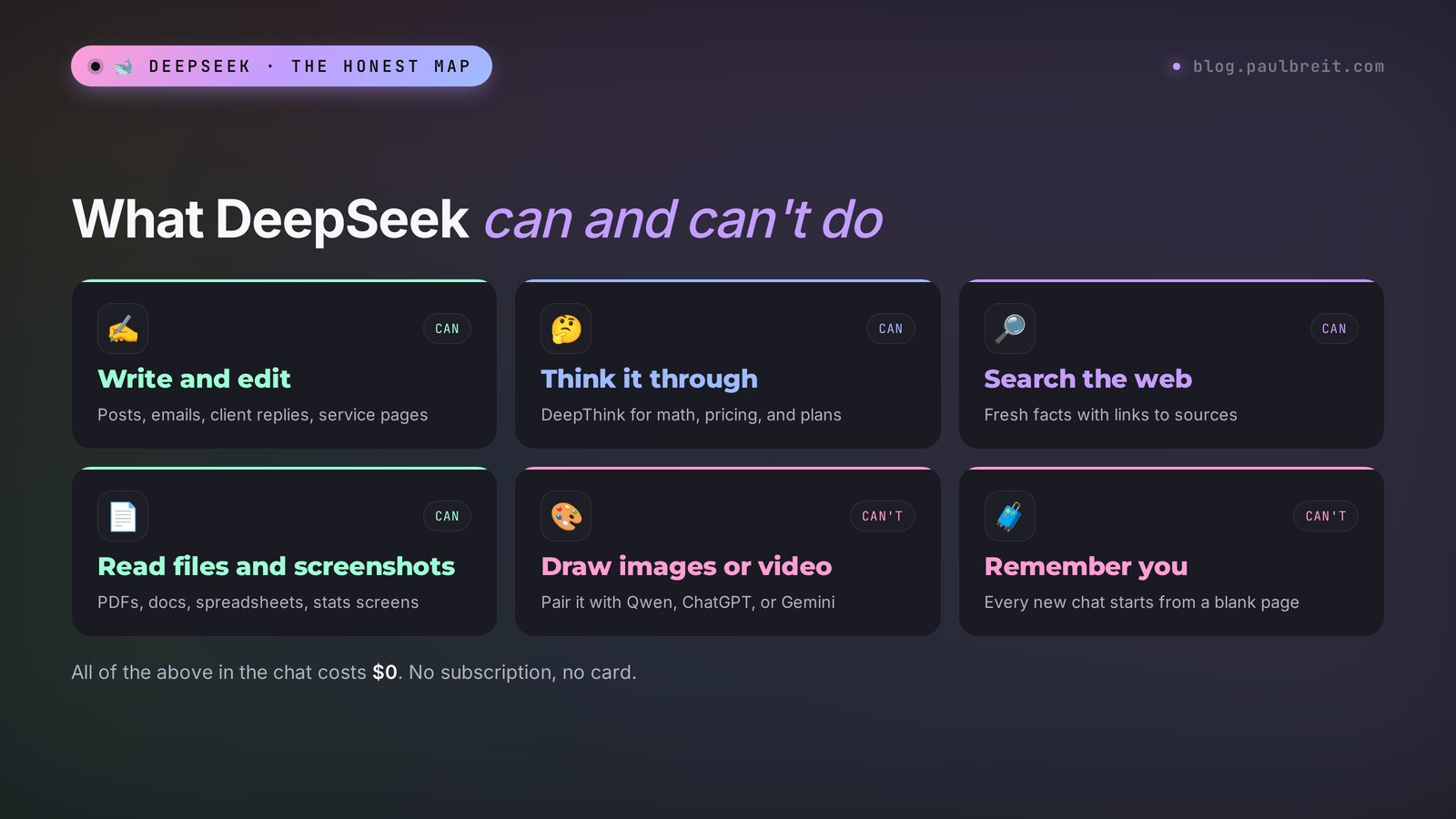
Section 10What DeepSeek can't do and what to pair it with
DeepSeek has honest gaps, and it's better to know them in advance than to spend an evening hunting for a button that doesn't exist.
- It doesn't draw images. Ask it for a cover image and it will offer a text description or some code. For images, use Qwen with its Qwen-Image model, ChatGPT, or Gemini. A good combo: DeepSeek writes a detailed description of the picture, and another tool draws it. Ready-made ideas are in AI photo prompt ideas, and a comparison of the tools in AI image generators.
- It doesn't make video. Qwen with its Wan model turns text into video, and so do Gemini and a number of dedicated services; see AI video from text. DeepSeek is useful here as the scriptwriter – see prompt 7.
- There's no voice conversation. You can't talk to DeepSeek out loud the way you would with a person, at least for now. You can dictate a prompt with the microphone on your phone's keyboard and send it as regular text.
- It doesn't remember you between chats. Every new chat starts from a blank page. Save your introduction paragraph from prompt 1 in your notes and paste it at the top of every work chat.
- It doesn't publish or send anything. It won't post to your account or reply to a client by itself. That kind of automation takes AI agents, which is a separate level; start with what an AI agent is.
DeepSeek for writing, math, and documents. Qwen for images and video. The free tier of ChatGPT or Gemini for quick illustrations and voice. These three are enough to cover nearly all the content a small business needs, and you don't pay a cent. The full overview of free options is in free AI tools.
Section 11How much DeepSeek costs
The chat on the website and in the apps is free. DeepSeek has no subscription like ChatGPT Plus for regular users, and there are no paid features inside the chat. Everything in this guide is available at no cost.
The only people who pay are those who plug DeepSeek into their own software through the API, for example into a chatbot on their website or an automated lead-processing flow. There you pay for the volume of text the model reads and writes, and it costs fractions of a dollar per million tokens. By market standards, it's one of the lowest prices among strong models, which is why chatbot developers love DeepSeek so much. Rates drop even lower during the night in Beijing.
Topping up an API balance takes a bank card. If you only use the chat, you can forget this paragraph.
If someone offers to sell you DeepSeek Pro, DeepSeek Premium, or "extended access," it's not an official product. The company has no paid subscription for the chat. Most likely, someone is reselling a free service.
Section 12DeepSeek on your own computer
Since DeepSeek's models are open, you can download them and run them on your own machine with no internet connection. Then your data stays on your computer, and you could work on a plane. It sounds tempting, but you need to understand the scale.
The full V4 Flash model weighs more than 160 gigabytes and needs server hardware with several expensive graphics cards. A regular laptop can't handle it. For home use, there are lightweight versions of the older R1, from 7 to 14 billion parameters. You can run them with the free apps LM Studio or Ollama on a computer with 16 gigabytes of RAM or more.
An honest word on quality: the lightweight versions are noticeably weaker than the cloud chat. They get lost in long texts, write worse, and run slowly on modest hardware. I'd only consider local DeepSeek in one case: if you need to process confidential documents and you're willing to live with lower quality. For posts, emails, and plans, the cloud chat is many times more convenient.
Section 13DeepSeek vs ChatGPT, Claude, Gemini, and Qwen
A quick comparison, so you can see where DeepSeek fits among the tools people use most:
| AI | Price | Images | Where your data goes | What it's best at |
|---|---|---|---|---|
| DeepSeek | Free | No | Servers in China | Logic, math, long texts, documents |
| Qwen | Free | Yes, and video | Servers in China | All in one: text, images, video, simple web pages |
| ChatGPT | Free plan, paid from $20/month | Yes | US company, OpenAI | Versatility, voice, the biggest ecosystem |
| Claude | Free plan, paid from $20/month | No | US company, Anthropic | The most natural writing, long documents, code |
| Gemini | Free plan and paid plans | Yes, and video | US company, Google | Built into Gmail, Docs, and Drive; video and audio |
My practical take: if you want a strong AI for writing and thinking tasks and don't want another subscription, DeepSeek makes an excellent main tool. Add Qwen for images, and you have a free kit for every day. If you're willing to pay $20 a month, Claude writes the most natural copy of the bunch, and ChatGPT is the handier all-round assistant with voice. For a direct head-to-head of those two, read Claude vs ChatGPT, and to pick tools task by task, open the best AI tools of 2026.
If you decide to try Claude at some point, sign up on the official site at claude.ai. The free plan is enough to compare it with DeepSeek on your own tasks: give both the same prompt with the same samples of your writing and read the two answers side by side. That ten-minute test tells you more than any review.
Section 14Privacy, censorship, and mistakes
Three things you need to know before DeepSeek becomes your everyday assistant.
Where your conversations are stored
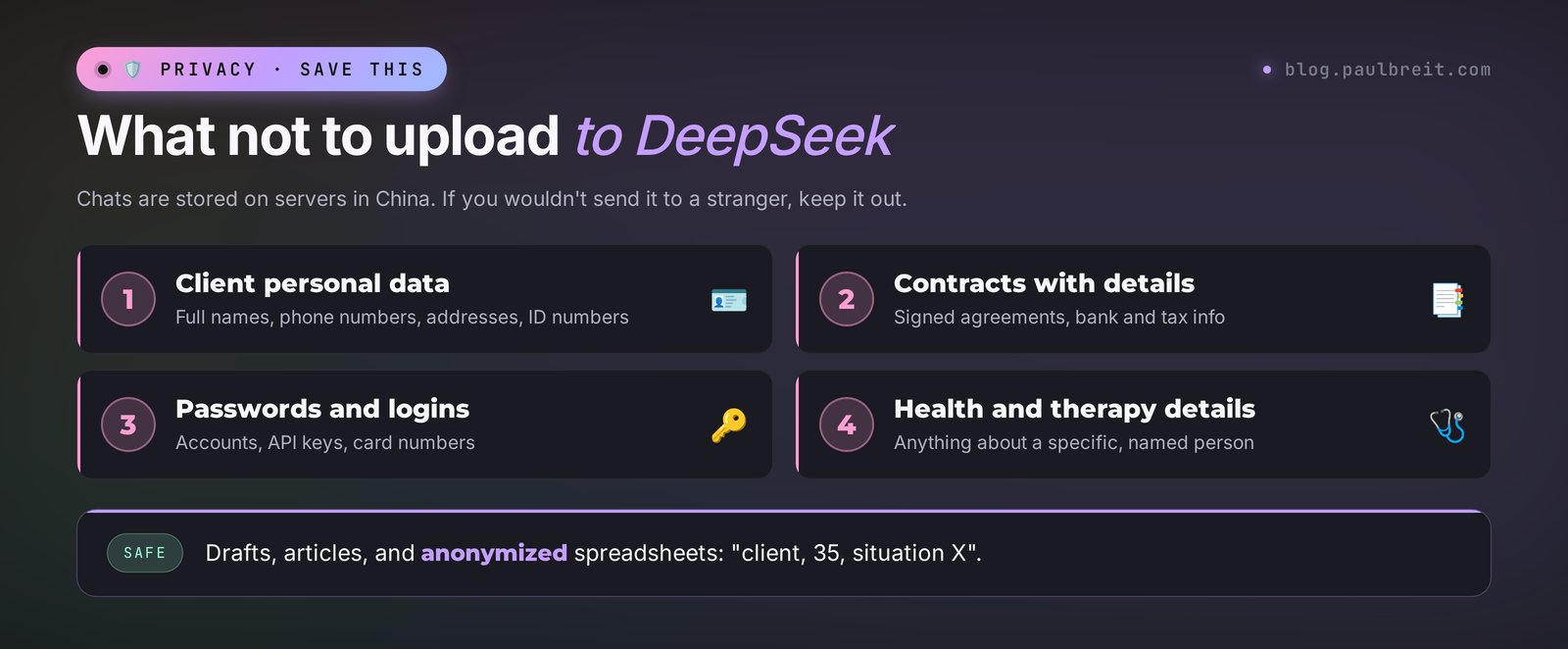
The company stores user data on servers in China; its privacy policy says so directly. Your conversations may be used to improve the models. Because of that, in 2025 a number of countries restricted DeepSeek on government devices, and some US states did the same for state employees. For you, the practical rule is simple: anything you wouldn't send to a stranger, don't send to DeepSeek either.
- Don't upload clients' full names, phone numbers, addresses, or ID numbers.
- Don't paste contracts with banking or tax details, logins, passwords, or card numbers.
- Don't share medical or psychological details about specific people. If you need to work through a case, anonymize it: "female client, 35, here's the situation."
- You can delete your chat history in your profile settings. Do it for conversations where you discussed anything sensitive.
If your work involves sensitive information by default – therapy, coaching around health, legal or financial advice – keep DeepSeek for the public side of your business: posts, emails, course outlines, pricing math. Anything tied to a real client stays in tools your clients have agreed to and your local rules allow.
Censorship
DeepSeek operates under Chinese rules, so on topics like Chinese politics, its history, and disputed territories, it gives evasive answers or refuses to talk. For marketing, sales, and teaching tasks, this almost never gets in the way. If you need analysis of political questions, use a different AI.
Mistakes and made-up facts
Like any AI, DeepSeek is sometimes confidently wrong: it cites statistics that don't exist, mixes up dates, attributes quotes to the wrong people. Reasoning mode cuts down on logic errors, but you still need to check the facts. Every number and every name from an answer that's headed for publication should be double-checked with search and links (prompt 17) or against the original source.
Section 15When something goes wrong
The most common beginner problems and what to do about them:
| What happened | Why | What to do |
|---|---|---|
| "Server is busy" | Peak load, often during the daytime in Beijing, which is evening and night in the US | Wait a couple of minutes and hit retry. US mornings are usually quieter |
| The email code doesn't arrive | The email went to spam or got delayed | Check Spam and Promotions, request the code again, or sign in with Google |
| Your phone number isn't accepted | Phone sign-in doesn't cover every country | Sign up with email or Google |
| Chinese characters slipped into the answer | The model occasionally mixes languages | Add "Answer in English only" to the end of your prompt |
| The text is generic and faceless | The AI knows nothing about you or your style | Give it context (prompt 1) and three of your posts as samples (prompt 2) |
| The answer cut off mid-sentence | The answer was too long for one go | Type "continue" or ask it to split the answer into parts |
| The chat asks you to start a new conversation | The conversation hit its length limit | Ask for a short summary of the chat, open a new one, and paste the summary as the first message |
| The site won't open at all | An outage on DeepSeek's side | Open the app on your phone, check again in an hour, and use Qwen or Gemini in the meantime |
| The AI refused to answer | The topic hit a restriction | Rephrase the prompt without political context, or use a different AI |
Section 16Your first week with DeepSeek: a checklist
To make DeepSeek part of your daily work, go through this week step by step. Twenty to thirty minutes a day is enough.
Day 1. Sign-up and introduction
Sign up on the website and in the app. Write your introduction paragraph (prompt 1) and save it in your phone's notes.
Day 2. Your voice
Give DeepSeek three of your best posts (prompt 2). Save the style description next to your introduction paragraph.
Day 3. Content plan
Build a plan for the month (prompt 4). Pick one post from it and take it all the way to publication (prompt 3).
Day 4. Sales
Prepare replies to your clients' three most common objections (prompt 5) and a description of your main service (prompt 6).
Day 5. Numbers
Turn on DeepThink and calculate how many leads you need to hit your income goal (prompt 14). Check your product's price (prompt 12).
Day 6. Documents and the market
Upload a long document that's been sitting unread for ages and get a summary (prompt 9). With Search on, build a competitor table (prompt 15).
Day 7. The stack
Add a second tool for images, for example Qwen, ChatGPT, or Gemini. Make a cover image for the post from Day 3: DeepSeek writes the description, the second tool draws it.
By the end of the week you'll have a saved introduction, a description of your voice, a month of topics, objection replies, the math on your goal, and a pairing for images. That's a working system, and it cost you nothing but a few evenings. The next step, if you want a whole bank of ready commands, is the AI prompt library.
Section 17The whole path in a minute
- DeepSeek is a free Chinese AI chat at chat.deepseek.com that opens directly in the US and most of Europe.
- Sign in with email or Google; no phone or card needed. Install the app only from the developer DeepSeek.
- Since September 10, 2026, the chat runs V4.1 Flash: it decides how long to think and understands images.
- Turn on DeepThink for math and plans, Search for fresh facts, and use the paperclip for files.
- Write prompts with the formula: who you are, who it's for, what to do, format, example.
- Give the AI three of your posts, or your copy will come out faceless.
- DeepSeek doesn't make images or video; pair it with Qwen, ChatGPT, or Gemini.
- Data is stored in China: no client personal data, contracts, or passwords.
- Check numbers and facts from its answers before you publish.
FAQFrequently asked questions
Is DeepSeek free?
Yes. The chat at chat.deepseek.com and in the official apps is free, and there is no paid subscription for regular users. Writing, DeepThink reasoning mode, web search, and document and image uploads are all free. Only developers who connect DeepSeek to their own software through the API pay.
Is DeepSeek available in the US and Europe?
Yes. As of October 2026, chat.deepseek.com opens directly in the US and most of Europe, and the app is in the App Store and Google Play. In 2025, some countries and US states restricted it on government devices, and Italy blocked the app, but regular users elsewhere can use it freely. Occasional outages from server load usually clear within an hour or two.
How do I sign up for DeepSeek?
Open chat.deepseek.com, choose to sign in with email or a Google account, enter the code from the email, and create a password. Any email works, including Gmail, Outlook, and iCloud. Phone sign-in doesn't cover every country, so email is the more reliable option.
Does DeepSeek work in English and other languages?
Yes. DeepSeek understands English and many other languages and answers in the language of your prompt. Occasionally a few Chinese characters slip into an answer; if that happens, add "Answer in English only" to the end of your prompt.
What is DeepThink in DeepSeek?
It's reasoning mode. When it's on, the AI first shows its thinking about the task and then gives the answer. It's slower, but more accurate on calculations, comparisons, plans, and logic problems. For regular posts and emails, you can leave it off.
Can DeepSeek create images?
No. DeepSeek understands uploaded images and screenshots, but it doesn't create images or video itself. For images, use Qwen, ChatGPT, or Gemini. DeepSeek is handy for writing a detailed image description for those tools.
Is it safe to upload documents to DeepSeek?
User data is stored on servers in China and may be used to improve the models. Work drafts, articles, and anonymized spreadsheets are fine to upload. Client personal data, contracts with banking details, passwords, and health information should not go into DeepSeek.
Why does DeepSeek say "server is busy"?
That's how the chat signals peak load. Wait a couple of minutes and hit retry. Load is usually highest during the daytime in Beijing, which is evening and night in the US. In US mornings the service usually responds faster.
How is DeepSeek different from ChatGPT?
DeepSeek is completely free, with no paid plan for the chat, and it's strong at logic, math, and long texts. ChatGPT has a free plan and paid plans from $20 a month, and it can draw images, hold voice conversations, and offers more built-in tools. For writing and thinking tasks at no cost, DeepSeek is a good choice.