How to Use Character AI in 2026: A Beginner's Guide
Character AI is a service where you talk to an AI that plays a role: a historical figure, a language tutor, a picky client, or a character you invented yourself. In this guide I show you how to use Character AI from the first sign-up: how to find the official site, how to keep a character in character and in your language, how to build your own from scratch, and how to turn a "toy" into a practice partner for sales, negotiations, and presentations. I also cover pricing, the 18+ rule, and what you should never type into a chat like this. For everyone who sells services, courses, and consulting and wants to know how Character AI can help at work.
To use Character AI, open character.ai or the Character AI app, sign in with Google, Apple, or email, and enter your real age: open chat is available only from 18. Find a character through search or tap "Create" and describe your own. Set the scene in your first message, fill in a short Persona about yourself, and give your character a greeting and two or three example dialogs, and it will stay in character for the whole conversation. The basic plan is free, and c.ai+ costs $9.99 a month. Never send your clients' personal data to the chat.
For anyone who heard about Character AI from their kids, friends, or a Reel and wants to figure it out without the pain. And for anyone looking for a way to rehearse a sales call, a hard conversation, or a talk with a partner who never gets tired and never takes offense. If you're still choosing your first AI, start with the best AI tools of 2026 and come back here for role-play scenarios.
What's inside
- What Character AI is in 2026
- Where Character AI works and how to spot the real site
- Signing up, step by step
- How to keep characters in character and in your language
- Your first conversation: buttons and tricks
- How to create your own character
- 8 characters for work
- Voice, calls, group chats, and stories
- How much Character AI costs
- The 18+ rule and kids
- Privacy: what not to type into the chat
- Character AI, ChatGPT, Claude, and others
- When something goes wrong
- Your first-week checklist
- The whole path in a minute
Most adults find out about Character AI the same way. A kid or a nephew shows you their phone, and they've been chatting with Harry Potter for half an hour. Or a clip pops up in your feed where someone argues with an AI Napoleon. The first reaction makes sense: another toy, I don't have time for this.
Now picture something else. Tomorrow you have a call with a client who will definitely say "that's too expensive." You know it in advance, and you still stumble every time. What if tonight you could run that conversation ten times in a row with a partner who pushes back exactly like your client does? No witnesses, no awkwardness, with a review after every attempt.
That's the same Character AI. A service where the AI holds a role and stays in it until you tell it to stop. Kids use it to play. You can use it to practice. The only difference is who you put on the other end of the chat.
Inside: what Character AI can do in 2026, how to sign up safely, how to keep a character consistent, how to build your own from a template, 8 ready-made characters for work, pricing, the rules for kids, and an honest comparison with ChatGPT and Claude. Read in order or jump around with the table of contents.
Section 01What Character AI is in 2026
Character AI is a platform where an AI talks to you as a character. A character is a set of descriptions: who they are, how they talk, what they know, how they behave. The AI reads that description and answers the way that character would. You send a message, the character replies, and the conversation flows like a chat in a messaging app.
The service was launched in 2022 by Noam Shazeer and Daniel De Freitas, former Google engineers who had worked on the conversational model LaMDA. In 2024, Google signed a licensing deal with Character AI and brought both founders back. The service itself stayed an independent company, and since summer 2025 it has been run by Karandeep Anand.
What you need to know as of early October 2026:
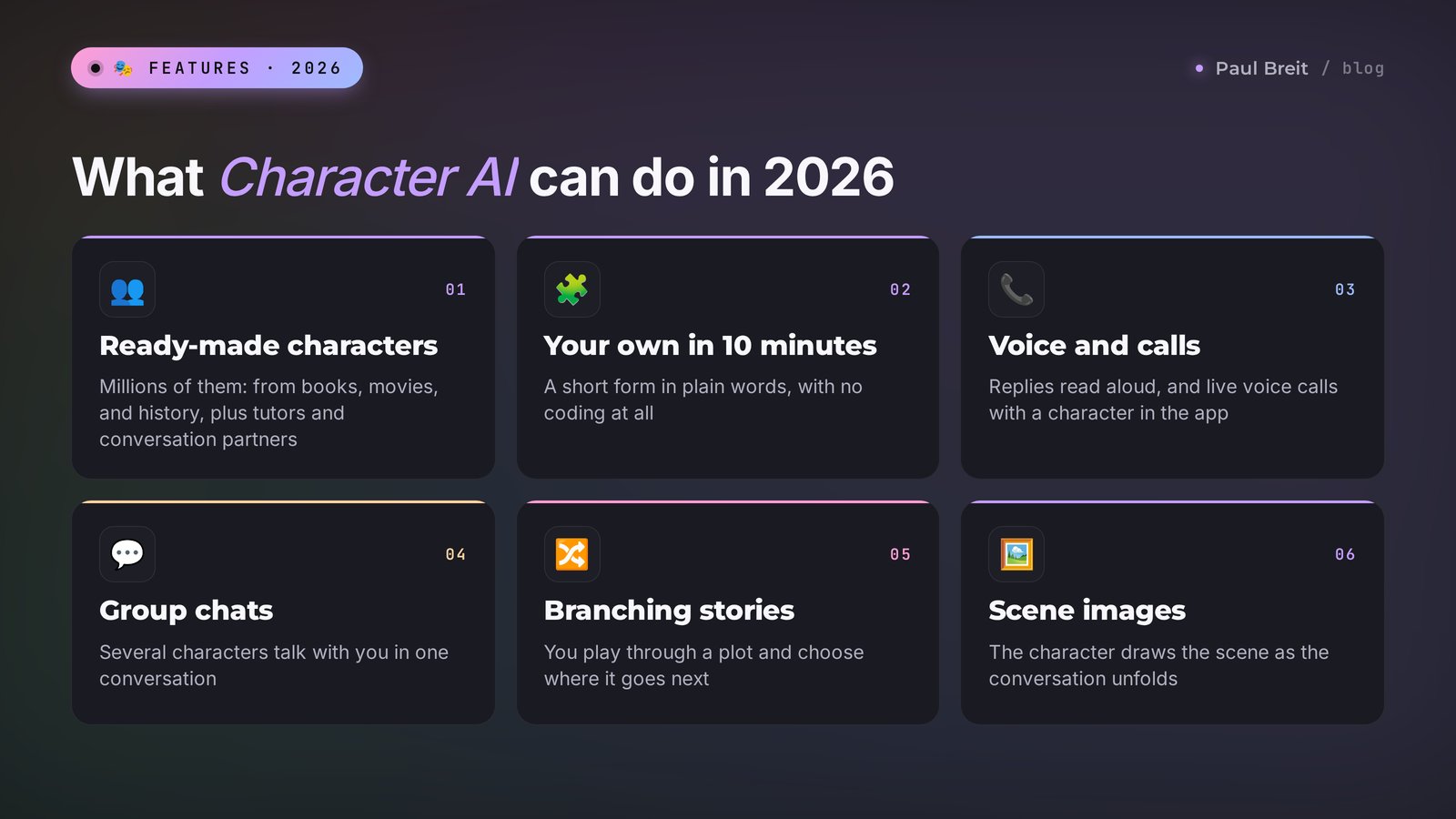
- Millions of ready-made characters. Users create them: characters from books and movies, historical figures, tutors, conversation partners, game worlds. You find the one you need by searching for a name or a topic.
- Your own character in 10 minutes. The "Create" button opens a form with a few fields. You fill it in with plain words, no coding.
- Its own models. Character AI answers with its own AI models trained specifically on dialog. In spring 2026, the company made PipSqueak 2 its main model: according to the developers, it holds a character's personality better and remembers details you mentioned at the start of the conversation.
- Voice. You can give a character a voice and listen to replies out loud, and in the app you can call the character and talk in real time.
- Images, stories, and group chats. A character can draw a scene for your conversation, and in the stories format you play through a plot with branching choices. In a group chat, several characters talk with you at once.
- Strict rules for teens. Since November 25, 2025, users under 18 can no longer have open-ended chats with characters. More on that in the section about age.
Analysts estimate the service has about 20 million monthly users. Most of them come to have fun: to chat with a favorite character or play a text adventure. The same engine works great for practicing skills, though, and that's what we'll focus on.
Character AI is a role-play AI. Its strong side is holding a persona and keeping a conversation alive. Its weak side is precise facts, long texts, and working with documents. Keep that split in mind and you won't be disappointed when you ask a character to write a sales proposal. If words like "model" and "context" still sound fuzzy, take a look at 30 AI terms explained in plain words.
Section 02Where Character AI works and how to spot the real site
Short answer: in the US, the UK, Canada, Europe, and most other countries, character.ai and the apps open directly, on a regular home or mobile connection. You don't need any workarounds, and the free plan doesn't ask for a card.
There are still three things worth knowing up front:
- Peak-hour slowdowns happen. Character AI is popular, and in the evenings and on weekends the free plan can make you wait in line, load slowly, or show errors at sign-in. If the site won't load, try the app or another network: on mobile data and on Wi-Fi the picture is often different. Give it 10–15 minutes before you assume something is broken.
- The app has one official publisher. In Google Play and the App Store, look for Character AI from Character Technologies. Search results are full of look-alike apps with similar icons and names like "AI Character Chat." They aren't connected to the company, and many of them push paid subscriptions from the first screen.
- The website works on your phone too. If the app isn't available in your app store account, open character.ai in your phone's browser. It works the same way, and you can add an icon to your home screen through the browser's "Add to Home Screen" menu.
If role-play is secondary for you and you mostly need a work assistant, start with the free AI tools of 2026. That list covers the everyday helpers for copy, research, and planning.
Search results are full of sites and chatbots that use the Character AI name and promise an "unfiltered version" or "unlimited access" for a fee. Most of them are middlemen: they forward your messages to someone else's AI, take your money, and keep your chats. There's one official address, character.ai. Download the app only from the developer Character Technologies.
Section 03Signing up for Character AI, step by step
Signing up takes three minutes. Let's walk through it on a computer. The steps in the app are the same.
Open the official site
Type character.ai in the address bar. Check the address with your own eyes: exactly character, dot, ai. The home page shows popular characters, but you can only message them after you sign in.
Click "Sign up" or "Log in"
The button sits in the top right corner or at the bottom of the left column. Choose a method: a Google account, Apple ID, or email. With email, the service sends you a sign-in link, so you don't need to come up with a password. If nothing arrives within five minutes, check your Spam and Promotions folders.
Enter your date of birth honestly
The service asks your age, and it decides what you get: from 18 you have open chat, below that only limited formats. Don't make yourself younger or older. If the system decides the data doesn't add up, it asks you to verify your age, and chat access may be closed until the check is done.
Pick a username
This is the handle other people see if you create public characters. You don't have to use your full name. For work experiments, something neutral is fine.
Install the app on your phone
In Google Play or the App Store, find Character AI from Character Technologies and sign in the same way you did on the site. Your chat history and your characters sync. Calls with characters work best from your phone.
Fill in your Persona
Settings have a "Persona" section: a short description of you that characters see at the start of a conversation. Write two or three lines: who you are and how to address you. For example: "My name is Anna, I'm a nutrition coach and I work online. Keep it friendly and professional." Characters will take this into account without reminders.
The interface is in English, and it's simple: there aren't many buttons, and the conversations themselves happen in whatever language you write in. Below I'll show you how to keep a character from drifting off script.
Section 04How to keep characters in character and in your language
The most common complaint sounds the same everywhere. A character starts strong, and three messages later it slips. It forgets who it is, turns into a polite generic assistant, agrees with everything you say, or suddenly switches language if you chat in Spanish, French, or anything other than English.
The reason is simple. The AI reads the character's greeting, description, and example lines at the start of every conversation and leans on them. If those are vague, or written in a different language from yours, the character drifts toward the most generic version of itself. You fix it with five techniques, from easiest to most reliable.
Technique 1. Set the frame in your first message
Let's stay in this scene for the whole conversation. You're my client on a video call, and you're hesitant about the price. Stay in character even if I ask something off-topic. Reply only in English.This works with most characters for the first 15–20 messages. After that, the role or the language can start to drift, especially with characters whose description was written loosely.
Technique 2. Swipe and rate
If a character breaks role or answers in the wrong language, don't keep the conversation going on top of that reply. Swipe the reply to the right to get another version and pick the one that fits. Rate the bad version with one star. The AI looks at the whole chat history, and every off-character reply you leave in place pulls the next one in the same direction.
Technique 3. A Persona that anchors the scene
The description of yourself from step 6 of sign-up works as an anchor too. Add the details that matter for your practice: your role, your language, how the character should treat you. For example: "I only speak Spanish" if you're practicing Spanish, or "I'm a consultant who sells a $400 program" if you're rehearsing a sales call.
Technique 4. Example dialogs
Two or three short example exchanges in the character's Definition field shape the personality more than anything else. The character copies their length, tone, emotions, and actions in asterisks. If you want a skeptical client, show the client being skeptical in the examples.
Technique 5. Your own character, written from scratch
The most reliable path. When the name, description, greeting, and example lines are all written the way you want the character to sound, the AI keeps that voice for the whole conversation. Add a direct instruction to the description:
Always stay in character and never describe yourself as an AI. Reply only in English, in natural, conversational language with short sentences. Keep the tone of a real person on a business call.I'll show you how to build a character like this in Section 06. And if you care about high-quality writing from AI in general, take a look at the best AI for writing, where tools are compared by how well they write.
Character AI characters sound most alive in English. In other languages they're grammatical, but now and then you'll catch an odd turn of phrase or a line that reads like a translation. For practicing a conversation, that's no big deal. For finished texts you plan to publish, use ChatGPT or Claude.
Section 05Your first conversation: buttons and tricks
Open any popular character and send them a couple of messages. While you're getting your bearings, here's what's on the screen and how to use it.
| On screen | What it does | When you need it |
|---|---|---|
| Arrows on a reply | Show another version of the same reply | You don't like the reply, it broke character, or it switched language |
| Stars under a reply | A rating from 1 to 4 | Helps the character learn which replies work for you |
| Edit | Lets you change the text of the character's reply | Cut what's extra so the conversation goes where you need it |
| Pin a message | An important line always stays in the chat's memory | Price, terms, scenario details that can't be forgotten |
| Chat memory | A field where you write facts for the character | "My client owns a coffee shop, budget $700" |
| New chat | Starts a conversation with the same character from scratch | Repeat a practice session from the beginning |
| Voice | Reads replies out loud | Practicing by ear, foreign languages |
Button names change over time, but the logic stays the same: swipe a reply, rate it, edit it, pin what matters. Four actions that let you steer the conversation.
Three tricks that improve a conversation right away
Write actions in asterisks. That's the convention in Character AI: text between asterisks counts as an action or a stage direction. For example: "*sits down across from you and opens a notebook* Tell me what happened." The character picks up the format, and the scene comes alive.
Step out of the role in parentheses. If you need to say something to the character "off camera," write it in parentheses: "(pause, step out of the role and tell me how I handled that objection)." Most characters understand this signal, answer as an assistant, and then return to the role.
Set the frame in your first message. The more precisely you describe the scene at the start, the longer the character stays in it. "We're on a call, I'm selling you a weight-loss program, and you're hesitant about the price" works much better than "let's talk."
How memory works
A character remembers the latest messages of a conversation, though not forever. In a long chat, early details start to slip: the client's name, the amount, what you agreed on. Memory improved noticeably in spring 2026, but the rule stays the same. Put anything that matters for the whole conversation into pinned messages or the chat memory field. And start a new chat for every new practice session, so the character doesn't get confused by old attempts.
Section 06How to create your own character
Ready-made characters are good for getting to know the service. For work, you almost always need your own: built around your niche, your client, and your task. It takes 10–15 minutes, and you don't need to code anything.
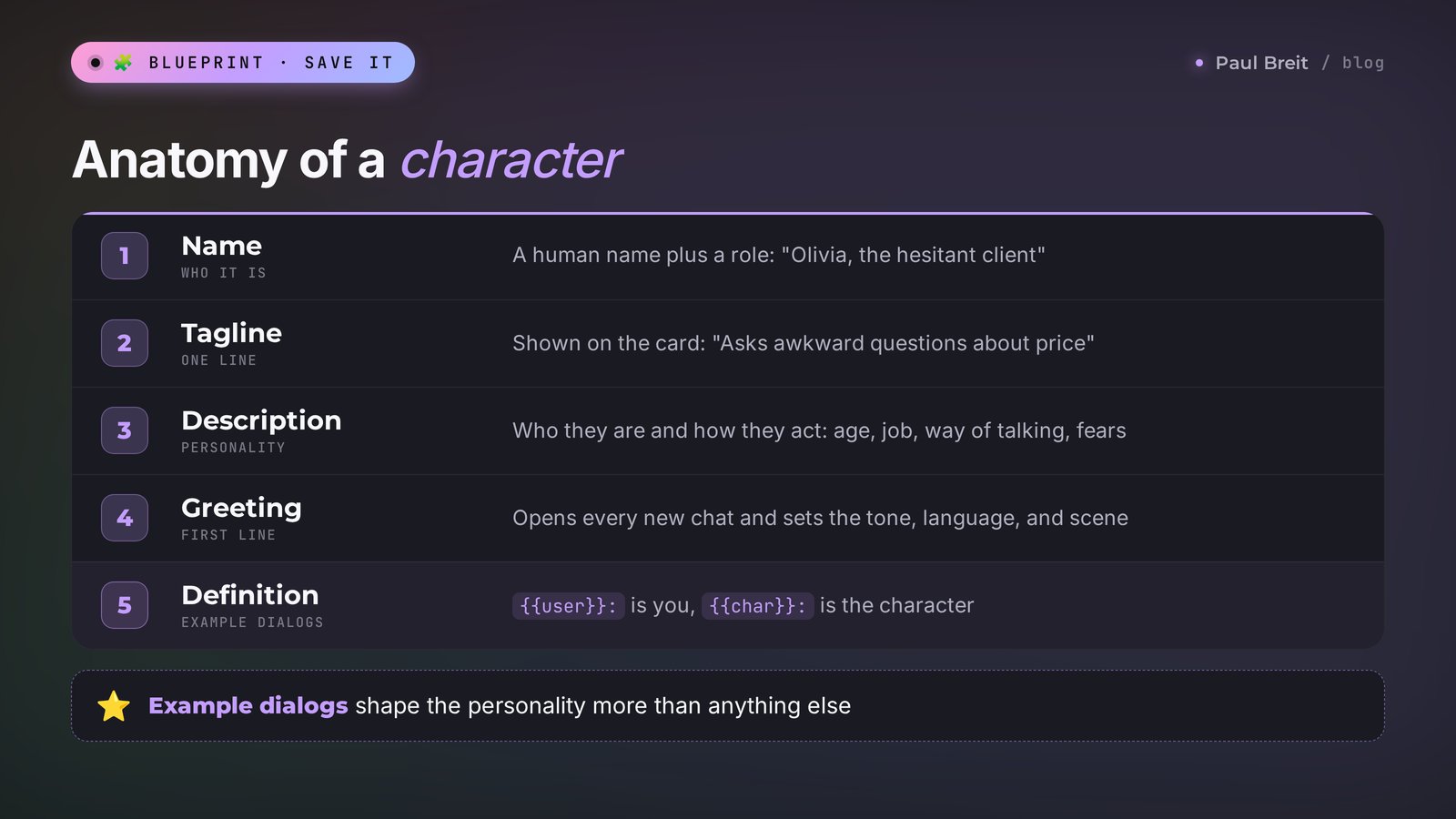
Click "Create" (or the plus in the app) and choose to create a character. A form opens. Let's go through it field by field.
Name
What the character is called. For a practice partner, a regular human name plus a role works best: "Olivia, the hesitant client." That way you see who it is in your chat list right away.
Tagline
One short line under the name, shown on the character's card. "Asks awkward questions about price and results."
Description
A few sentences about who this is and how they behave. Write in the third person and be specific: age, job, personality, way of talking, what they want, what they're afraid of.
Greeting
The character's first line in every new chat. The most underrated field: it sets the tone, the language, and the scene. Write it the way the character would really open the conversation.
Definition
An extended field hidden in the advanced settings. This is where detailed behavior rules and example dialogs go. The example dialogs have the strongest effect on how the character talks.
Voice, image, and visibility
Pick a voice from the library if you plan to listen to replies. You can upload your own image or generate one. Visibility: "Private" means only you, "Unlisted" means anyone with the link, "Public" means everyone. For work practice partners, choose "Private."
A complete character template
Here's a ready example you can copy field by field and adapt to yourself. It's a client who wants to buy an online program but has doubts.
Name:
Olivia, the hesitant clientTagline:
Wants results, but is afraid of wasting money againDescription:
Olivia is 41, works as a bookkeeper at a small company, and has two kids. She has bought online courses twice before and didn't finish either. Now she's considering the program [your product] for [price]. She's polite but guarded, asks specific questions, and wants examples. Objections: too expensive, no time, not sure it will work for her specifically, needs to talk it over with her husband. She agrees to buy only if she feels heard and believes the result is real. Always stay in character and reply in natural, conversational English.Greeting:
*joins the call a little late* Hi, sorry, I just got free. I looked at your page, but honestly, I have more questions than confidence right now. How much is it, and what exactly do I get?Definition (example dialogs):
{{user}}: The program is $400.
{{char}}: Wow. *sighs* That's a real amount for me. Last year I paid almost that for a course and dropped out in week three. Why would it be different with you?
{{user}}: What got in the way last time?
{{char}}: Probably that it was all recorded and nobody checked whether I did the homework. I'm not great at being my own boss. I need someone who checks in.
In Character AI, {{user}} means "you" and {{char}} means "the character." Two or three examples like this define a personality better than a paragraph of description. The character copies the style of the examples: the length of the lines, the emotions, the actions in asterisks.
Not sure which objections to write? Use real ones. Scroll through your client messages from the last month and write down the lines after which people went quiet. That's your raw material for the character. And to work out what to say to those objections, keep a sales call script close at hand.
Ask another AI to write the character for you
If you don't feel like filling in the fields yourself, open ChatGPT or Claude and give it this task:
Help me create a character for Character AI. This is my typical client: [who they are, age, job, situation]. I sell [product] for [price]. Their common objections: [list]. Write: a name with a role, a tagline up to 50 characters, a description up to 500 characters, a first-person greeting with an action in asterisks, and 3 example dialogs in the format {{user}}: / {{char}}:. The character should sound natural and give in only to strong arguments.A minute later all the fields are ready. Copy them into the Character AI form, save, and test the character in a conversation right away. If you want to write sharper requests like this one, the formula is in how to write prompts.
Section 078 characters for work
This is where it gets useful. Below are eight characters worth building if you sell services, courses, and consulting. For each one there's a one-line description for the Description field and the first message to start your practice with. Fill in the other fields using the template from Section 06.
1. The client who thinks it's too expensive
Description: A potential client who is interested in [product], but the price of [amount] feels high. Compares it with free videos and cheap courses. Isn't rude, but doesn't give in after the first answer. Stays in character and replies in natural English.Your first message: *we're on a call, I just named the price* The program is [amount]. What do you think?How to practice: run the conversation five times in a row, each in a new chat. After each one, ask in parentheses: "(step out of the role and tell me at what moment you were closest to buying and what pushed you away)." The character will honestly break down your weak spots.
2. The client who wants to "think about it"
Description: A client who liked everything but tends to put off decisions. Says "I need to think about it," "I'll talk it over with my wife," "let's come back to this after the holidays." The real reason is buried deeper: fear of making a mistake. Reveals it only if asked the right questions. Stays in character.Your first message: So, how do you feel about the program after our call?The goal of this session: get to the real reason for the doubts in 5–7 questions without pressuring the person.
3. Your audience avatar for interviews
Description: [Description of your typical client: age, job, income, family]. Shares problems, fears, and wishes honestly and in detail, tells stories from real life. Answers like a regular person, with no marketing jargon. Stays in character.Your first message: Thanks for agreeing to talk. What does a normal workday look like for you, and what annoys you most about it?This is a warm-up before real client interviews. The character will suggest questions and phrasings, but it won't replace living people: its answers come from typical ideas, and your real clients are always more specific. Use it to prepare your list of questions, then ask them to three real clients.
4. A tough journalist before an interview or a live show
Description: An experienced host of a business podcast. Asks sharp questions, interrupts when an answer runs too long, presses for numbers, and asks for examples. The goal is to get specifics out of the guest. Speaks briefly.Your first message: *in the studio, mics are on* I'm [name], and I work in [topic]. Ready for your questions.After a rehearsal like this, a real live show feels easy. For preparing the talk itself, the key points and the slides, there's a separate guide: how to prepare a talk with AI.
5. A conversation partner for a foreign language
Description: Friendly Spanish tutor from Madrid. Speaks simple, natural Spanish. Gently corrects mistakes after each message: shows the corrected sentence and explains it in one short line in English. Asks follow-up questions to keep the conversation going.Your first message: ¡Hola! Quiero practicar español para hablar con mis clientes. Hablemos de mi trabajo: soy [your profession].Here the mix of languages is on purpose: the character speaks Spanish and explains in English. Turn on voice and calls in the app, and you get speaking practice that you'd otherwise pay a tutor for. Swap Spanish for any language your clients speak. If you want a structured learning plan on top of practice, see how to turn AI into a personal tutor.
6. A negotiator on price and terms
Description: A small business owner who wants to hire me for [service]. Negotiates hard: asks for a discount, a payment plan, bonuses, compares me with competitors. Respects people who hold their price and explain the value. Stays in character.Your first message: Hi. I've put together a proposal for [service], the price is [amount]. Happy to go over the details.A great workout for freelancers and anyone who works with businesses. Try to finish the conversation without giving a discount and without losing the client.
7. The unhappy client
Description: A client who bought [product] and is unhappy: expected results faster, writes emotionally, threatens to leave a bad review, and demands a refund. Calms down if they feel heard and get a clear plan. Stays in character.Your first message: Hi, I saw your message. Tell me what happened?An unpleasant conversation that's better to live through once with a practice partner than for the first time with a real person. Along the way, you'll collect phrases that actually defuse conflict.
8. The skeptic from your niche
Description: A colleague from the [your niche] field who doesn't believe in my approach. Argues with reasons, cites research and examples, catches inconsistencies. Never gets personal. Stays in character.Your first message: I believe that [your claim from a post or course]. Argue with me.A great way to test a post or a course idea before you publish it. If the skeptic finds a hole in your argument in two messages, your readers will find it too. Double-check any facts the skeptic brings up: Character AI characters easily make up "studies" to sound convincing.
Therapists, coaches, and mentors sometimes use characters to practice first sessions: a client who shuts down, cries, or avoids the topic. It's good practice for your wording. Keep in mind that a character plays by patterns, and a living person is more complex. More work scenarios for these fields are in AI for coaches.
Section 08Voice, calls, group chats, and stories
Besides text chat, Character AI has several other formats. You won't need all of them for work, but it's worth knowing about them so you don't miss the handy ones.
- Character voice. In the character's settings you pick a voice from the library, and then you can listen to the replies. There are male and female voices, and some sound more natural than others. Try a few until you find the right one.
- Calls. In the app you can call a character and talk out loud in real time. After the call, the conversation is saved as text in the same chat. For practicing a sales call or a foreign language, this is the best mode: you speak out loud, just like on a real call.
- Group chats. Several characters in one conversation. For example, a client and their spouse who is against the purchase. Harder, but very true to life.
- Stories. A plot with branching choices: you pick an action, and the story moves on. This format is for fun, and it's open to teens too.
- Images. A character can draw a scene from the conversation, and the app keeps a gallery of the images you've made. For posts and banners it's a weak tool: specialized generators do better, and they're compared in AI image generators.
- Lorebook. Added in spring 2026: a reference book of the world for a character, with places, events, and other characters. It's useful for people building large game worlds. For work practice partners, a description and example dialogs are enough.
Some new features show up for c.ai+ subscribers first and reach everyone later. If you can't see a button you read about, most likely it hasn't reached your account yet or it only works in the app.
Section 09How much Character AI costs
You can use Character AI for free with no time limit. The subscription speeds things up and unlocks extra features, but you don't need it for practice sessions.
| What | Free | c.ai+ |
|---|---|---|
| Price | $0 | $9.99 a month or $94.99 a year |
| Chatting with characters | Yes | Yes |
| Creating your own characters | Yes | Yes |
| Reply speed | Regular, with a line at peak hours | Faster, priority at peak hours |
| Ads | May be shown | No ads |
| New features | Later | Early access |
| Voice and calls | With limits | Wider |
Character AI changes the terms of the free plan from time to time, and the company doesn't publish exact limits. For getting to know the service and running a few practice sessions a week, the free plan is more than enough.
If you do subscribe, pay only through the official site or the official app's in-app purchase. Sites that sell "accounts with a subscription" or ask for your login and password are worth avoiding: you'd be handing strangers access to your chats.
Don't pay in your first month. Build two or three characters from Section 07 and work with them for a week. If you find yourself practicing every day and running into speed limits, that's the time to decide on a subscription. An overview of other services that work without paying is in free AI tools 2026.
Section 10The 18+ rule and kids
This section is for two groups of readers: people signing up for themselves, and parents whose kids already use Character AI.
In 2024–2025, several high-profile lawsuits were filed against Character AI in the US. Families accused the service of letting teens get attached to characters and receive harmful replies while in a fragile emotional state. The company first added a separate model for teens and parental notifications, and in October 2025 it announced a tough step. Since November 25, 2025, users under 18 can no longer have open-ended chats with characters.
What this means in practice:
- Adults get regular chat. If the system suspects from your behavior or account data that you're under 18, it asks you to verify your age, for example with a selfie or an ID through a verification service.
- Teens still have formats without open dialog: branching stories, video, feeds, and other creative sections.
- Kids under 13 can't use the service at all. That rule was in place before too.
What parents can do
- Ask your kid whether they use Character AI or similar apps, and ask them to show you their favorite characters. Calmly, without an interrogation: you'll learn more that way.
- Check which age is set on the account. If your kid entered someone else's date of birth to get open chat, the teen restrictions don't apply to them.
- Watch out for similar apps without age filters. A ban in one service often pushes teens to another one with fewer rules.
- Explain the key point: a character is a program that adapts to whoever it's talking to. It isn't a friend or a therapist, even when it sounds warm.
If you or someone close to you is going through a hard time emotionally, a conversation with a character won't replace a real person. Reach out to people you trust or to professionals. In the US, you can call or text 988 to reach the 988 Suicide & Crisis Lifeline, free and available 24/7, for teens, parents, and adults alike.
Section 11Privacy: what not to type into the chat
Your chats with characters are stored on the company's servers and may be used to improve the service. The creator of a public character can't see your chats, but the company itself sees everything. That leads to a few simple rules for work.
| OK | Not OK |
|---|---|
| A general client profile: age, profession, typical objections | A real client's first and last name, phone number, or address |
| Describing a situation in your own words | Screenshots and copies of real conversations with clients |
| Your own product, price, and terms | Passwords, card details, internal company documents |
| Made-up stories for practice | Diagnoses and personal stories of a therapist's or doctor's clients |
The test is simple: if you'd feel uncomfortable seeing that message in someone else's hands, don't send it. A practice partner only needs an anonymized profile. It doesn't need real data.
And one more thing: don't make public characters based on real people without their consent. A character called "my client Jessica Miller from Austin" is a bad idea even in Private mode. Create a composite character.
Section 12Character AI, ChatGPT, Claude, and others
Character AI is often compared with general-purpose AIs. In practice, they're tools for different jobs, and it's handy to keep two of them within reach.
| Service | Strong side | Weak side | Best for |
|---|---|---|---|
| Character AI | Holds a role, lively dialog, voice calls, millions of ready-made characters | Copy, facts, documents | Live practice of a conversation |
| ChatGPT | All-purpose: copy, files, images, role-play mode through a prompt | You describe the character in every chat or build your own GPT | Scripts, lists of objections, reviews |
| Claude | The most natural writing, long texts, projects with a knowledge base | No character catalog and no calls with characters | Writing, analysis, reviewing a session |
| Talkie, Chai | Similar role-play apps | Less control over quality, weaker filters | Casual chatting |
| Qwen, DeepSeek | Free, hold a role well through a prompt | No special tools for characters | Free role-play by prompt |
Here's how I'd split the work. Practicing a conversation where emotions and live reactions matter goes to Character AI. Preparing for that conversation, with a script, a list of objections, and answers to them, goes to ChatGPT or Claude. The review after a practice session, when you paste in the whole conversation and ask for an assessment, is also easier in a general-purpose AI: it pays closer attention to detail. For a side-by-side of the two big assistants, see Claude vs ChatGPT.
You can get a role-play mode in Claude too. Describe the role in your first message or save it in a project, and Claude will hold the persona for the whole conversation. I explain how projects work in Claude Projects: a knowledge base that remembers everything. You can sign up at claude.ai with a Google account or email, and the free plan is enough to try it.
And if you want an assistant that thinks and writes like you, that's a different level: a digital twin built on your own texts. Character AI is too weak for that job: it doesn't have enough memory for your materials.
Section 13When something goes wrong
| Problem | What to do |
|---|---|
| The site keeps loading or shows a blank screen | Refresh the page, try the app or another network (mobile data instead of Wi-Fi). Clear your browser cache. At peak hours, wait 10–15 minutes |
| The sign-in email doesn't arrive | Check Spam and Promotions. Try signing in with Google or Apple |
| The character switches language | Swipe the reply, ask it to reply only in your language, and state your language in your Persona. The most reliable fix is your own character written fully in that language |
| The character forgot details | Pin important messages, write facts into chat memory, start a new chat for each new practice session |
| The character agrees too quickly | Add to the description: "doesn't agree to buy before 10 messages, and only for strong arguments." Give an example dialog where they stand their ground |
| A reply cuts off in the middle | Type "continue" or swipe to another version |
| The character steps out of the role and talks like an assistant | Swipe the reply and give it one star. In the description, spell out who they are and that they never call themselves an AI |
| A message won't send, with a rules warning | The filter kicked in. Rephrase more gently. The service's filters are strict, especially on violence and explicit content |
| It asks you to verify your age | Complete the check if you're 18 or older. Until then, open chat may be closed |
Section 14Your first-week checklist
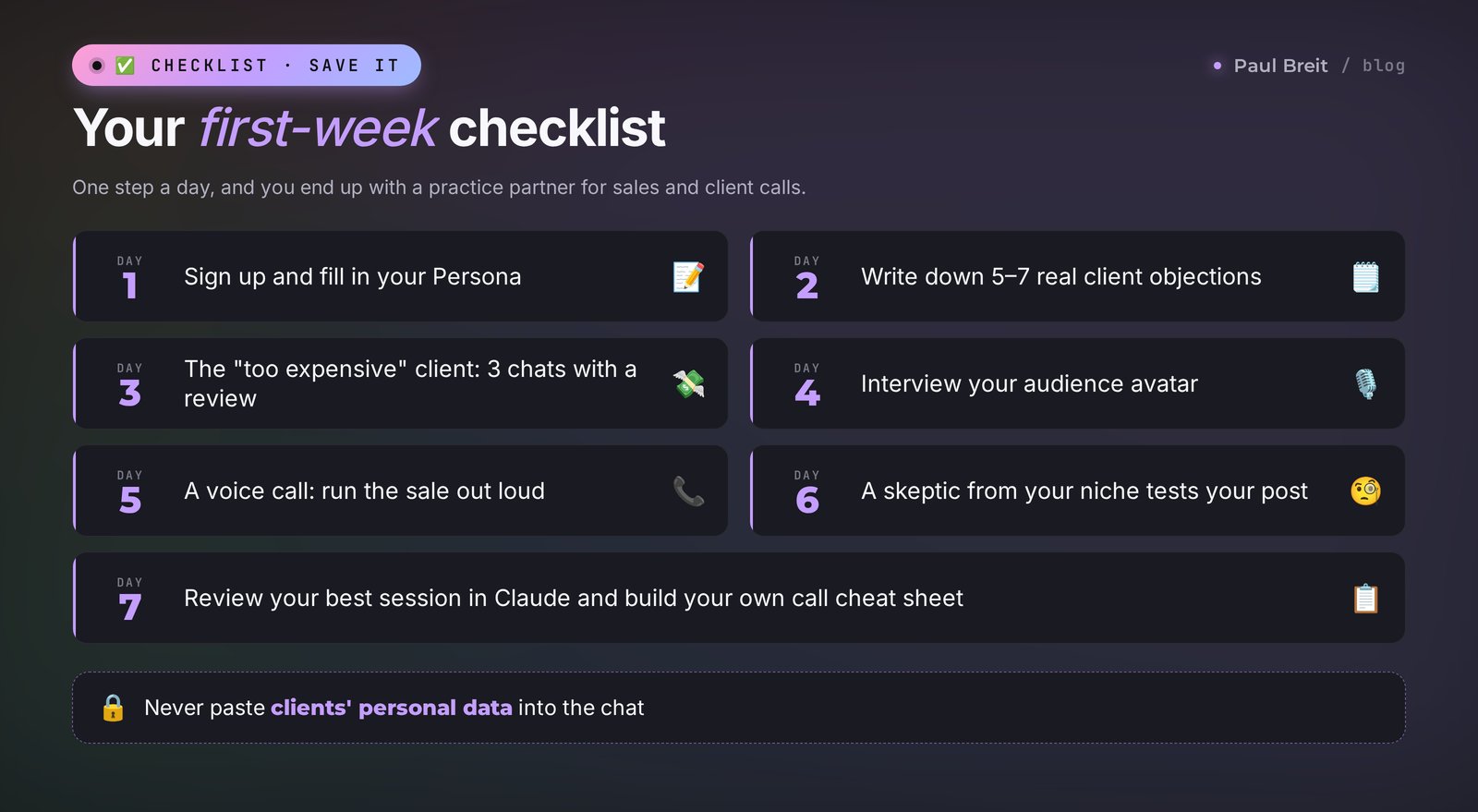
One task a day, 15–20 minutes. By the end of the week you'll have a set of personal practice partners and a clear sense of where Character AI actually helps you.
- Day 1. Sign up, fill in your Persona, and talk to two or three popular characters. Get used to swiping, stars, and pinning.
- Day 2. Pull 5–7 real objections from your client messages. Ask ChatGPT or Claude to build a character from them with the prompt from Section 06.
- Day 3. Create the "too expensive" client in Private mode. Run three conversations in new chats, and after each one ask for a review in parentheses.
- Day 4. Build your audience avatar and interview it. Save the 10 best questions for conversations with real clients.
- Day 5. Call a character from the app and run the sale out loud. Notice where you hesitate and fill pauses with filler words.
- Day 6. Create a skeptic from your niche and test the main point of your next post on them. Rewrite the post to close the holes they found.
- Day 7. Paste your best session of the week into ChatGPT or Claude and ask for a review: which lines worked and which didn't. Turn them into your own cheat sheet for calls.
After a week you'll have three or four personal practice partners, a cheat sheet of lines that work, and an honest answer to whether this "toy" is worth your time. For many people it becomes a habit before every important call.
Section 15The whole path in a minute
- Character AI is a platform for conversations with AI characters. The site is character.ai, and there are apps for Android and iPhone.
- Use only the official site or the app from Character Technologies. Skip copycat apps and "unlimited" versions sold by middlemen.
- Sign in with Google, Apple, or email. Enter your real age: open chat is for 18+ only.
- To keep a character consistent: set the scene in your first message, fill in your Persona, swipe and rate off-character replies, and most reliably, build your own character.
- Your own character = name, tagline, description, greeting, and 2–3 example dialogs. The examples shape the personality most.
- For work: practice partners for sales, negotiations, interviews, talks, and foreign languages.
- The basic plan is free, and c.ai+ is $9.99 a month or $94.99 a year.
- Never type real client data into the chat. Use composite characters.
- Do copy and documents in ChatGPT or Claude, and practice live conversations in Character AI.
Open character.ai today and create your first character: the client who says "too expensive." Fifteen minutes of practice, and tomorrow's call will go more calmly.
FAQFrequently asked questions
Is Character AI free?
Yes. The basic plan is free with no time limit: you can chat with characters and create your own. The c.ai+ subscription costs $9.99 a month or $94.99 a year and adds faster replies, priority at peak hours, no ads, and early access to new features.
How do I know I'm using the official Character AI?
The official site is character.ai, and the official app in Google Play and the App Store comes from the developer Character Technologies. Sites, chatbots, and look-alike apps that sell an "unfiltered" or "unlimited" Character AI are middlemen: they forward your messages to someone else's AI, take your money, and keep your chats.
How do I create my own character on Character AI?
Click "Create," choose to create a character, and fill in the fields: name, tagline, description, greeting, and, if you like, an extended definition with example dialogs. Pick a voice and a visibility setting: Private, Unlisted, or Public. Save and start a conversation. The whole thing takes 10–15 minutes and needs no coding.
Why does my Character AI character break character or switch language?
Because the AI leans on the character's greeting, description, and example lines, and when those are vague or written in another language, it drifts. Swipe off-character replies and rate them one star, set the scene in your first message, and state your role and language in your Persona. The most reliable fix is your own character with a clear description and two or three example dialogs.
How old do you have to be to use Character AI?
You can sign up from 13, but since November 25, 2025, open-ended chat with characters is available only from 18. Teens still have stories, video, and other formats without free-form conversation. If the system has doubts about your age, it may ask you to verify it.
Can the creator of a character see my chats?
No, the author of a public character can't see your conversations with it. Your chats are stored on Character AI's servers and may be used to improve the service, though, so don't type real client data, passwords, or personal stories into the chat.
How is Character AI different from ChatGPT?
Character AI is built for role-play: a character holds its persona, talks naturally, and the service has a catalog of ready-made characters and voice calls. ChatGPT is more versatile: it writes better copy and works with files and images, but you have to describe a character every time or build a custom GPT.
Can I use Character AI for work?
Yes, as a practice partner. Create a character based on your client and rehearse sales calls, price objections, hard conversations, interviews, and talks. For a foreign language, a tutor character with voice calls works well. Copy, posts, and documents are easier in general-purpose AIs like ChatGPT or Claude.