Codex vs Claude Code: Which One to Choose in 2026
Codex vs Claude Code is the question everyone hits once they outgrow chatting with AI and want an agent that builds pages, tables, and small bots on its own. Both do the same kind of work, both need zero programming, and both start at $20 a month. The difference is in the details: where you can try one for free, how the limits work, and which subscription you already pay for. I compare them using the official OpenAI and Anthropic pages, with a test on a real task.
Codex vs Claude Code: both are AI agents that work with files on your computer from plain-English instructions. Codex has a limited free version in the ChatGPT desktop app; the full version starts with ChatGPT Plus at $20 a month. Claude Code starts with Claude Pro at $20 and isn't free. Pick the one you already pay for.
What's inside
- What Codex and Claude Code have in common
- The key differences in one table
- Codex vs Claude Code pricing
- Usage limits: the 5-hour window and the week
- What to do when you hit the limit
- Where they run and how to install them
- Test: one task, no code
- Tasks you can hand to either agent
- AGENTS.md and CLAUDE.md: project rules
- Skills, MCP, and subagents
- Which one to choose for your situation
- How to compare them yourself in one evening
- Using both: three setups that work
- Mistakes when choosing and how to avoid them
- Everything in one minute
- Sources
What Codex and Claude Code have in common
Both are AI agents. Besides answering in a chat, they do the work with their own hands: they open a folder on your computer, read files, create new ones, run a check, and fix whatever broke. You describe the result in plain words, and the agent decides what code it needs to get there. You never have to read that code.
Codex is made by OpenAI, the company behind ChatGPT. Claude Code is made by Anthropic, the company behind Claude. Their jobs overlap almost completely: build a page or a landing page, turn a folder of intake forms into a table, write a small program, set up a bot, rework a website. If you sell services, courses, or consulting, this is a way to get a developer's work done without hiring a developer.
The similarities go further. According to the official documentation of both companies, each agent can:
- run in a regular desktop app with a chat window, no black screen full of commands required;
- remember project rules in an instructions file and follow them in every task;
- use skills, which are ready-made instructions for work you repeat;
- connect to outside services through MCP, an open standard that links AI tools to things like your cloud drive, spreadsheets, or CRM;
- split a task among helpers called subagents that work in parallel.
So the real question isn't "which one is smarter." It's where you're comfortable working, how much you're ready to pay, and which AI already holds your work. Let's go through it in order.
New to the idea of agents altogether? Start with what an AI agent is and come back.
The key differences in one table
I put into one table what actually affects a beginner's choice. Everything comes from the official OpenAI and Anthropic pages, checked November 20, 2026.
| What we compare | Codex (OpenAI) | Claude Code (Anthropic) |
|---|---|---|
| Where to open it | ChatGPT desktop app (Mac, Windows), web, CLI, IDE extension, mobile app, Codex Cloud | Code tab in the Claude desktop app (macOS, Windows), web at claude.ai/code, terminal, VS Code and Cursor, JetBrains, Claude app on iOS and Android |
| Free plan | Yes, limited: on Free and Go, GPT-6 Luna at Standard speed in the desktop app, subject to rollout | No: Claude Code isn't included in Claude Free |
| Cheapest full plan | ChatGPT Plus, $20 a month | Claude Pro, $20 a month, or $17 a month with annual payment ($200 upfront) |
| Models | GPT-6.1 Sol and GPT-6 Luna on Plus | Claude models in your plan; Fable on Pro is paid with usage credits |
| Project rules file | AGENTS.md | CLAUDE.md, and it can read AGENTS.md instead |
| Limits | Counted in 5-hour windows; Pro plans add more | 5-hour windows plus a weekly cap; Ultra has no 5-hour limit |
| Cloud work | Codex Cloud; on Plus, cloud integrations like automatic code review and Slack | Web sessions, cloud scheduled tasks, desktop scheduled tasks |
| Phone | Codex on iOS starting with Plus | Claude app on iOS and Android, Remote Control of a desktop session |
| The rest of the subscription | All of ChatGPT: images, voice, projects | All of Claude: projects, memory, document work |
In short: Codex is cheaper to get into, because you can touch it for free. Claude Code asks for payment from day one, but the Max and Ultra plans spell out generous limits in plain numbers.
Codex vs Claude Code pricing
Both subscriptions are billed in US dollars. Below are the official prices as of November 20, 2026, from learn.chatgpt.com/docs/pricing and claude.com/pricing. Anthropic lists prices before tax, so your bill may be a little higher depending on where you live.
| Tier | Codex in ChatGPT | Claude Code in Claude |
|---|---|---|
| Free | Free, $0: GPT-6 Luna in the desktop app, subject to rollout | Free, $0: no Claude Code |
| Cheapest paid | Go, $8 a month: same Codex access as Free | No equivalent |
| Working plan | Plus, $20 a month: Codex on the web, in the CLI, in the IDE extension, and on iOS | Pro, $20 a month, or $17 a month with annual payment ($200 upfront) |
| Heavy use | Pro: $100, $200, or $500 a month; Ultrafast mode on Pro $500 | Max, $100 a month: 5x Pro usage. Ultra, $200 a month: no 5-hour limit, 10x Pro usage every week |
| Teams | Business, $20 per user a month, annual plan, 2+ users | Not covered in this comparison |
| Pay as you go | API key: Codex in the CLI, SDK, and IDE extension at API prices | Not covered in this comparison |
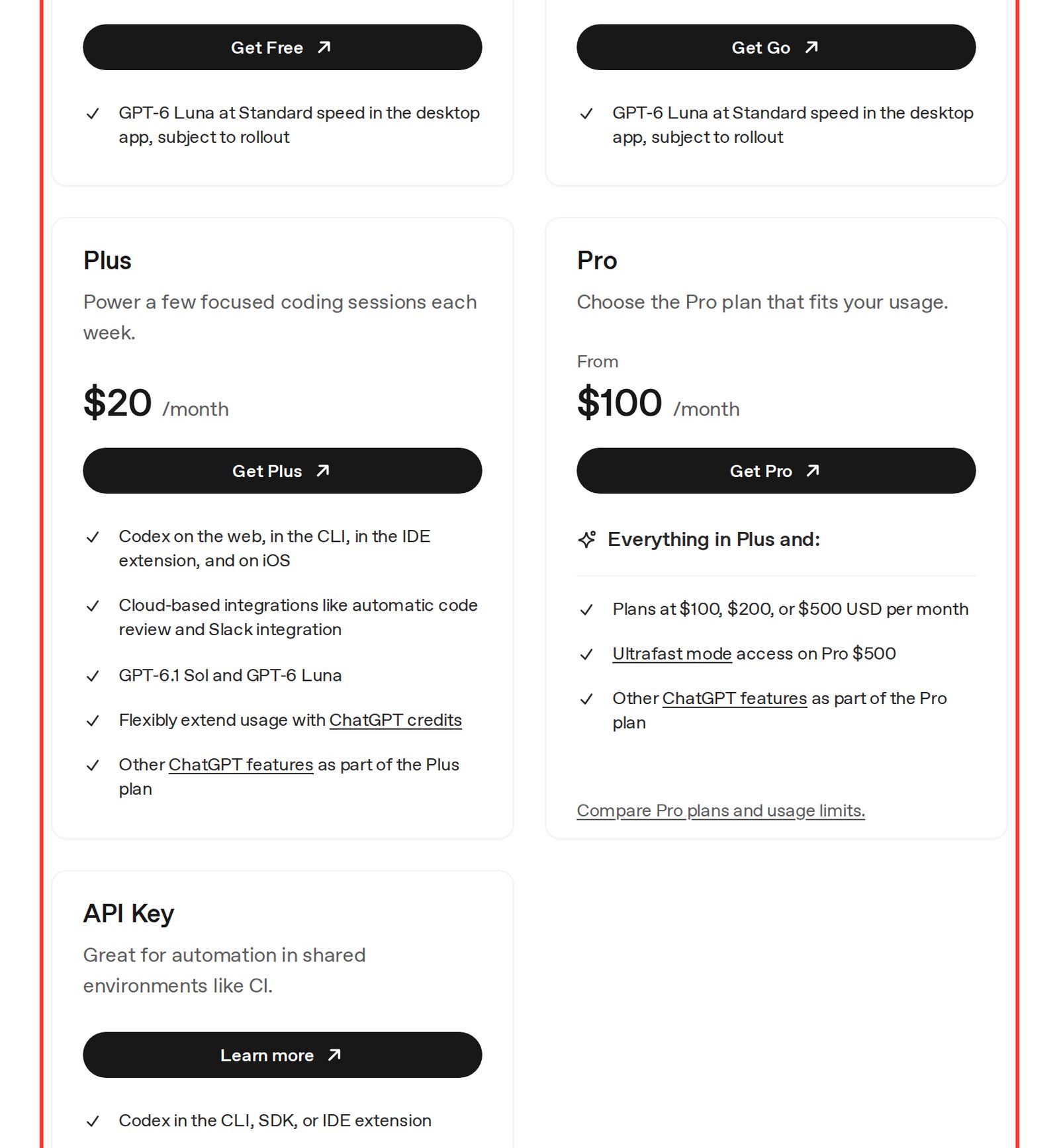
Here is the official Codex page. On Free and Go the agent lives only in the desktop app with GPT-6 Luna, while Plus opens it everywhere: in the browser, the terminal, the code editor, and on the iPhone.
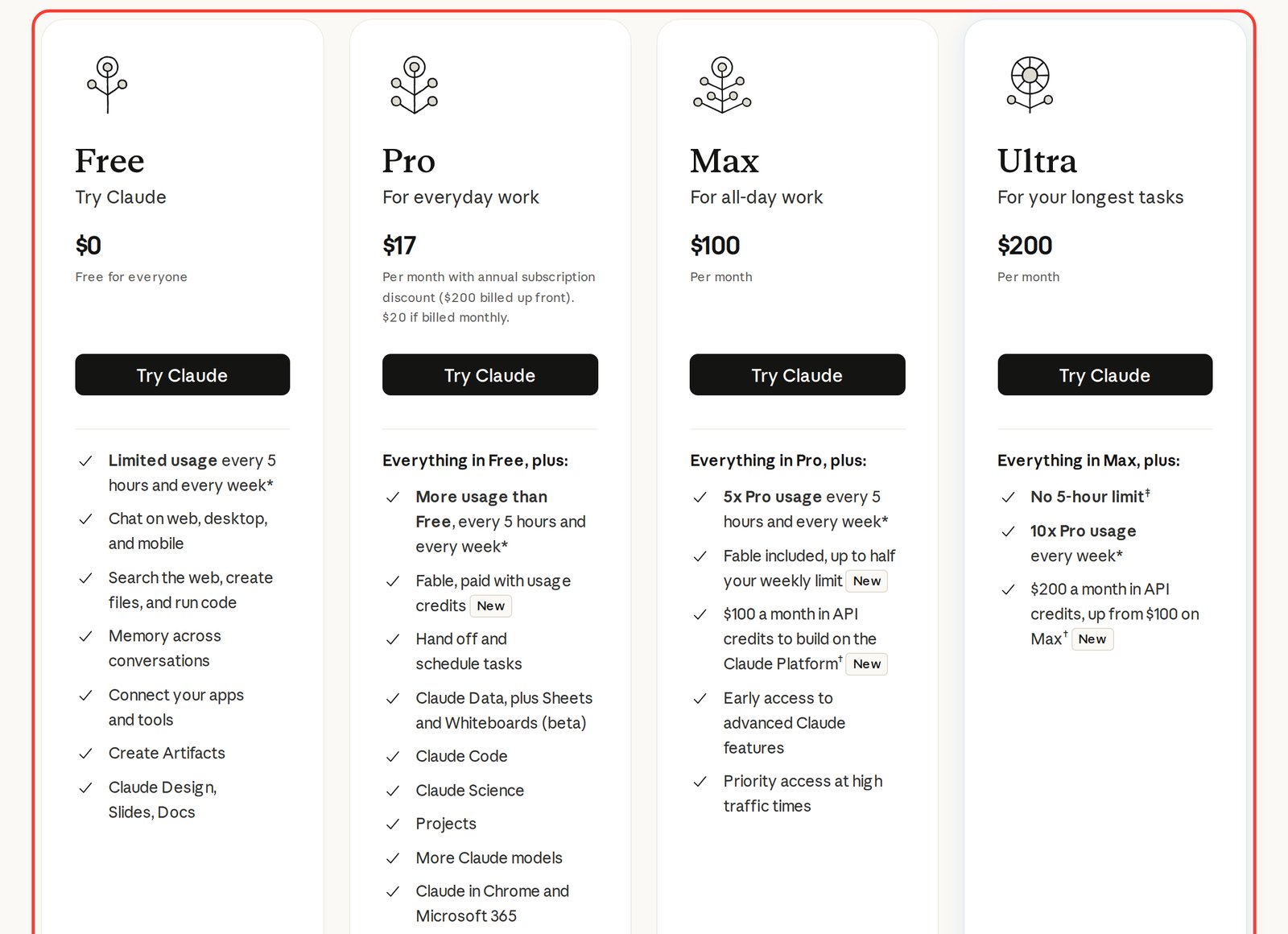
And this is the Claude pricing page. Claude Code shows up in the list starting with Pro. The free plan doesn't have it.
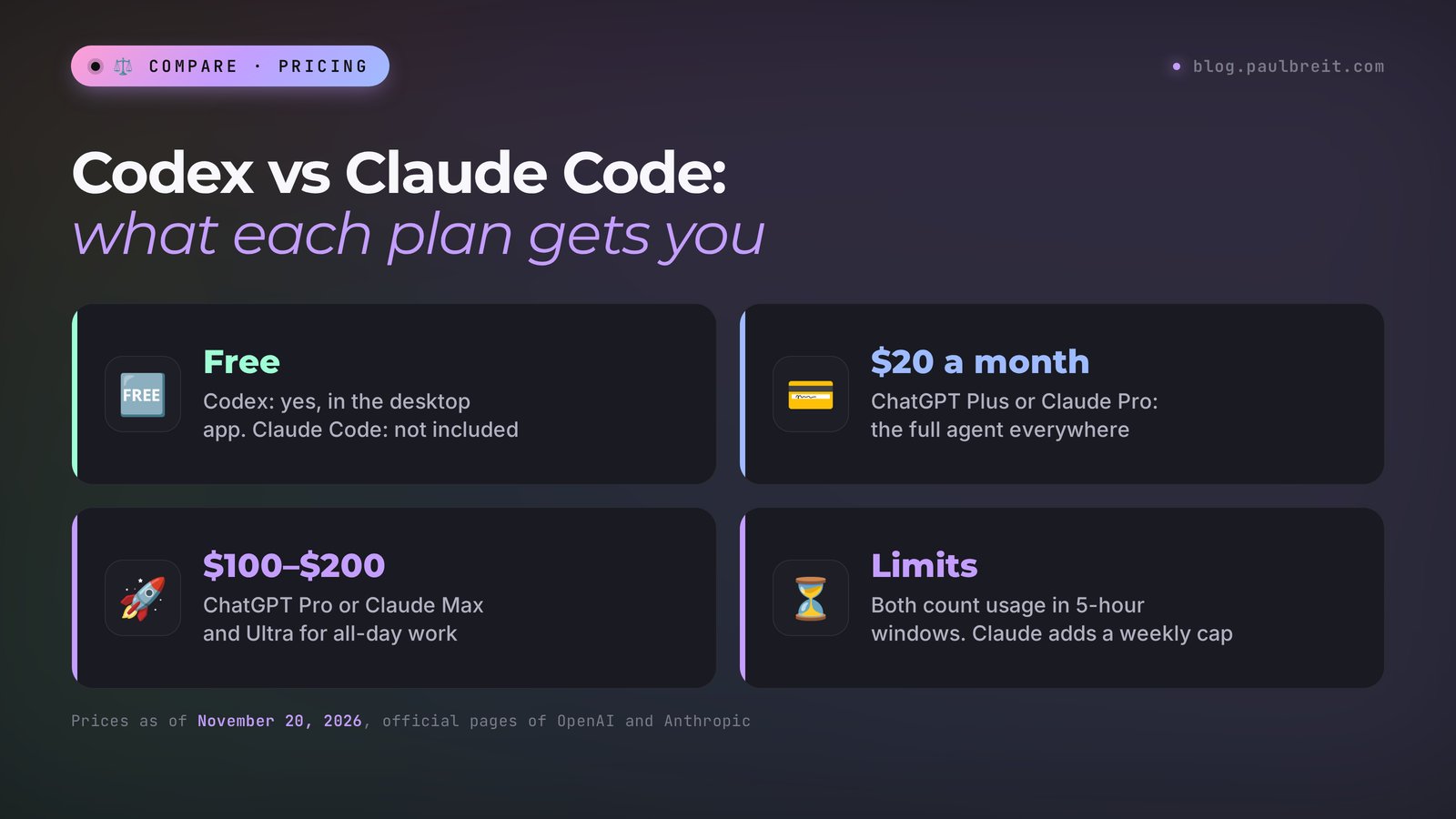
The practical takeaway. If you're not sure you need an agent at all, start with free Codex: install the ChatGPT desktop app and give it one task. If you already pay for Claude Pro or ChatGPT Plus, one of the agents is already in your plan at no extra cost, so start there. A full breakdown of every Claude tier lives in Claude pricing plans.
Usage limits: the 5-hour window and the week
Limits are the part most comparisons skip, and they're what you'll actually feel. Neither company sells "unlimited" agents. Both meter how much work you can give the agent within a time window.
Codex. OpenAI counts Codex usage in 5-hour windows. Once you use up a window, you wait for the next one. On Plus, OpenAI says you can flexibly extend usage with ChatGPT credits. The Pro plans at $100, $200, and $500 a month exist for people who need more. OpenAI's own description of Plus is telling: "Power a few focused coding sessions each week." So treat Plus as a plan for a few solid work sessions a week, with all-day use reserved for Pro.
Claude Code. Anthropic uses two meters at once: a 5-hour window and a weekly limit. Here is how the plans compare, per claude.com/pricing:
| Claude plan | Every 5 hours | Every week | Fable |
|---|---|---|---|
| Free | Limited usage, no Claude Code | Limited usage | Not included |
| Pro, $20 | More usage than Free | More usage than Free | Paid with usage credits |
| Max, $100 | 5x Pro usage | 5x Pro usage | Included, up to half the weekly limit |
| Ultra, $200 | No 5-hour limit | 10x Pro usage | Included, as in Max |
What this means in practice. On Pro you can hit the 5-hour wall in a long afternoon session and then hit the weekly wall by Thursday if you use the agent every day. Max multiplies both meters by five. Ultra removes the 5-hour wall entirely and leaves only the weekly one, which is the best fit for someone who works with the agent in long, uneven bursts.
Neither company publishes a fixed number of messages or tasks per window, and the amount depends on the size of the task. As a rule of thumb, long sessions with many large files burn through a window faster than short, focused tasks. That's why the advice below is mostly about how you work, not about which button you press.
Don't compare "$20 vs $20" in a vacuum. Compare how you'll use it. One focused session a day fits on either $20 plan. Several hours of agent work every day is where Claude Max or Ultra and ChatGPT Pro start to make sense. Upgrade only after you've actually hit a limit at least a few times.
What to do when you hit the limit
Sooner or later the agent tells you that you've used up your allowance. Here's what you can do, from cheapest to most expensive.
Wait for the window to reset
Both companies count usage in 5-hour windows, so the simplest fix is a break. Plan your day around it: big tasks in the morning, review and small edits after the reset. On Claude, keep an eye on the weekly limit as well, since a reset of the 5-hour window doesn't reset the week.
Make tasks smaller
"Rebuild my whole website" eats a window fast. "Rewrite the pricing section on index.html, keep the rest" is cheaper and easier to check. Give the agent one file or one section at a time and ask it to stop and report before moving on.
Hand the task to the other agent
If you have both ChatGPT Plus and Claude Pro, the second agent is your backup. Keep the rules in one AGENTS.md file (more on that below), and the second agent picks up the same project with the same rules.
Add credits on ChatGPT Plus
On Plus, OpenAI lets you flexibly extend Codex usage with ChatGPT credits. This makes sense for a one-off crunch week, without changing your plan.
Upgrade the plan
If you hit the wall several times a week for a month, it's time for ChatGPT Pro from $100 or Claude Max at $100. Ultra at $200 is for those who keep hitting the 5-hour window but rarely the weekly one.
Here's a prompt that helps the agent spend less of your allowance. Paste it at the start of a long task:
Before you start, write a short plan: which files you will open and change, and in what order. Wait for my "go". Work on one file at a time. Don't reread files you've already read unless they changed. When you finish each step, give me a two-line report: what is done and what is next.
Where they run and how to install them
A year ago both agents lived in the terminal, and people who don't code stayed away. Now both have a regular app with a chat window.
Codex is built into the ChatGPT desktop app for Mac and Windows. You open ChatGPT, switch to Codex, pick a folder, and type the task. Codex also runs on the web, in the CLI, in an IDE extension, in the mobile app, and in Codex Cloud, where tasks run on OpenAI's servers. The full first run is in my guide Codex by OpenAI: how to use it without coding.
Claude Code is built into the Claude desktop app for macOS and Windows as the Code tab. There's nothing extra to install, the app already contains the agent, but you need a paid subscription. It also runs in the browser at claude.ai/code, inside VS Code and Cursor, in JetBrains editors, and in the Claude app for iOS and Android.
If you're comfortable with a terminal, the command-line version of Claude Code installs with one command. From Anthropic's documentation, for macOS, Linux, and WSL:
curl -fsSL https://claude.ai/install.sh | bash
And for Windows PowerShell:
irm https://claude.ai/install.ps1 | iex
Step-by-step setup for each case: how to use Claude Code, plus separate guides for Windows and Mac. Don't have an account yet? Sign up at claude.ai.
From your phone. Claude Code continues work in the Claude app on iOS and Android, and with Remote Control you can pick up a session running on your computer from your phone. I covered that in Claude Code from your phone. Codex is available in the ChatGPT app on iOS on paid plans starting with Plus.
Test: one task, no code
Comparisons online usually measure agents on developer tasks. You probably care about something else: can the agent handle an everyday business task if you describe it in plain words? I took a typical situation for a nutritionist: a file with client intake forms in a folder, and a need for a clear summary.
Here is the exact task I gave the agent. You can copy it and give it to both Codex and Claude Code, since the wording works for either.
The folder contains intake.csv with client intake forms from a nutritionist. Create itog.html: one page with a table of clients and a short summary at the top – how many clients there are, how many want to lose weight, and which dietary restrictions come up. Make it neat and easy to read. Check that the file opens.
Claude Code version 2.1.289 ran the task on a CSV file with five test intake forms. It took 41 seconds. The agent built the page, opened it in a browser on its own, and checked that the table displayed correctly. Its report: 5 clients, 3 with a weight-loss goal, 1 without restrictions, and the restrictions found were a nut allergy, gluten-free, lactose-free, and vegetarian. It also warned me, unprompted, that the page was built once and won't update by itself when new forms come in. I did not run Codex in this test, so I'm not giving a time for it.
Pay attention to that last sentence about updates. A good agent tells you where its work ends. If yours stays silent about that, add this line to your project rules: "At the end of every task, tell me what you didn't do and what might break."
The task is also a good template for your own test. It has a clear input (one file), a clear output (one page), numbers you can check by hand, and a built-in self-check ("check that the file opens"). Keep those four parts in any task you use to compare agents.
Tasks you can hand to either agent
The test above is one example. Here's what people who sell services, courses, and consulting typically give an agent. Each of these works in Codex and in Claude Code with the same wording.
| Who you are | Task for the agent | What you get |
|---|---|---|
| Coach or consultant | Build a one-page site for a consultation from my description file | An HTML page you can open, check on a phone, and upload |
| Freelancer | Read my price list and make a pricing page with three columns | A clean page where every price matches the file |
| Course creator | Turn my workshop notes into a handout and a 10-question quiz page | A printable handout and an interactive quiz |
| Nutritionist or trainer | Summarize intake forms into one table with totals | A summary page like the one in the test |
| Anyone with leads | Count leads by source from a CSV export and say how many paid | A summary table and three plain-language takeaways |
| Therapist or tutor | Rename and sort 200 files in a folder by date and client code | An organized folder and a list of what moved where |
| Small agency | Compare two versions of a sales page and list every changed sentence | A change report you can send to the client |
Three ready tasks you can copy as they are:
1. Build a one-page site for my consultation: who I am, what the client gets, the price, and a booking button that links to my booking page. Take the text from description.txt. Open the page and check that it looks right on a phone.

2. The folder has a lead export, leads.csv. Count how many leads came from each source and how many of them paid. Make a summary table and write three takeaways in plain language.

3. Read my price list, prices.docx, and turn it into a clean pricing page: three columns, with the most popular plan highlighted. Check that every price matches the file.
What these tasks don't cover: anything that has to run around the clock, like a bot that answers inquiries or a daily report. An agent can build that, but it has to live on a server, not on your laptop. If that's your goal, read how to build a bot without a programmer first.
AGENTS.md and CLAUDE.md: project rules
An agent forgets everything between sessions unless you write it down. Both agents solve this with a plain text file in the project folder that they read before every task.
- Codex reads AGENTS.md, per OpenAI's documentation.
- Claude Code reads CLAUDE.md. According to Anthropic's documentation, if the repository has an AGENTS.md, Claude Code can read that instead.
That second point matters more than it looks. It means one file with rules can serve both agents, and you never have to keep two versions in sync.
What goes into a good rules file:
- who you are and what you do, in two or three sentences;
- who the materials are for: your clients, their level, their language;
- style rules: tone, length, words you never use;
- hard limits: never invent numbers, testimonials, or prices; ask when data is missing;
- how to finish: a short report of what's done, what isn't, and what might break.
You don't have to write it yourself. Ask either agent to create it:
Create an AGENTS.md file in this folder with the project rules. Include: who I am and what I do, who we're making materials for, that all copy is in plain American English and speaks to the reader as "you", and that you must never make up numbers, prices, or testimonials – if data is missing, ask me. At the end of every task, write a short note on what's done and what you didn't do.
Keep the file short. A page of clear rules works better than five pages of wishes. When the agent breaks a rule twice, don't just correct the output, add a line to the file so it doesn't happen a third time.
Skills, MCP, and subagents
Once the basics work, three features turn an agent from a helper into a small production line. Both agents have all three, per their official documentation.
Skills. A skill is a folder with instructions for one recurring job: "make a weekly report from this export," "format a case study in my template," "check a landing page against my checklist." Instead of pasting the same long prompt every time, you call the skill by name. Codex lists Skills and Plugins in its docs; Claude Code lists Skills. I showed how to build them without code in Codex skills and Claude Skills.
MCP. The Model Context Protocol is a shared standard that lets an agent talk to other services: cloud drives, spreadsheets, a CRM, a calendar. Because it's a standard, the same connector idea works in both agents. More in Claude MCP explained.
Subagents. For a big task, the main agent can hand pieces to helpers that work in parallel: one checks the copy, another checks the links, a third checks the mobile layout. Then the main agent assembles the result. Both Codex and Claude Code support subagents. The details for Claude are in Claude Code subagents.
Claude Code's documentation lists a few more things worth knowing:
- Hooks: automatic actions that fire at certain moments, for example a check after every file edit;
- Scheduled tasks in the cloud and on the desktop, so a job can run on its own at a set time;
- Remote Control: steer a session on your computer from your phone.
On the Codex side, Plus includes cloud integrations like automatic code review and a Slack integration, which is handy if your team already talks in Slack.
Which one to choose for your situation
There's no universal winner. The choice depends on where your work already lives and what you plan to hand off.
| Your situation | What to choose | Why |
|---|---|---|
| I want to try an agent without paying | Codex | Available on the free ChatGPT plan in the desktop app |
| I already pay for ChatGPT Plus | Codex | Included in your subscription, nothing extra to pay |
| I already pay for Claude Pro | Claude Code | Included in your subscription, with your Claude projects at hand |
| I write client copy in Claude | Claude Code | Same models and the same voice, less to relearn |
| I need the agent all day, with long tasks | Claude Code on Max or Ultra, or Codex on Pro | Both have tiers for heavy use; Ultra has no 5-hour window |
| I need a job to run on a schedule | Claude Code | Scheduled tasks in the cloud and on the desktop are in its docs |
| My team works in Slack | Codex | Slack integration is part of Plus |
| I want images and copy in the same subscription as the agent | Codex | ChatGPT Plus includes image generation, voice, and the agent |
Still deciding between the two chat assistants themselves, without agents? That's a separate question, covered in Claude vs ChatGPT. And for the bigger picture of why people with no coding background use these tools at all, see Claude Code for non-coders.
How to compare them yourself in one evening
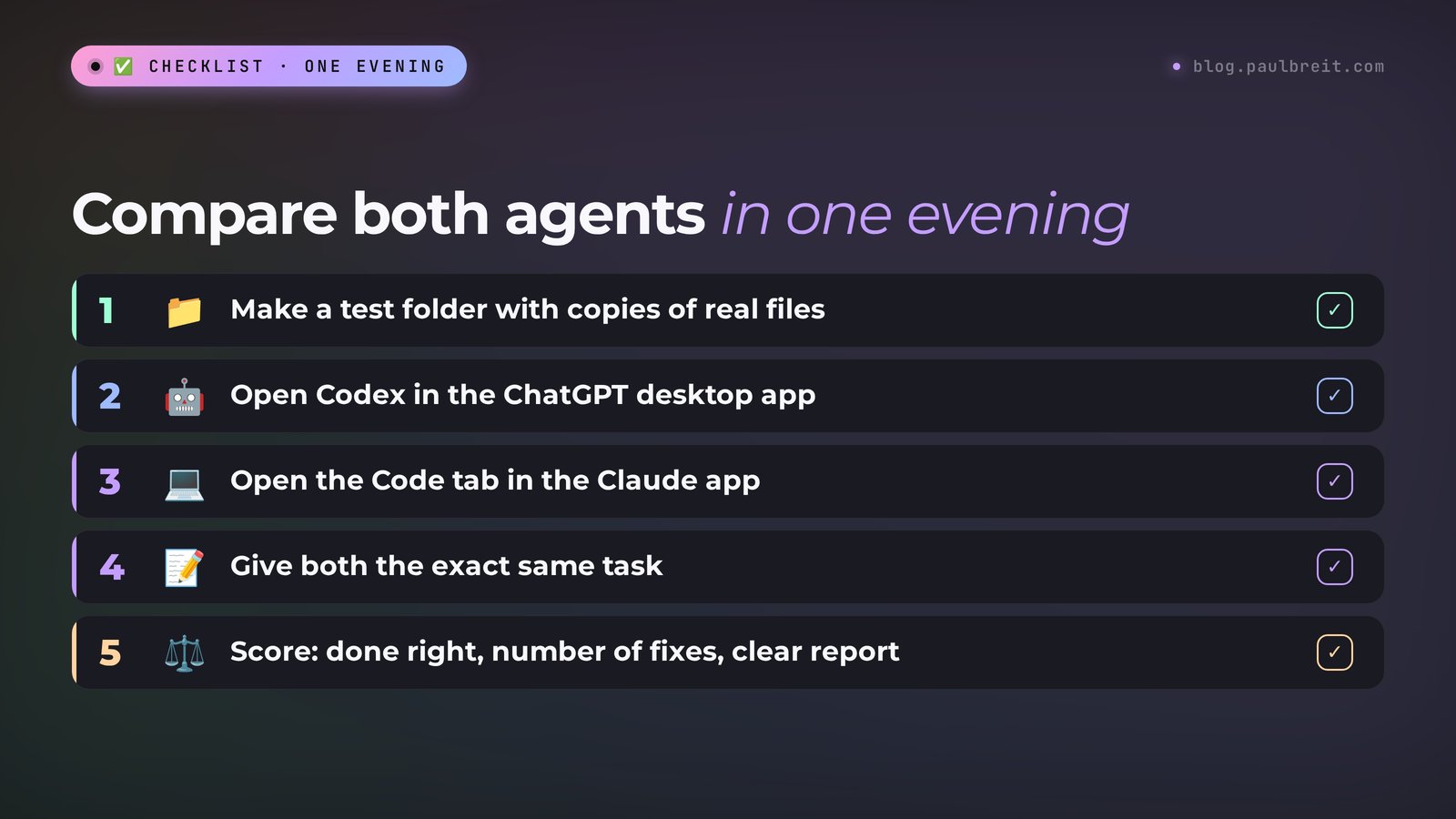
Other people's comparisons help, but one evening of your own tests is more reliable. Here's an order that needs no coding knowledge.
Make a test folder
Create a folder called "agent test" on your desktop and put in what you really work with: a lead export, intake forms, a price list, the text of a sales page. Replace clients' personal data with made-up names first.
Open Codex
Download the ChatGPT desktop app from chatgpt.com, sign in, switch to Codex, and point it to the test folder. On the free plan you get GPT-6 Luna at Standard speed, which is enough for a first task.
Open Claude Code
If you have Claude Pro, download the Claude desktop app, go to the Code tab, and choose the same folder. Without a subscription, skip this step and come back once Codex shows you an agent is worth it.
Give both the exact same task
Paste identical text into both agents. Use one of the three tasks from the section above, whichever is closest to your work.
Score them on three things
First, did the agent do what you asked, without extras? Second, how many times did you have to correct it? Third, did it clearly explain what it did? Speed matters less: a one-minute difference isn't worth an extra hour of fixes.
Write the scores down right away, while the details are fresh. A simple table with three columns per agent is enough. After two or three tasks, the pattern is usually obvious.
Using both: three setups that work
You can use both, and plenty of people do. Here are three setups that make sense once you pay for ChatGPT Plus and Claude Pro.
1. Builder and reviewer. One agent does the work, the other checks it. Codex builds the page, Claude Code looks for mistakes in it, or the other way around. A second pair of eyes catches broken links, prices that don't match the file, and copy that drifted from your rules. A review prompt:
Another agent built the files in this folder. Don't change anything yet. Check them against AGENTS.md and list every problem: broken links, numbers that don't match the source files, rules that were broken, and anything that looks wrong on a phone. For each problem, give the file name and a one-line fix.
2. Main and backup. You work in one agent day to day. When its limit runs out for the next few hours, the task moves to the other. This is where the single AGENTS.md file pays off: the second agent opens the same folder and reads the same rules.
3. Split by task type. Some people keep one agent for pages and documents and the other for scheduled jobs or team integrations. For example, Claude Code for a scheduled weekly report, Codex for work that should show up in the team's Slack.
To make any of these work without losses, keep the project rules in one file and ask each agent to end every task with a short report. Then you, or the other agent, always know where things stand.
In my own course, the AI agent block is built this way. You can take it in Claude Code or in Codex: you pick the agent with a switch right in the lesson, and the prompts are the same. You can switch at any time, and what you learn in one agent carries over to the other.
Mistakes when choosing and how to avoid them
| Mistake | What it leads to | What to do |
|---|---|---|
| Choosing by coding benchmarks | The winner of a coding test may be worse at your pages and tables | Test both on your own task from the "compare in one evening" section |
| Buying the most expensive plan right away | $100–$200 a month for an agent you use once a week | Start with free Codex or a $20 plan and upgrade after you hit the limit several times |
| Comparing only the price tag | Two $20 plans with very different limits for your workload | Read the 5-hour and weekly rules, then match them to how many hours a day you'll use the agent |
| No project rules file | You explain everything again each time, and the agent invents numbers | One AGENTS.md with the rules, read by both agents |
| Giving the agent a folder with real client data | Intake forms and phone numbers go to the service's servers | Work on a copy with made-up names |
| One giant task per session | The window runs out halfway, and the work is hard to check | Split it: one file or one section per request, with a plan first |
| Running a permanent bot on your laptop | You close the laptop and the bot stops answering | Anything that runs 24/7 needs a server; the agent can set it up there |
| Not reading the agent's final report | You miss the "this won't update by itself" warning | Read the last paragraph every time and ask follow-up questions |
Everything in one minute
Codex and Claude Code do the same job: they work with files in your folder and build pages, tables, and small programs from plain-language descriptions. Codex is in every ChatGPT plan, with a limited free version in the desktop app; the full version starts with Plus at $20. Claude Code starts with Claude Pro at $20 and isn't free, but Max and Ultra spell out generous limits. Both count usage in 5-hour windows, and Claude adds a weekly cap. Take the one you already pay for, test both on one real task, and keep your rules in one AGENTS.md file so the second agent can pick up the work without losses.
Cheat sheet: Codex vs Claude Code
1. You pay for ChatGPT Plus: start with Codex. You pay for Claude Pro: start with Claude Code.
2. You pay for neither: install the ChatGPT desktop app and try Codex for free.
3. Prices as of November 20, 2026: ChatGPT Plus $20, ChatGPT Pro from $100; Claude Pro $20 ($17 a month with annual payment), Max $100, Ultra $200.
4. Limits: both count usage in 5-hour windows. Claude also has a weekly cap. Ultra has no 5-hour limit.
5. Make an "agent test" folder with copies of real files and replace personal data.
6. Give both agents the same task in the same words.
7. Score them: done without extras, number of fixes, clear report.
8. Keep project rules in one AGENTS.md file. Codex reads it, and Claude Code can read it instead of CLAUDE.md.
9. Hit the limit? Wait for the reset, split the task, switch agents, or add ChatGPT credits on Plus.
10. Upgrade only after you've hit the limit several times.
Sources
- Codex Pricing (OpenAI: plans and Codex access), checked November 20, 2026
- Claude Pricing (Anthropic: plans, limits, and Claude Code), checked November 20, 2026
- Claude Code overview (Anthropic docs: where it runs, install, CLAUDE.md and AGENTS.md, skills, hooks, MCP, subagents), checked November 20, 2026
- Codex documentation (OpenAI docs: app, CLI, AGENTS.md, skills, MCP, subagents), checked November 20, 2026
Frequently asked questions
Which is better for beginners: Codex or Claude Code?
For a first try, Codex is easier to reach: it comes with every ChatGPT plan, including a limited free version in the ChatGPT desktop app. If you already pay for Claude Pro, start with Claude Code, since it is included. Neither requires programming.
Can I use Claude Code for free?
No. Claude Code is not included in the Claude Free plan. It starts with Claude Pro at $20 a month, or $17 a month with annual payment ($200 upfront), as of November 20, 2026. Codex does have a limited free version in the ChatGPT desktop app.
How much do Codex and Claude Code cost?
As of November 20, 2026, the working plan for both is $20 a month: ChatGPT Plus for Codex and Claude Pro for Claude Code. For heavy use, ChatGPT Pro costs $100, $200, or $500 a month, and Claude offers Max at $100 and Ultra at $200.
What are the usage limits for Codex and Claude Code?
Both count usage in 5-hour windows. Claude also has a weekly limit: Max gives 5x Pro usage every 5 hours and every week, and Ultra removes the 5-hour limit and gives 10x Pro usage every week. On ChatGPT Plus you can extend Codex usage with ChatGPT credits.
Can I use Codex and Claude Code together?
Yes. Keep the project rules in one AGENTS.md file: Codex reads it, and Claude Code can read it instead of its own CLAUDE.md. Then a task can move from one agent to the other without losses, for example when the first one hits its limit.