AI for Accountants: Reports and Emails Without the Late Nights
In 2026, AI for accountants is a working tool. It writes emails to clients and vendors, turns an export from QuickBooks or Xero into a report the owner can actually read, suggests Excel formulas, sorts through source documents, and drafts responses to tax notices. Inside: 8 tools picked by task, 12 tasks with ready prompts, the rules for client data, and a plan for your first week. AI will not take over checking the numbers or signing the return, but it will give you your evenings back during busy season.
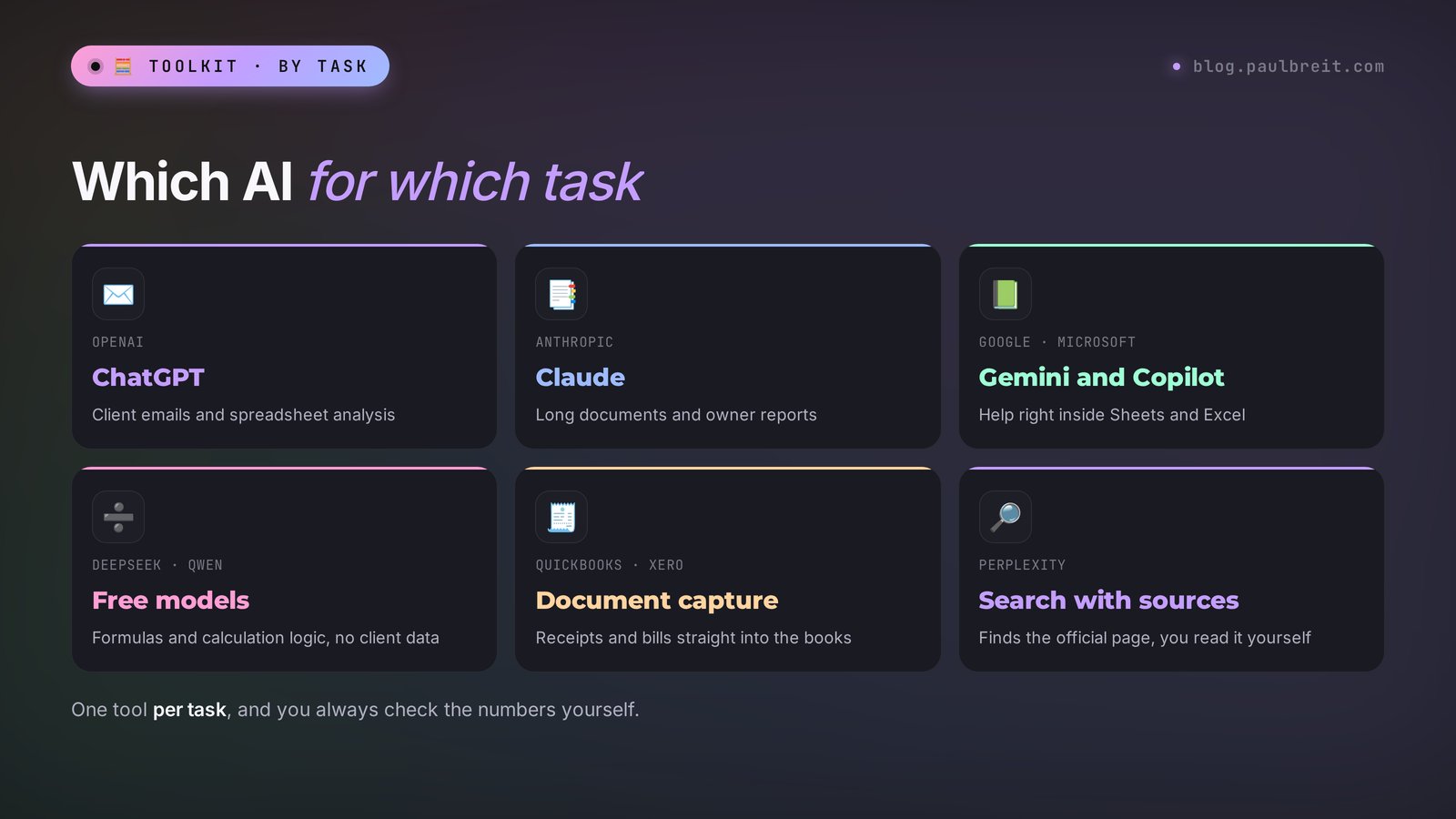
The best AI tools for accountants in 2026: ChatGPT and Claude for emails, reports, and spreadsheet analysis; Gemini in Google Sheets and Microsoft Copilot in Excel for help right inside your files; DeepSeek and Qwen as free options for formulas and calculation logic; Perplexity for finding official sources; and the built-in document capture in QuickBooks or Xero for entering receipts and bills. AI drafts an email in a couple of minutes, turns a trial balance into a report for the owner, writes Excel formulas, and finds mismatches in reconciliations. Replace client personal data with labels before uploading, and check every amount and tax rate against the original source.
Busy season looks the same every year. During the day, calls from clients who sent their documents at the last minute. In the evening, reconciliations, emails to vendors, responses to tax notices, and explaining to the owner why there is profit on paper but no cash in the bank. At night, the returns themselves. And half of those hours go to writing and routine where your head is barely needed.
I help everyone who sells services, courses, and consulting take routine off their plate with AI. Accountants stand apart in this story: the cost of a mistake is measured in penalties, so here AI works as a fast assistant under your control. Below is how to set up that pairing so it saves hours and never burns you.
You will read it in 25 minutes. You will close your first task today. By the next filing deadline you will have your own prompt library, and the evening before a deadline will stop turning into a night.
What's inside
- What AI can do for an accountant, and where its ceiling is
- The best AI tools for accountants in 2026, by task
- Emails to clients, vendors, and tax agencies
- Reports and spreadsheets: from trial balance to owner report
- Source documents, contracts, and reconciliations
- Content for accountants who sell their services
- The prompt formula, before and after
- Client data: what never to upload
- Why AI gets numbers and rates wrong
- How to get started with ChatGPT and Claude
- A plan for your first week
- 6 mistakes that make AI let you down
- The whole path in a minute
Section 01What AI can do for an accountant, and where its ceiling is
Let me start with an honest frame, so nothing disappoints you later. AI is a language model. It is excellent with text and structure. It understands how a reconciliation works, what separates a debit from a credit, and what an email asking a client for missing documents usually looks like. What it does not have is a built-in, up-to-date copy of the tax code. And it counts worse than an ordinary calculator unless you ask it to write formulas or run code.
That is where its real strengths come from. What AI does well:
- writes emails of any difficulty: a polite reminder, a firm demand, an explanation for a client with no accounting jargon;
- turns a dry export from your accounting software into plain-English takeaways: where expenses grew, where the cash gap came from, what changed since last quarter;
- writes formulas for Excel and Google Sheets for your exact task and explains how they work;
- compares two lists and shows the mismatches, if you set the task up correctly;
- breaks a long contract into clauses and highlights the parts that affect the books and taxes;
- drafts procedures, client instructions, and month-end close checklists;
- writes posts, newsletters, and answers to common questions if you sell accounting services.
Now the ceiling, and it matters more than the list above. AI can confidently name an outdated rate or cite a section of the code that does not exist. It can get a sum wrong when the table has a hundred rows. It does not know about the guidance the IRS published last week. And it cannot see the full picture of your client: the agreements, the history, the specifics of their accounting policies. So the roles split simply. AI makes the first version and clears the routine. The accountant checks, calculates, and takes responsibility.
Treat AI like a sharp junior assistant. It writes fast, it has read a lot, and it never gets tired of near-identical emails. But your name is on the return and the financials, so every number that comes out of its hands goes through your review. With that split, the pairing saves hours and creates no problems.
Section 02The best AI tools for accountants in 2026, by task
There is no single AI "for accounting." There are general language models that handle text and spreadsheets very well, and there are built-in features in accounting software that read documents. The working setup is to combine two or three tools for different tasks. Below is a selection by task that you can start with today.
1. ChatGPT – emails, spreadsheets, quick answers
The most versatile option. It writes solid business emails, understands uploaded Excel and CSV files, builds summary takeaways, and suggests formulas. It can run code for calculations, so it handles large tables more carefully than models without that feature. The free version is enough to get acquainted; the paid subscription is about $20 a month. If you are choosing between the two leaders, see Claude vs ChatGPT.
2. Claude – long documents and reports
My main tool for long texts. Claude holds structure more carefully when you upload a 30-page contract or a stack of exports, and it writes more natural prose. It is handy for owner reports, procedures, contract reviews, and emails where tone matters. The Pro subscription is about $20 a month. How to get started is covered below in its own section, and the full walkthrough is in Claude from scratch.
3. Gemini – help inside Google Sheets
Google's AI. If your office already lives in Google Workspace, Gemini can work right next to your spreadsheets and documents, so you do not have to copy data back and forth. It handles emails, short summaries, and simple explanations well. A detailed walkthrough is in how to use Gemini.
4. Microsoft Copilot in Excel – help where the numbers already are
Microsoft's assistant, available in Microsoft 365 plans that include Copilot. Inside Excel it can suggest formulas, explain what a table shows, and help you summarize data without leaving the file. A good choice if your firm runs on Microsoft 365 and your IT policy prefers tools inside that environment.
5. DeepSeek – formulas and calculation logic
A Chinese model with a strong reasoning mode. It walks through the logic of a calculation step by step, builds complex formulas, and explains why they are built the way they are. It is free. Do not upload confidential data there: the data is processed on servers in China, and the storage rules are opaque to you.
6. Qwen – a free backup for drafts
Alibaba's model, free and fairly strong with text and tables. Useful when you want a second draft to compare, or when you have hit the limit in your main tool. The data rules are the same as for DeepSeek. More in how to use Qwen.
7. Document capture in your accounting software – source documents straight into the books
QuickBooks Online and Xero both let you capture receipts and bills from a photo or a scan, and Xero does it through Hubdoc. The built-in document capture in your accounting software pulls out the key fields and amounts and prepares a transaction for you to review. You check it and post it. If you key in receipts and bills by hand in batches, this is the first thing worth turning on.
8. Perplexity – finding official sources fast
An AI search engine that shows the sources behind every answer. Useful when you need to find the right page on the IRS or your state tax agency website quickly. The rule stays the same: Perplexity points you to the page, and you read the number on the page yourself. More in how to use Perplexity.
| Tool | Best for | Price |
|---|---|---|
| ChatGPT | emails, Excel analysis, formulas | free tier, subscription ~$20 |
| Claude | long documents, reports, procedures | free tier, Pro ~$20 |
| Gemini | help inside Google Sheets and Docs | free tier, more with Google plans |
| Microsoft Copilot in Excel | formulas and summaries inside Excel | Microsoft 365 plans with Copilot |
| DeepSeek | calculation logic, complex formulas | free |
| Qwen | a backup for drafts | free |
| Document capture in QuickBooks or Xero | entering receipts and bills into the books | part of your accounting software plan |
| Perplexity | finding official sources with citations | free tier |
If you want the wider picture, look at the best AI tools of 2026 for 12 work tasks and the overview of free AI tools. For an accountant, the starter kit is this: one strong model for writing and analysis, the AI that is already inside your office suite, and the document capture in your accounting software.
Section 03Emails to clients, vendors, and tax agencies
Correspondence eats more of an accountant's time than it seems. Each email on its own takes five minutes. Twenty of them pile up in a day, and that is already an hour and a half on texts where what matters is tone and clarity. This is where AI gives the fastest payoff. Four tasks worth handing over first.
Task 1. Reminding a client about documents
The client still has not sent bank statements for the third time, and the deadline is five days away. You do not want to be blunt, and you already tried gentle. AI will find the right tone in a minute.
You help an outsourced bookkeeper. Write an email to a client: we need the September bank statements and the vendor invoices. This is the third request, and the filing deadline is in 5 days. Tone: polite but firm, no reproach. Explain what a delay means: late-filing penalties and interest. Give an exact list of documents and the date we need them by. Up to 120 words.
A minute later you have a finished email. Fill in the date and the name, and send it. Save the version that worked as a template, and next time you only change the month.
Task 2. Explaining something complex in plain words
The owner asks why the tax bill is so big when "there was no money." You know the answer, but explaining it to someone with no accounting background is a separate skill.
Explain to a small business owner with no accounting background why tax is due for the quarter even though there is little cash in the bank. The situation: sales were invoiced but customers have not paid yet, and part of the money went into buying inventory. Use plain words, no jargon, and one everyday example. Up to 150 words. At the end, give two actions that help avoid a cash gap.
Explanations like this sharply cut the number of repeat questions. Once the client understands the logic, they stop calling with the same question every quarter.
Task 3. An email to a vendor about a reconciliation
The vendor statement does not match your records, and you need to ask for documents carefully without damaging the relationship. Describe the mismatch to AI in your own words, without account details, and ask for the email.
Write an email to a vendor about reconciling our accounts for the third quarter. Our records show a balance of $1,980 owed to them; their statement shows $2,830. It looks like two of our payments in August are missing on their side. Ask them to check and send a corrected statement or copies of the documents behind their amount. Tone: professional and friendly. Do not use company names, I will fill them in.
Task 4. A draft response to a tax notice
A notice arrived from the IRS or your state tax agency asking for an explanation. Here AI helps with the form and structure of the response, while you check the substance and the law yourself against the original source. This is a high-responsibility zone.
You help an accountant in the US. A tax notice arrived asking for an explanation of a difference on a return. The difference: [describe in your own words, without taxpayer IDs or names]. Our explanation: [facts]. Build the structure of the response: an introduction, the explanation point by point, and a list of attached documents. Write in a dry, professional style. Do not insert code section numbers; put the mark [verify the rule] in their place.
The mark "verify the rule" is the most important line in this prompt. It stops AI from inventing references to the law and immediately shows you what needs checking in an official source. Why AI gets rules wrong has its own section below.
If emails from AI sound like a robot, give it a couple of your old emails and ask it to write in the same style. Another option: ask it to cut the bureaucratic language and shorten the text by a third. How to do this systematically is covered in how to make AI write like a human.
Section 04Reports and spreadsheets: from trial balance to owner report
These are the tasks where AI saves the most hours. You export a table, strip out what is not needed, upload it, and get takeaways, formulas, or the mismatches you were looking for. Four scenarios that work for accountants every month.
Task 5. An owner report from the trial balance
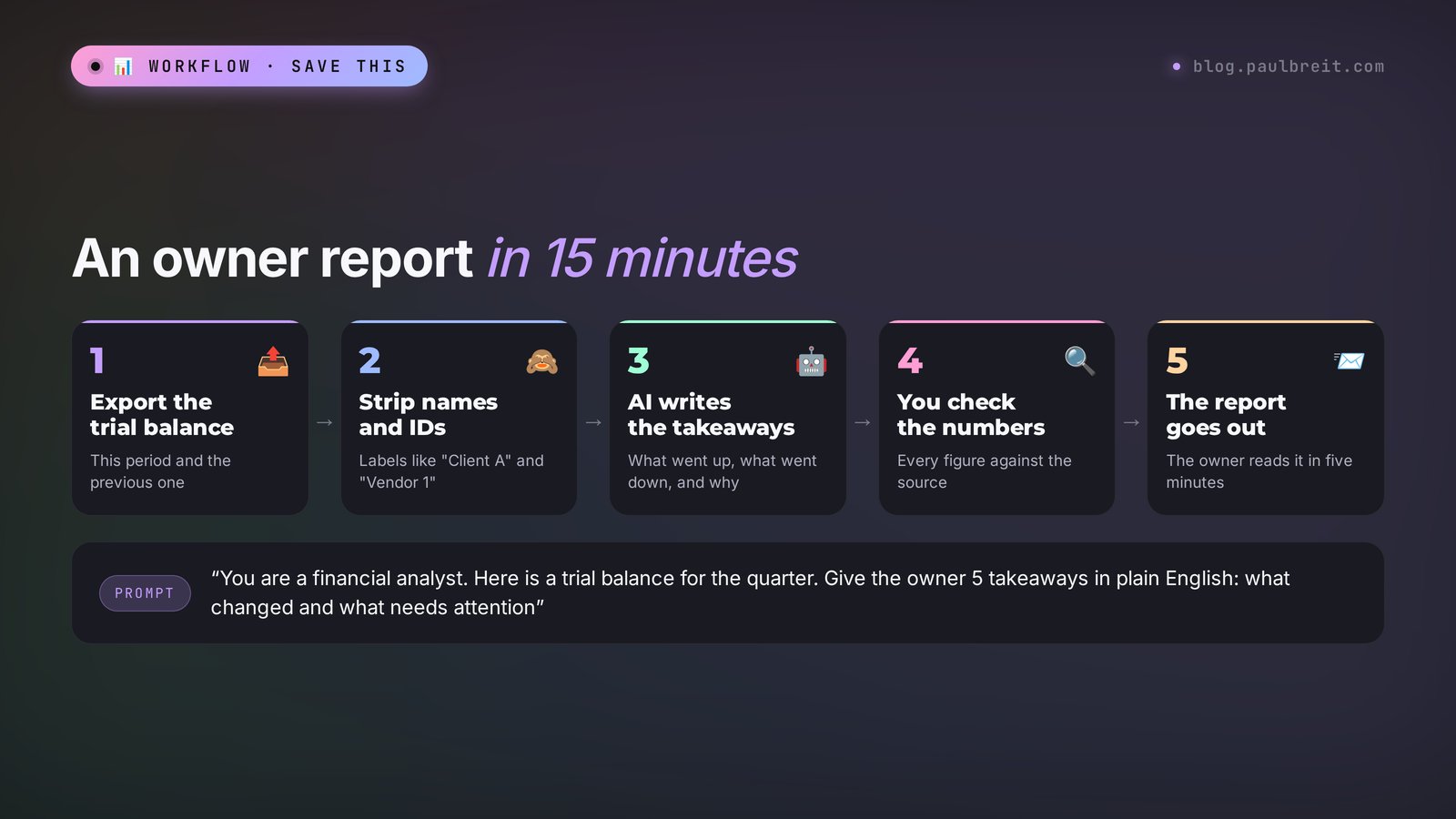
The owner does not need a ten-page trial balance. They need to understand three things: how much the business made, where the money went, and what comes next. An accountant usually puts this together by hand in an hour or an hour and a half. With AI, it takes 15 minutes including the check.
Export the trial balance for this period and the previous one
Save it to Excel. Delete vendor and employee names, or replace them with labels: "Vendor 1," "Employee 2." Keep the accounts and amounts.
Upload the file and set the task
"You are a financial analyst. This is a small business trial balance for Q3 and for Q2. Compare the periods. Write a report for the owner with no accounting jargon: revenue, the main expense lines, changes larger than 10%, what customers owe us and what we owe vendors. At the end, list three questions worth discussing. Up to 300 words. Under each number, state which line it came from."
Check the numbers
The last line of the prompt exists exactly for this: you see the source of every number and quickly check it against the trial balance. Five minutes of checking, and the report is ready to send.
After two or three months you will have a standing report template, and the owner will start waiting for it like a handy digest. For an outsourced accountant, it is also an argument for a higher-priced package.
Task 6. Excel formulas for your exact task
You need to calculate how many days each customer is overdue, or pull a summary by line item from three sheets. Instead of searching forums, describe the task to AI.
In Excel, on the sheet "Register," column A is the customer, B is the invoice date, C is the amount, and D is the payment date (empty if unpaid). Write a formula for column E that shows the number of days overdue as of today with 30-day payment terms. If paid on time, show 0. Then write a formula for the total overdue amount per customer on a separate sheet. Explain each formula step by step.
I cover spreadsheets in depth in AI for spreadsheets, with more examples of pivot tables and data checks.
Task 7. Finding mismatches between two lists
A bank statement and the payments register from your accounting software. Two hundred rows, three that do not match. By eye, that is half an hour.
I am uploading two files: the bank statement and the payments register from our accounting software for September. Match the payments by date and amount. Output a table: payments that are on the statement but not in the register; payments that are in the register but not on the statement; payments with the same date but a different amount. Do the matching with code, not in your head.
The phrase "with code" matters. ChatGPT and Claude can run calculations, and with this request the accuracy of the comparison goes up by an order of magnitude. Still check the mismatches it finds in your accounting software.
Task 8. Commentary on budget variances
If you prepare budget-versus-actual reports, AI can write the explanation for each notable variance. Give it the budget-versus-actual table and short notes: "in August we renovated the office, in September shipping rates went up." It will link the numbers to the causes and turn them into clean text. You supply the causes; AI is only responsible for the wording.
Section 05Source documents, contracts, and reconciliations
Source documents are the biggest time sink in small accounting practices. Two types of tools work here, and it helps not to confuse them.
Task 9. Entering receipts and bills through document capture
To get documents into the books, use the built-in document capture in your accounting software: receipt and bill capture in QuickBooks Online, or Hubdoc with Xero. They prepare the transaction right inside your books. General AI like ChatGPT is awkward for this: you would have to move the result into your software by hand, and the whole point of saving time is lost.
How to roll it out without pain. Start with one document type that comes in a steady stream, usually vendor bills or receipts. For the first two weeks, check every captured document in full. Watch where the tool makes mistakes: usually bad scans, handwritten notes, and nonstandard forms. After that, spot-check, and keep the problem document types on manual entry.
Task 10. Reviewing a contract for accounting and tax points
A client sent a contract to sign and asks whether "everything is fine on the accounting side." AI will break it into clauses in minutes.
You help an accountant in the US. Read the contract (the parties' details have been removed). Put into a table: the subject, the price and payment terms, when ownership transfers, deadlines and acceptance terms, which closing documents are required, whether there is a prepayment, penalties, and late fees. Separately, flag the clauses that affect when revenue or expenses are recognized under GAAP and anything related to sales tax. Do not insert references to rules; where you are unsure, write [verify].
The legal assessment of the contract is a lawyer's job. For the accountant, this table shows in five minutes when to recognize revenue, which documents to expect, and where surprises are possible. If you want to go deeper on reviewing documents, see review contracts and documents with AI.
Task 11. A month-end close checklist
Every client has their own specifics, and keeping them all in your head is hard. Ask AI to build a month-end close checklist from your description: which banks the client uses, whether there is petty cash, inventory, payroll, foreign currency transactions. It will produce a list of steps, you adjust it to your practice and save it. A new team member can close the month from that list on the first try.
Section 06Content for accountants who sell their services
If you sell accounting services, clients come through trust. Trust appears when a person sees that you explain complex things clearly. A blog, a LinkedIn page, a newsletter with short breakdowns: this is a working source of clients that an accountant never has time for. AI gives that time back.
Task 12. Posts from client questions
You already hear the best post topics every day. "Can I pay myself a salary from my LLC?", "What happens if I file a day late?", "Why do we reconcile every month?" Write down ten questions like these and hand them to AI.
I am an accountant who handles bookkeeping and taxes for small businesses and self-employed clients. Here are the 10 questions clients ask me most often: [list]. For each one, write a LinkedIn post: a hooky first paragraph, a simple explanation with no jargon, one real-life example, and at the end a soft invitation to send me a direct message with questions. Up to 180 words each. Write in the first person and speak directly to the reader.
The checking rule is the same: verify every rate, deadline, and amount in a post against the original source. A mistake in a public post hurts an accountant's reputation more than almost anyone else's.
What else you can hand to AI for marketing:
- a client newsletter with reminders about deadlines for the month ahead – more on newsletters in email newsletters with AI;
- a monthly content plan around your services, covered in a content plan for a month in one evening;
- copy for your services page: what each package includes, who it fits, and how to get started;
- answers to common questions for your website or chatbot.
Ready-made wording for social media is collected in social media prompts. Start with two posts a week: that is enough for referrals from your content to start arriving within a couple of months.
Section 07The prompt formula, before and after
The quality of the answer depends almost entirely on how you set the task. For an accountant, a strong prompt is built from five parts. Put all five together and you get a usable result instead of generic phrases.
Role and jurisdiction
"You help an accountant in the US, books kept under GAAP on the accrual basis, the client is an S corporation." Without this, AI can easily mix rules from different countries or different entity types.
Inputs and data
The period, the amounts, the situation, an anonymized file. The more specific you are, the less AI fills in on its own.
One task
Write an email, find the mismatches, build a report, write a formula. One task per request. Mix three and you get a blurry answer.
Output format
A table, an email up to 120 words, a report with sections, a formula with an explanation. AI adapts to the shape you set.
The safety net
"Calculate with code. Do not invent section numbers, write [verify]. Under each number, state the source. If you do not know something, say so." These lines separate an accountant's prompt from an amateur's.
Here is how it looks in practice. Compare two requests for the same task.
| Weak prompt | Strong prompt |
|---|---|
| "Make a report from this table" | "You help an accountant in the US. This is the trial balance of an LLC for Q3, with vendor names replaced by labels. Write a report for the owner with no jargon: revenue, the 5 largest expense lines, what customers owe, and changes from last quarter larger than 10%. Up to 300 words. Calculate with code, and under each number state the source line. If data is missing, say which." |
| Result: generic phrases, some numbers calculated wrong, no way to tell where anything came from | Result: a finished report, every number with a source, the check takes five minutes |
The formula is broken down on dozens of examples in how to write prompts. And a hundred ready commands for different tasks are waiting in the AI prompt library.
Section 08Client data: what never to upload
An accountant holds other people's money, payroll, and personal data. Client confidentiality is part of the job: your engagement letter usually promises it, professional rules require it, and if you prepare tax returns, federal rules restrict how you use and disclose return information. So before you upload anything into AI, run a short check.
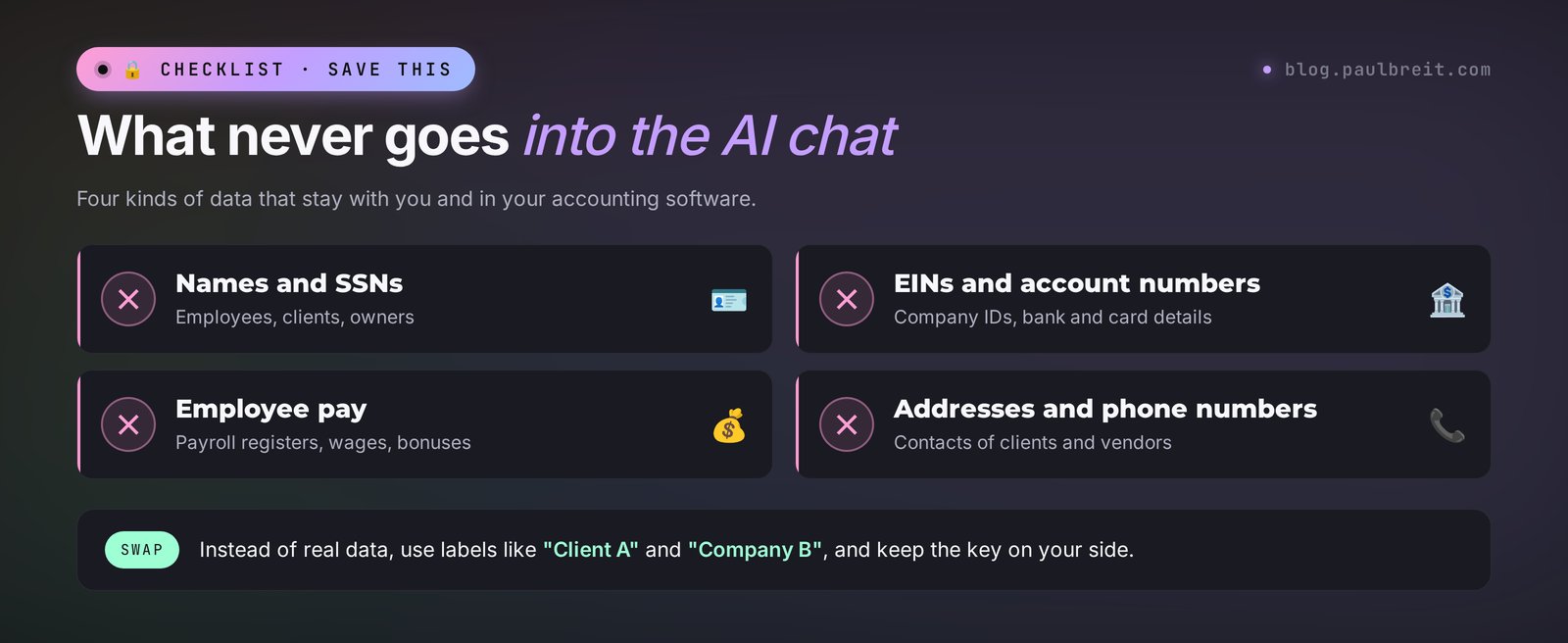
What to remove or replace with labels before uploading:
- full names of employees and individuals, Social Security numbers, ID details;
- EINs and other taxpayer IDs, bank account and card numbers;
- the pay of specific people and payroll registers by employee;
- addresses, phone numbers, email addresses;
- the names of the client's company and its vendors, if they make it clear who this is about.
How to do it fast. In Excel, replace the name column with "Vendor 1, 2, 3" using simple numbering, and delete personal columns entirely. For analysis, AI needs amounts, dates, and accounts; it does not need names. Keep the key that maps labels to real names on your side, and put the names back into the finished report in your own file.
Some tasks are impossible without real data. Then you have two options. The first is a business plan of an AI tool that your firm has approved, with contractual data protections, for example the business tiers of ChatGPT or Claude, or Copilot inside your company's Microsoft 365. The second is to keep that task away from AI. Which tools are allowed is decided by the firm's leadership together with the accountant. If you are on staff, check the policy before you start.
One more simple habit: in the settings of ChatGPT and Claude you can turn off the use of your conversations for training models. Do it on your first day. Still do not upload personal data there; the setting just adds another layer of protection.
Section 09Why AI gets numbers and rates wrong
A language model predicts plausible text. It does not open the tax code and does not check the current version. If the model was trained on data from before a rate, a threshold, or a deadline changed, it will confidently give you the old figure. A typical case: a rate or a limit changes at the start of the year, and a model trained earlier calmly calculates with the outdated one. For an accountant, that kind of mistake turns into an additional assessment with penalties.
The second problem is arithmetic. In plain text mode, AI calculates "in its head" and makes mistakes on long tables. A sum of forty rows can be off by a couple of thousand dollars, and it will look completely confident.
How to protect yourself:
- Ask it to calculate with code. ChatGPT and Claude can run calculations as a program. The phrase "calculate with code and show the calculation" cuts errors sharply.
- Check the totals. Compare the total from the AI's answer with the total in Excel or your accounting software. One comparison, and you know whether you can trust the rest.
- Rates, deadlines, and rules only from the original source. The IRS website, your state tax agency, official publications, your professional research tools. AI can suggest where to look, but you take the number yourself.
- Ask it to flag uncertainty. "If you are not sure this is current, say so." In response, models more often admit honestly that the information may be outdated.
- Give it the current text yourself. Need to understand new IRS guidance? Paste its text into the chat and ask questions about it. That way AI relies on the fresh document and fills in less from memory.
AI writes text and proposes a calculation. A number that goes into a return, the financials, or a client email is always checked by you against the original source or recalculated in your accounting software. No exceptions.
Section 10How to get started with ChatGPT and Claude
Getting started takes about ten minutes. Here is the path for Claude; ChatGPT works the same way.
Create an account
Open claude.ai and sign in with Google or with your email, then confirm the address. For ChatGPT, the same steps on the OpenAI site.
Set up privacy
In the settings, turn off the use of your conversations for improving the models. It takes a minute.
Run your first task
Take one email you need to send today and write it with the prompt from Section 03. Compare the result and the time with your usual way.
Upgrade only when you hit the limits
The free version is enough to try every task in this article. If you run into the limits, the paid plan is about $20 a month for either tool.
If you want to go deeper into Claude, including projects and working with files, the full guide is in Claude from scratch.
Section 11A plan for your first week
One task a day, fifteen to twenty minutes. By Friday you will have a working system and your first saved hours.
Access and setup
Create an account in ChatGPT or Claude, and check whether your office suite already includes Gemini or Copilot. Turn off training on your conversations. Create a "My prompts" file in your notes, where you will collect the requests that work.
Emails
Take three emails you need to send today and write them with AI using the prompts from Section 03. Compare the time with your usual way. The best prompt goes into the file.
A spreadsheet
Pick a table you usually struggle with: a payments register, a reconciliation, a budget-versus-actual. Anonymize it and ask AI to find the mismatches or write a formula. Check the result in Excel.
An owner report
Make a test report from a trial balance following the steps in Section 04. Even if you do not send it to the client, you will see how long it takes and where AI makes mistakes.
Templates and content
Collect everything that worked this week into your prompt file. If you sell services, write two posts from client questions with AI. If you have a steady stream of receipts and bills, test the document capture in your QuickBooks or Xero on one document type.
A library of 15-20 prompts for your recurring tasks. Emails go out in a couple of minutes, the owner report comes together in a quarter of an hour, and reconciliations no longer eat your evening. The freed-up time can go to the hard parts of the books or to new clients.
Section 126 mistakes that make AI let you down
1. Trusting numbers without checking. The most expensive mistake. Every amount, rate, and deadline in an AI answer gets checked. The total gets reconciled with your accounting software.
2. Uploading files as they are. An export with names, SSNs, and payroll in an outside service is a direct risk for you and your client. Anonymizing takes three minutes.
3. Writing short requests. "Make a report" gets generic words. Five parts of a prompt get a usable result. An extra thirty seconds per request saves half an hour of rework.
4. Mixing tasks in one request. "Find the mismatches, write an email to the vendor, and build a report" is three tasks and three requests. One chat is fine, but one at a time.
5. Asking for rules from the model's memory. "When is the filing deadline?" is a question for your tax calendar or the IRS website. Let AI explain and format, and take the current rules from the source.
6. Not saving prompts that worked. Writing every request from scratch means losing half the savings. A good prompt works for months; only the period changes.
RecapThe whole path in a minute
AI for accountants covers four layers of work. Emails: reminders to clients, explanations without jargon, reconciliation correspondence, drafts of responses to tax notices. Reports and spreadsheets: an owner report from the trial balance, Excel formulas, finding mismatches, commentary on budget variances. Source documents and contracts: document capture in QuickBooks or Xero, a contract review for accounting points, month-end close checklists. Content: posts from client questions, a newsletter, copy for your services page.
The starter kit is one strong model (ChatGPT or Claude), the AI already inside your office suite (Gemini in Sheets or Copilot in Excel), and the document capture in your accounting software. Build the prompt from five parts: role and jurisdiction, inputs, one task, format, safety net. Anonymize client data, recalculate the numbers, and take the rules from the original source. Start with one task today, collect your first templates by Friday, and the next busy season will pass without late nights.
FAQFrequently asked questions
Which AI is best for an accountant?
For emails, reports, and spreadsheet analysis, ChatGPT and Claude do the best job. Inside your office suite, Gemini in Google Sheets and Microsoft Copilot in Excel help right where the numbers are. For entering receipts and bills, the built-in document capture in QuickBooks or Xero is more convenient. The working setup is to combine two or three tools for different tasks.
Will AI replace accountants?
No. AI takes on writing, drafts, takeaways from spreadsheets, and the routine of data entry. Responsibility for the numbers, the accounting decisions, and the signature on the return stay with the accountant. The winners are those who use AI and free up time for complex work and new clients.
Can I upload client bank statements and trial balances into AI?
Only anonymized ones. Remove names, Social Security numbers, EINs, account numbers, employee pay, and company names, or replace them with labels like Vendor 1. For analysis, AI needs amounts, dates, and accounts. You put the real names back into the finished report in your own file.
Can I trust AI calculations?
Not without checking. In plain text mode, AI calculates imprecisely, especially on long tables. Ask it to calculate with code and show the calculation, and always compare the total with Excel or your accounting software. Take rates and deadlines only from the IRS, your state tax agency, and other official sources.
Can AI write a response to an IRS notice?
It can prepare the structure and a draft of the wording based on your facts. The substance of the explanation, references to the rules, and the attached documents are checked by the accountant. In the prompt, ask it not to insert code section numbers and to put the mark [verify the rule] instead, so you see right away what to check.
Are there free AI tools for accountants?
Yes. DeepSeek and Qwen are free. ChatGPT, Claude, Gemini, and Perplexity have free versions with limits, and they are enough to try every task in this article. Document capture comes with your accounting software plan, and Copilot in Excel comes with Microsoft 365 plans that include it.
Do I need a paid subscription to start?
No. The free versions of ChatGPT and Claude are enough to try the emails, formulas, and reports from this article. If you hit the limits, the paid plan is about 20 dollars a month for either tool. Upgrade once AI has become a daily part of your work.
How should an accountant with no AI experience start?
With emails. Take three emails you need to send today and write them with AI using the ready prompts. Save the requests that work in a separate file. After a week, move on to spreadsheets and the owner report, and then to document capture for receipts and bills.